
Join us at FabCon Atlanta from March 16 - 20, 2026, for the ultimate Fabric, Power BI, AI and SQL community-led event. Save $200 with code FABCOMM.
Register now!The Power BI Data Visualization World Championships is back! Get ahead of the game and start preparing now! Learn more
Hello all
I have a table with a "from" and a "till" date. I need to generate a row for each date in that range, i think ive done this before but cant figure out how i did it.
Best regards
Solved! Go to Solution.
Hi @Anonymous ,
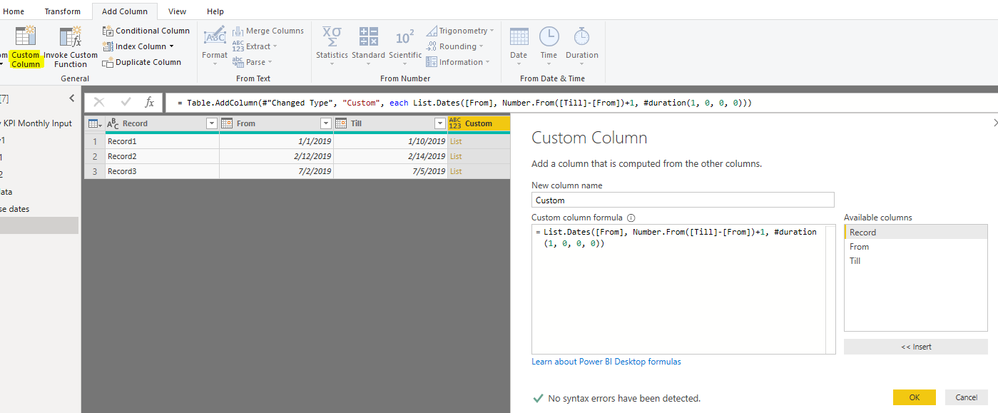
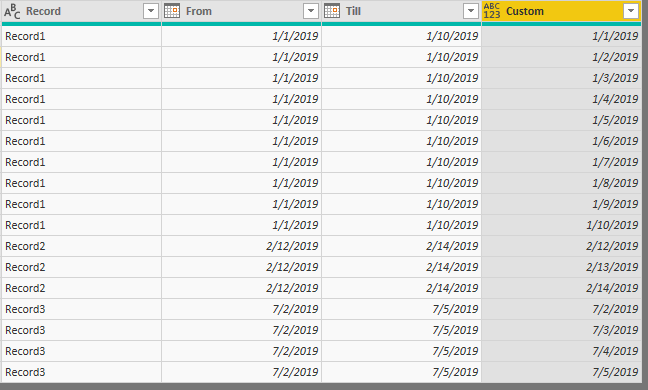
Add a custom column in Query Editor mode.
=List.Dates([From], Number.From([Till]-[From])+1, #duration(1, 0, 0, 0))
Best regards,
Yuliana Gu
Hi @Anonymous ,
Add a custom column in Query Editor mode.
=List.Dates([From], Number.From([Till]-[From])+1, #duration(1, 0, 0, 0))
Best regards,
Yuliana Gu
Hi @v-yulgu-msft ,
Lets say for some rows i have from from and till date same, like from = "25/05/2022" and till = "25/05/2022". will it create only 1 row or multiple rows?
because i have a scenario where in i have some cases with from and till date as same data and other cases with different dates.
This may give you some ideas that you can adapt. https://exceleratorbi.com.au/expanding-rows-using-power-query/
Ill take a look into it, thank you!
Just to add infos, every record/row in this table does have a from and till column. So the dates are not spreaded in the whole table.
The Power BI Data Visualization World Championships is back! Get ahead of the game and start preparing now!
| User | Count |
|---|---|
| 39 | |
| 37 | |
| 33 | |
| 32 | |
| 29 |
| User | Count |
|---|---|
| 132 | |
| 88 | |
| 82 | |
| 68 | |
| 64 |