Join us at FabCon Atlanta from March 16 - 20, 2026, for the ultimate Fabric, Power BI, AI and SQL community-led event. Save $200 with code FABCOMM.
Register now!The Power BI Data Visualization World Championships is back! Get ahead of the game and start preparing now! Learn more
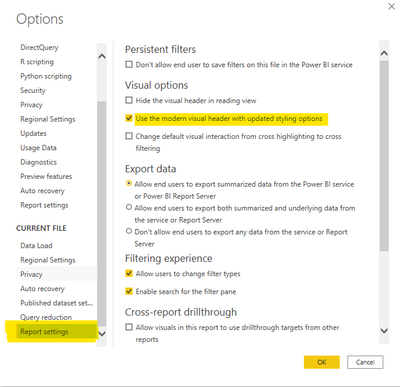
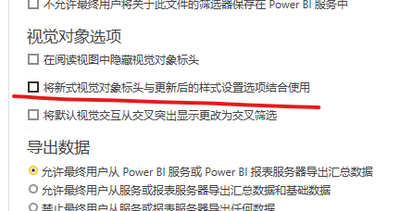
Go to File, Options and settings, options, current file, report settings and enable or disable "use the modern visual header with updated styling options".
这不成问题。 转到文件、选项和设置、选项、当前文件、报告设置并启用或禁用“使用具有更新样式选项的现代视觉标题”。 由 Google 翻译翻译
Go to File, Options and settings, options, current file, report settings and enable or disable "use the modern visual header with updated styling options".
这不成问题。 转到文件、选项和设置、选项、当前文件、报告设置并启用或禁用“使用具有更新样式选项的现代视觉标题”。 由 Google 翻译翻译
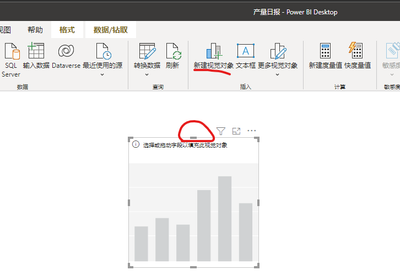
thakns you,I disabled this setting, so it's ready to display. What is the purpose of enabling this feature?
It is giving more formatting options and detaching the header from the visual itself.
I recommend you read this page:
Use visual elements to enhance Power BI reports - Power BI | Microsoft Docs
The Power BI Data Visualization World Championships is back! Get ahead of the game and start preparing now!
| User | Count |
|---|---|
| 39 | |
| 37 | |
| 33 | |
| 32 | |
| 29 |
| User | Count |
|---|---|
| 133 | |
| 88 | |
| 85 | |
| 68 | |
| 64 |