Don't miss your chance to take the Fabric Data Engineer (DP-700) exam on us!
Learn moreNext up in the FabCon + SQLCon recap series: The roadmap for Microsoft SQL and Maximizing Developer experiences in Fabric. All sessions are available on-demand after the live show. Register now
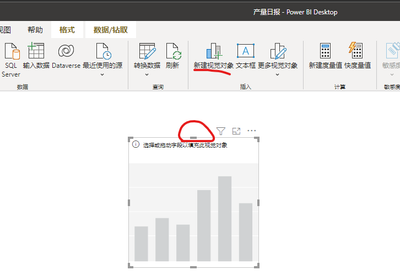
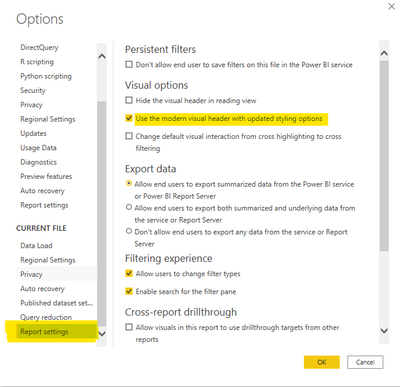
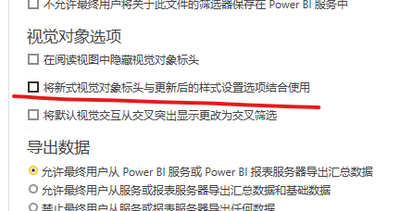
Go to File, Options and settings, options, current file, report settings and enable or disable "use the modern visual header with updated styling options".
这不成问题。 转到文件、选项和设置、选项、当前文件、报告设置并启用或禁用“使用具有更新样式选项的现代视觉标题”。 由 Google 翻译翻译
Go to File, Options and settings, options, current file, report settings and enable or disable "use the modern visual header with updated styling options".
这不成问题。 转到文件、选项和设置、选项、当前文件、报告设置并启用或禁用“使用具有更新样式选项的现代视觉标题”。 由 Google 翻译翻译
thakns you,I disabled this setting, so it's ready to display. What is the purpose of enabling this feature?
It is giving more formatting options and detaching the header from the visual itself.
I recommend you read this page:
Use visual elements to enhance Power BI reports - Power BI | Microsoft Docs
If you have recently started exploring Fabric, we'd love to hear how it's going. Your feedback can help with product improvements.
A new Power BI DataViz World Championship is coming this June! Don't miss out on submitting your entry.
Share feedback directly with Fabric product managers, participate in targeted research studies and influence the Fabric roadmap.
| User | Count |
|---|---|
| 53 | |
| 45 | |
| 44 | |
| 20 | |
| 19 |
| User | Count |
|---|---|
| 73 | |
| 71 | |
| 34 | |
| 33 | |
| 31 |