cancel
Showing results for 
Search instead for 
Did you mean: 

The Power BI Data Visualization World Championships is back! It's time to submit your entry. Live now!

Reply
Anonymous
Not applicable

Create new table using ranges

Hi everyone,


I am having some troubles with this issue and after many failed tests I am reaching to you. I feel like I should use PowerQuery here but I am not sure.


I have a table with various products that have many caracteristics, including a range beginning and a range ending, and costs :

ProductCaracteristics 1Caracteristics 2Range beginningRange endCost
AZ201110
BG123210
CD355312
AE408830


What I want to do is to create a new table that would have the product information, its caracteristics, but with ligns for every number between the beginning and ending range, and that would divide the cost equally between each range.


ProductCaracteristics 1Caracteristics 2RangeCost
AZ20110
BG1235
BG1225
CD3554
CD3544
CD3534
AE40830


I would appreciate any advice !


Thank you 🙂 


1 ACCEPTED SOLUTION
Ashish_Mathur
Super User
Super User

Hi,

This M code works

let
    Source = Excel.CurrentWorkbook(){[Name="Data"]}[Content],
    #"Changed Type" = Table.TransformColumnTypes(Source,{{"Product", type text}, {"Caracteristics 1", type text}, {"Caracteristics 2", Int64.Type}, {"Range beginning", Int64.Type}, {"Range end", Int64.Type}, {"Cost", Int64.Type}}),
    #"Added Custom" = Table.AddColumn(#"Changed Type", "Range", each {Number.From([Range end])..Number.From([Range beginning])}),
    #"Expanded Range" = Table.ExpandListColumn(#"Added Custom", "Range"),
    #"Removed Columns" = Table.RemoveColumns(#"Expanded Range",{"Range beginning", "Range end"}),
    #"Merged Columns" = Table.CombineColumns(Table.TransformColumnTypes(#"Removed Columns", {{"Caracteristics 2", type text}}, "en-IN"),{"Product", "Caracteristics 1", "Caracteristics 2"},Combiner.CombineTextByDelimiter(";", QuoteStyle.None),"Merged"),
    #"Grouped Rows" = Table.Group(#"Merged Columns", {"Merged"}, {{"Count", each Table.RowCount(_), Int64.Type}, {"All", each _, type table [Merged=text, Cost=nullable number, Range=number]}}),
    #"Expanded All" = Table.ExpandTableColumn(#"Grouped Rows", "All", {"Cost", "Range"}, {"Cost", "Range"}),
    #"Added Custom1" = Table.AddColumn(#"Expanded All", "Custom", each [Cost]/[Count]),
    #"Removed Columns1" = Table.RemoveColumns(#"Added Custom1",{"Count", "Cost"}),
    #"Split Column by Delimiter" = Table.SplitColumn(#"Removed Columns1", "Merged", Splitter.SplitTextByDelimiter(";", QuoteStyle.Csv), {"Merged.1", "Merged.2", "Merged.3"}),
    #"Changed Type1" = Table.TransformColumnTypes(#"Split Column by Delimiter",{{"Merged.1", type text}, {"Merged.2", type text}, {"Merged.3", Int64.Type}}),
    #"Renamed Columns" = Table.RenameColumns(#"Changed Type1",{{"Merged.1", "Product"}, {"Merged.2", "Characteristics 1"}, {"Merged.3", "Characteristics 2"}, {"Custom", "Cost"}})
in
    #"Renamed Columns"

Hope this helps.
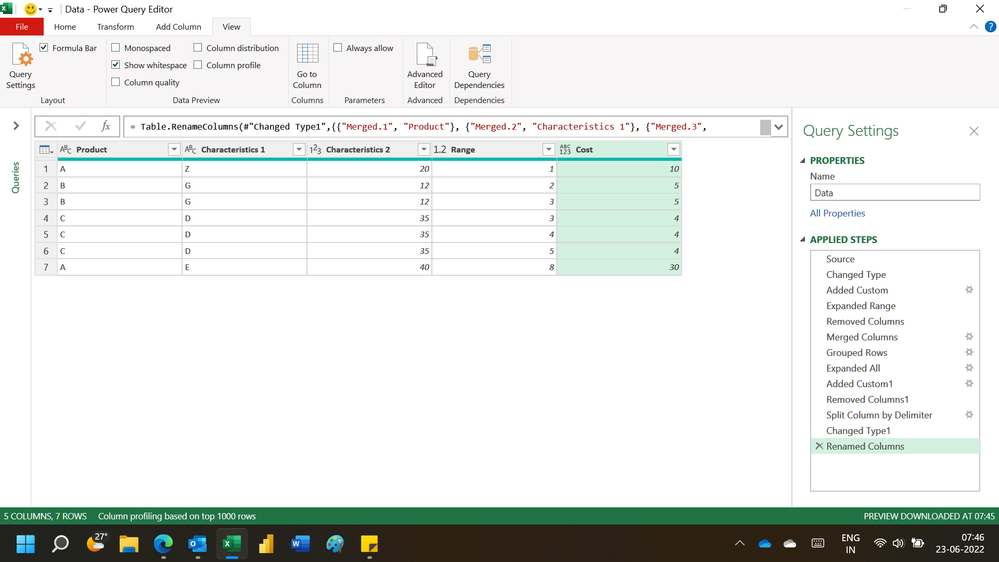
Untitled.png


Regards,
Ashish Mathur
http://www.ashishmathur.com
https://www.linkedin.com/in/excelenthusiasts/

View solution in original post

3 REPLIES 3
Ashish_Mathur
Super User
Super User

Hi,

This M code works

let
    Source = Excel.CurrentWorkbook(){[Name="Data"]}[Content],
    #"Changed Type" = Table.TransformColumnTypes(Source,{{"Product", type text}, {"Caracteristics 1", type text}, {"Caracteristics 2", Int64.Type}, {"Range beginning", Int64.Type}, {"Range end", Int64.Type}, {"Cost", Int64.Type}}),
    #"Added Custom" = Table.AddColumn(#"Changed Type", "Range", each {Number.From([Range end])..Number.From([Range beginning])}),
    #"Expanded Range" = Table.ExpandListColumn(#"Added Custom", "Range"),
    #"Removed Columns" = Table.RemoveColumns(#"Expanded Range",{"Range beginning", "Range end"}),
    #"Merged Columns" = Table.CombineColumns(Table.TransformColumnTypes(#"Removed Columns", {{"Caracteristics 2", type text}}, "en-IN"),{"Product", "Caracteristics 1", "Caracteristics 2"},Combiner.CombineTextByDelimiter(";", QuoteStyle.None),"Merged"),
    #"Grouped Rows" = Table.Group(#"Merged Columns", {"Merged"}, {{"Count", each Table.RowCount(_), Int64.Type}, {"All", each _, type table [Merged=text, Cost=nullable number, Range=number]}}),
    #"Expanded All" = Table.ExpandTableColumn(#"Grouped Rows", "All", {"Cost", "Range"}, {"Cost", "Range"}),
    #"Added Custom1" = Table.AddColumn(#"Expanded All", "Custom", each [Cost]/[Count]),
    #"Removed Columns1" = Table.RemoveColumns(#"Added Custom1",{"Count", "Cost"}),
    #"Split Column by Delimiter" = Table.SplitColumn(#"Removed Columns1", "Merged", Splitter.SplitTextByDelimiter(";", QuoteStyle.Csv), {"Merged.1", "Merged.2", "Merged.3"}),
    #"Changed Type1" = Table.TransformColumnTypes(#"Split Column by Delimiter",{{"Merged.1", type text}, {"Merged.2", type text}, {"Merged.3", Int64.Type}}),
    #"Renamed Columns" = Table.RenameColumns(#"Changed Type1",{{"Merged.1", "Product"}, {"Merged.2", "Characteristics 1"}, {"Merged.3", "Characteristics 2"}, {"Custom", "Cost"}})
in
    #"Renamed Columns"

Hope this helps.

Untitled.png


Regards,
Ashish Mathur
http://www.ashishmathur.com
https://www.linkedin.com/in/excelenthusiasts/
Anonymous
Not applicable

Works prefectly, thanks @Ashish_Mathur !

You are welcome.


Regards,
Ashish Mathur
http://www.ashishmathur.com
https://www.linkedin.com/in/excelenthusiasts/

Helpful resources

Announcements
FabCon Atlanta 2026 carousel

FabCon Atlanta 2026

Join us at FabCon Atlanta, March 16-20, for the ultimate Fabric, Power BI, AI and SQL community-led event. Save $200 with code FABCOMM.