Join us at FabCon Atlanta from March 16 - 20, 2026, for the ultimate Fabric, Power BI, AI and SQL community-led event. Save $200 with code FABCOMM.
Register now!Get Fabric Certified for FREE during Fabric Data Days. Don't miss your chance! Request now
Hi, I have a table which contains Date, CustomerName, Price, month, & weekday.
I have created measure using the DAX, Day 1 = CALCULATE(sum(Actual[Price]),FILTER('Actual','Actual'[Day]=1))
similarly for all days. If i select 3 months at a time i am getting the total values, as shown in the fig
My query is I need to get an average value's if i select 2 or 3 months in the slicer. Anyone has an idea how to solve this ?
Solved! Go to Solution.
Hi @siva3012,
Create an extra measure like:
Count month selected = DISTINCTCOUNT(Actual[Month])
Modify the measure for Day 1 as below:
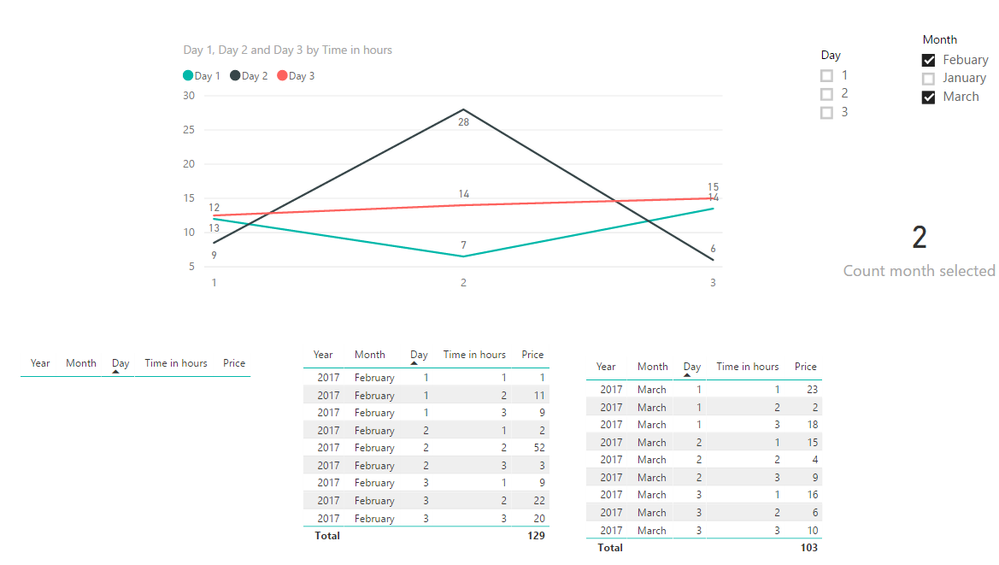
Day 1 = CALCULATE(sum(Actual[Price]),FILTER('Actual','Actual'[Day]=1))/[Count month selected]
Result.
Best regards,
Yuliana Gu
Hi @siva3012,
Create an extra measure like:
Count month selected = DISTINCTCOUNT(Actual[Month])
Modify the measure for Day 1 as below:
Day 1 = CALCULATE(sum(Actual[Price]),FILTER('Actual','Actual'[Day]=1))/[Count month selected]
Result.
Best regards,
Yuliana Gu
@v-yulgu-msft : Is it possible to draw an average line for those data which is shown in the graph ? Like this
@v-yulgu-msft : Hi, There is an small eror in the solution. If we select 2 Months data Jan & Feb in slicer. Jan has 31 days and Feb has 28 days. The average is been calaculated wrongly for Jan 29, 30 & 31.
Do you have any idea over this ?
I have solved this issue,
Day 1 = CALCULATE(sum(Actual[Price]),FILTER('Actual','Actual'[Day]=1))/(CALCULATE([Count month selected],Actual[Day]=1))
Check out the November 2025 Power BI update to learn about new features.
Advance your Data & AI career with 50 days of live learning, contests, hands-on challenges, study groups & certifications and more!