cancel
Showing results for 
Search instead for 
Did you mean: 

The Power BI Data Visualization World Championships is back! Get ahead of the game and start preparing now! Learn more

Reply
brandonchan
Frequent Visitor

Create measure for same column

Hi,


I am a beginner of power query and have imported a query from SQL and create a matrix visuals. In Values, i drag column "Total Cost". In Columns, i drag the column "Date". As my data contains data in 2019 and 2020, so in matrix visuals it shows in 2 columns. How can I create a measure to show the difference and % change of total cost between 2019 and 2020?


Name    2019       2020       Total

A            $20         $25         $45

B            $30         $28         $58

C            $40         $35         $75


Thanks

1 ACCEPTED SOLUTION
Icey
Community Support
Community Support

Hi @brandonchan ,


Try this:


1. Create a Calendar table.

Calendar = CALENDAR ( MIN ( 'Table'[Date] ), MAX ( 'Table'[Date] ) )


2. Create relationship.

rela.PNG


3. Create Measures.

Difference = 
VAR Current_ =
    SUM ( 'Table'[Total Cost] )
VAR Previous_ =
    CALCULATE (
        SUM ( 'Table'[Total Cost] ),
        SAMEPERIODLASTYEAR ( 'Calendar'[Date] )
    )
RETURN
    Current_ - Previous_
% Difference = 
VAR Current_ =
    SUM ( 'Table'[Total Cost] )
VAR Previous_ =
    CALCULATE (
        SUM ( 'Table'[Total Cost] ),
        SAMEPERIODLASTYEAR ( 'Calendar'[Date] )
    )
RETURN
    DIVIDE ( Current_ - Previous_, Previous_ )


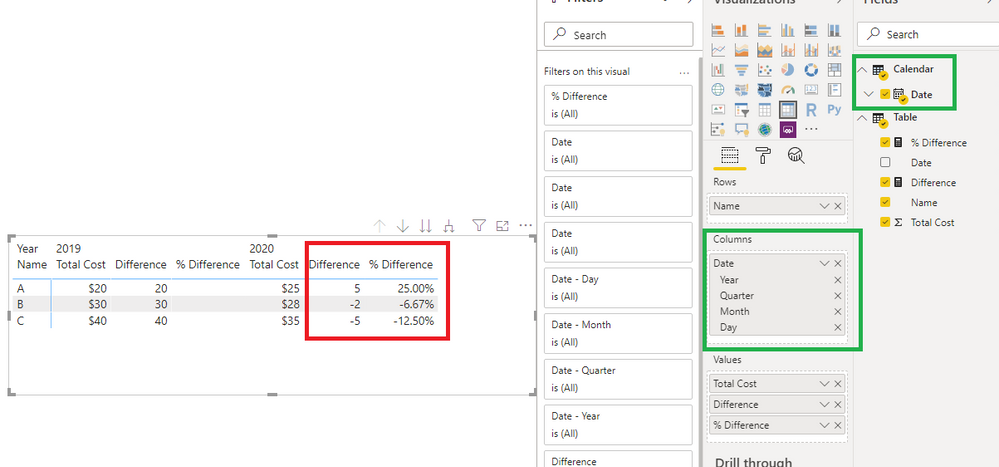
4. Create a Matrix visual.

diff.PNG


Best Regards,

Icey


If this post helps, then please consider Accept it as the solution to help the other members find it more quickly.

View solution in original post

3 REPLIES 3
Icey
Community Support
Community Support

Hi @brandonchan ,


Is this problem solved?


If it is solved, please always accept the replies making sense as solution to your question so that people who may have the same question can get the solution directly.


If not, please let me know.


Best Regards,
Icey

Icey
Community Support
Community Support

Hi @brandonchan ,


Try this:


1. Create a Calendar table.

Calendar = CALENDAR ( MIN ( 'Table'[Date] ), MAX ( 'Table'[Date] ) )


2. Create relationship.

rela.PNG


3. Create Measures.

Difference = 
VAR Current_ =
    SUM ( 'Table'[Total Cost] )
VAR Previous_ =
    CALCULATE (
        SUM ( 'Table'[Total Cost] ),
        SAMEPERIODLASTYEAR ( 'Calendar'[Date] )
    )
RETURN
    Current_ - Previous_
% Difference = 
VAR Current_ =
    SUM ( 'Table'[Total Cost] )
VAR Previous_ =
    CALCULATE (
        SUM ( 'Table'[Total Cost] ),
        SAMEPERIODLASTYEAR ( 'Calendar'[Date] )
    )
RETURN
    DIVIDE ( Current_ - Previous_, Previous_ )


4. Create a Matrix visual.

diff.PNG


Best Regards,

Icey


If this post helps, then please consider Accept it as the solution to help the other members find it more quickly.

amitchandak
Super User
Super User

If they are a column in your table then you can use

Diff = [2020]-[2019]


But if they are like row values. Or you dow it by using unpivot

https://radacad.com/pivot-and-unpivot-with-power-bi

After that year would one column. create a new year table and do it like this

this year = 
CALCULATE(SUM(Sales[Sales Amount]),filter(all(Year),Year[Year]=Max(Year[Year])))


last year = 
CALCULATE(SUM(Sales[Sales Amount]),filter(all(Year),Year[Year]=Max(Year[Year])))


Share with Power BI Enthusiasts: Full Power BI Video (20 Hours) YouTube
Microsoft Fabric Series 60+ Videos YouTube
Microsoft Fabric Hindi End to End YouTube

Helpful resources

Announcements
Power BI DataViz World Championships

Power BI Dataviz World Championships

The Power BI Data Visualization World Championships is back! Get ahead of the game and start preparing now!

December 2025 Power BI Update Carousel

Power BI Monthly Update - December 2025

Check out the December 2025 Power BI Holiday Recap!

FabCon Atlanta 2026 carousel

FabCon Atlanta 2026

Join us at FabCon Atlanta, March 16-20, for the ultimate Fabric, Power BI, AI and SQL community-led event. Save $200 with code FABCOMM.