cancel
Showing results for 
Search instead for 
Did you mean: 

The Power BI Data Visualization World Championships is back! Get ahead of the game and start preparing now! Learn more

Reply
PowerBIsv
Frequent Visitor

Create holiday chart - The expression refers to multiple columns...

Hello DAX-people!

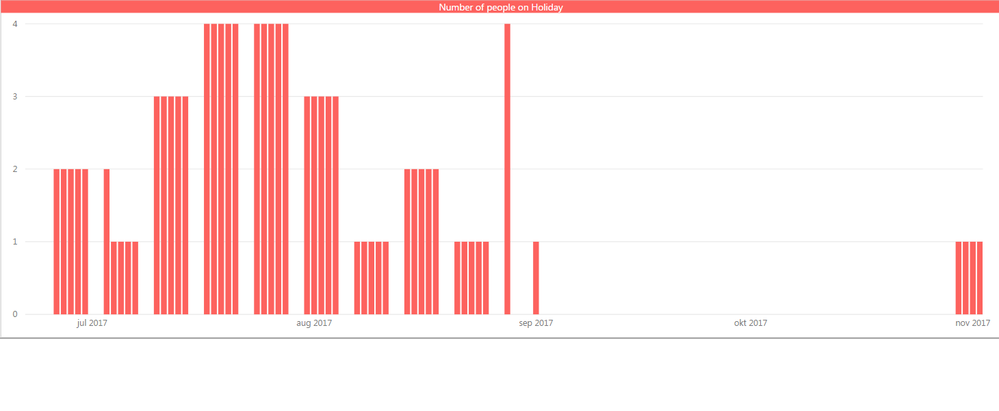
I want to create a report that show who(how many) is on holiday in a "Clustred column chart".

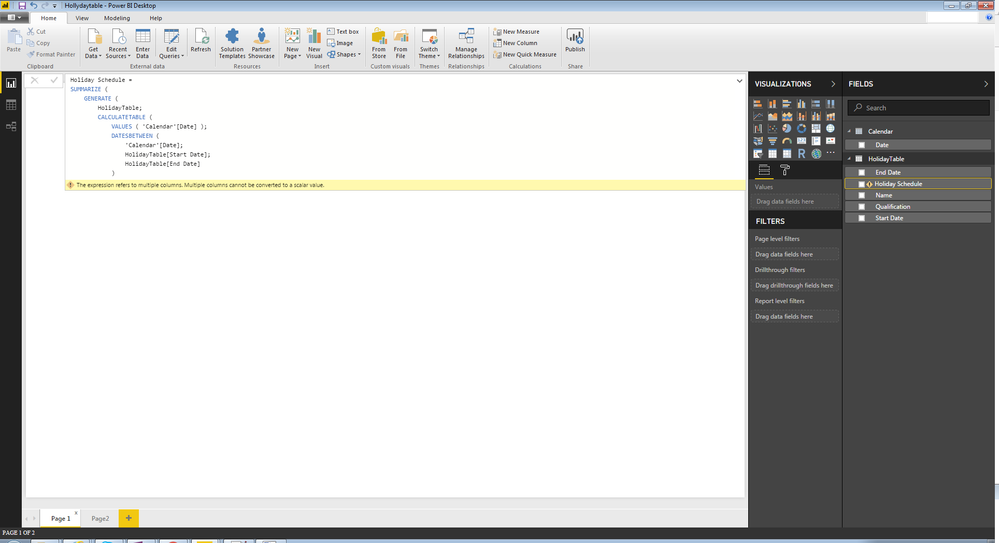
The problem: I keep getting "The expression refers to multiple columns. Multiple columns cannot be converted to a scalar value".
I have tried(done the exact same thing) some similar examples that seems to work but I must be doing something wrong.
One of the examples i tried: https://community.powerbi.com/t5/Desktop/Holiday-Calculation-From-Start-and-End-Date-to-quot-Aggrega...


I have two tables:
1. Date-table "Calendar = CALENDAR (DATE(2017;1;1); DATE(2017;12;1))"
2. Holiday Schedule-table
 Name (ex David)
 Qualification (ex A)
 Start Date (ex 2017-11-01)
 End Date (ex 2017-11-15)
 Hollyday.png
 There is no relation between the tables.
 
 Tried this Calculated column(and Meassure but I think Calculated Column is the way to go, right?)
 
 Holiday Schedule =
SUMMARIZE (
    GENERATE (
        HolidayTable;
        CALCULATETABLE (
            VALUES ( 'Calendar'[Date] );
            DATESBETWEEN (
                'Calendar'[Date];
                HolidayTable[Start Date];
                HolidayTable[End Date]
            )
        )
    );
    HolidayTable[Name];
    'Calendar'[Date];
    HolidayTable[Qualification]
)

I would really appreciate some guidance.


What i hope to accomplish.

People on holiday.png

1 ACCEPTED SOLUTION
Anonymous
Not applicable

Hi @PowerBIsv,


SUMMARIZE function will generate a table, you can't direct use this function in calculated column.

SUMMARIZE Function (DAX)

Returns a summary table for the requested totals over a set of groups.


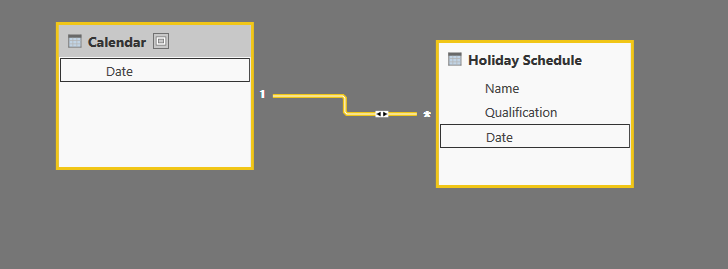
For your requirement, I'd like to suggest you to create the expand table to stored the detail holiday range, then create relationship with calendar table and build visual on these columns.


Table formula:

Holiday Schedule = 
    SUMMARIZE (
        FILTER (
            CROSSJOIN ( HolidayTable, 'Calendar' ),
            [Date] >= [Start Date]
                && [Date] <= [End Date]
        ),
        [Name],
        [Date],
        [Qualification]
    )

4.PNG


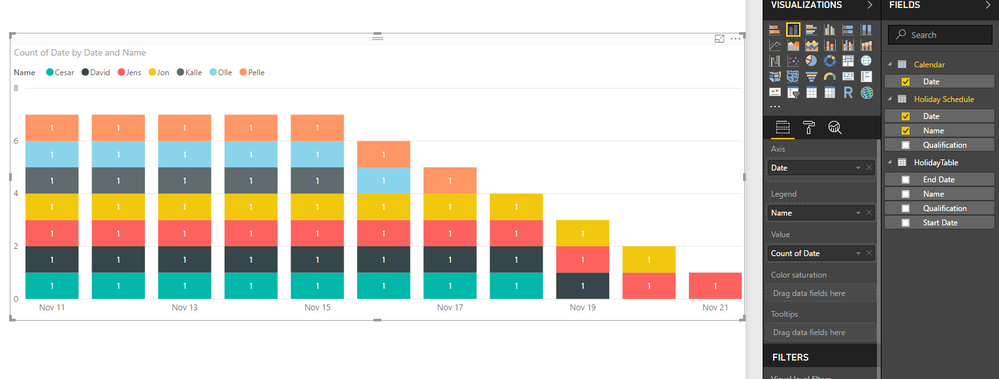
Result:

5.PNG


Regards,

Xiaoxin Sheng

View solution in original post

2 REPLIES 2
Anonymous
Not applicable

Hi @PowerBIsv,


SUMMARIZE function will generate a table, you can't direct use this function in calculated column.

SUMMARIZE Function (DAX)

Returns a summary table for the requested totals over a set of groups.


For your requirement, I'd like to suggest you to create the expand table to stored the detail holiday range, then create relationship with calendar table and build visual on these columns.


Table formula:

Holiday Schedule = 
    SUMMARIZE (
        FILTER (
            CROSSJOIN ( HolidayTable, 'Calendar' ),
            [Date] >= [Start Date]
                && [Date] <= [End Date]
        ),
        [Name],
        [Date],
        [Qualification]
    )

4.PNG


Result:

5.PNG


Regards,

Xiaoxin Sheng

Absolutely perfect!

Thank you so much!

Helpful resources

Announcements
Power BI DataViz World Championships

Power BI Dataviz World Championships

The Power BI Data Visualization World Championships is back! Get ahead of the game and start preparing now!

December 2025 Power BI Update Carousel

Power BI Monthly Update - December 2025

Check out the December 2025 Power BI Holiday Recap!

FabCon Atlanta 2026 carousel

FabCon Atlanta 2026

Join us at FabCon Atlanta, March 16-20, for the ultimate Fabric, Power BI, AI and SQL community-led event. Save $200 with code FABCOMM.