Join us at FabCon Atlanta from March 16 - 20, 2026, for the ultimate Fabric, Power BI, AI and SQL community-led event. Save $200 with code FABCOMM.
Register now!The Power BI Data Visualization World Championships is back! Get ahead of the game and start preparing now! Learn more
Hello Expert,
I'm newbie to power query and PBI as trying to find solution for my requirement and afraid as i couldn't find it.
Here is input
Firstly, it should create duplicate row referring the upper row and Duplicate row should calcuclate by adding D+G columns of Input.
Ex for 1 - in column D as 16 and G as 8 = 24 should appear in new dulicate line item.
Appreciate your valuable inputs in this regard.
Regards,
Arjun
Solved! Go to Solution.
@Anonymous
Please see attached file as well
HI Arjun @Anonymous
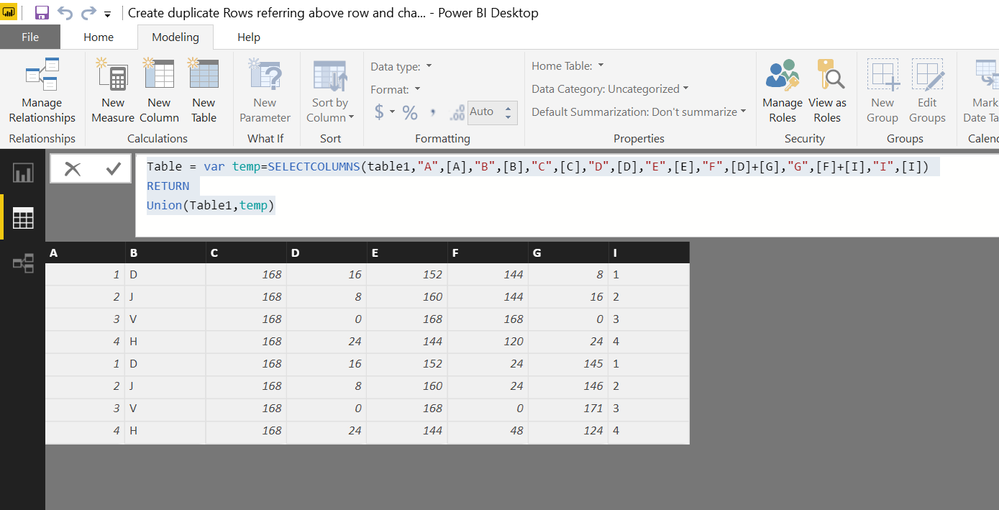
You can also do it via DAX calculated TABLE
Go to Modelling Tab>> NEW TABLE
Table =
VAR temp =
SELECTCOLUMNS (
table1,
"A", [A],
"B", [B],
"C", [C],
"D", [D],
"E", [E],
"F", [D] + [G],
"G", [F] + [I],
"I", [I]
)
RETURN
UNION ( Table1, temp )
@Anonymous
Please see attached file as well
Thank you @Zubair_Muhammad,
How can I use this function by importing the file from other workbook, which calaculation do i need to select?
Regards,
Arjun
The Power BI Data Visualization World Championships is back! Get ahead of the game and start preparing now!
| User | Count |
|---|---|
| 41 | |
| 39 | |
| 37 | |
| 29 | |
| 24 |
| User | Count |
|---|---|
| 124 | |
| 107 | |
| 80 | |
| 69 | |
| 67 |