cancel
Showing results for 
Search instead for 
Did you mean: 

Learn from the best! Meet the four finalists headed to the FINALS of the Power BI Dataviz World Championships! Register now

Reply
graceweii
Frequent Visitor

Create conditional column based on Two tables

I have two tables: Tests and Results. In the data model, the two tables are connected by the key column and it is a one (Tests) to many (Results).  relationship. 

Tests: 

key Lot code
1xxx
2yyy
3zzz

Results : 

key testcondition
1Apass
1Bpass
2Afail
2Dpass
2Cpass
3Bfail
3Dfail


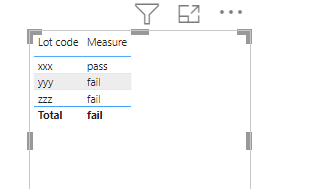
I want to produce the following table without merging the two tables:

Lot codeFinal Condition
xxxpass
yyyfail
zzzfail


The final table is produced by first getting the lot code and condition columns from the two tables. Then, If the lot code has any condition = fail, then the final condition of the lot will fail. In other words, for a lot to pass, the lot can only have pass conditions. 

Lot codeconditionfinal condition
xxxpasspass
xxxpasspass
yyyfailfail
yyypassfail
yyypassfail
zzzfailfail
zzzfailfail


I'm thinking of creating a new measure or new column on Power BI Desktop. But totally clueless how to write this. I hope I explained everything clearly. Please let me know if I need to clarify anything! 


Thank you in advance! 

1 ACCEPTED SOLUTION
ryan_mayu
Super User
Super User

@graceweii 

is this what you want?

Measure = if(COUNTROWS('Results')=CALCULATE(COUNTROWS(Results),FILTER(Results,Results[condition]="pass")),"pass","fail")

1.PNG


Did I answer your question? Mark my post as a solution!

Proud to be a Super User!


View solution in original post

1 REPLY 1
ryan_mayu
Super User
Super User

@graceweii 

is this what you want?

Measure = if(COUNTROWS('Results')=CALCULATE(COUNTROWS(Results),FILTER(Results,Results[condition]="pass")),"pass","fail")

1.PNG


Did I answer your question? Mark my post as a solution!

Proud to be a Super User!


Helpful resources

Announcements
Join our Fabric User Panel

Join our Fabric User Panel

Share feedback directly with Fabric product managers, participate in targeted research studies and influence the Fabric roadmap.

March Power BI Update Carousel

Power BI Community Update - March 2026

Check out the March 2026 Power BI update to learn about new features.