cancel
Showing results for 
Search instead for 
Did you mean: 

The Power BI Data Visualization World Championships is back! Get ahead of the game and start preparing now! Learn more

Reply
Anonymous
Not applicable

Create columns dynamically from column values

Hello community


I'm trying to create new columns in a table from the values in one column in the table.


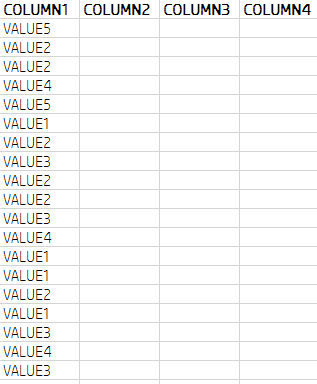
I have a data set as it is shown below:


FromColumns.PNG


And I want to get new columns from the values as it is shown in red.


NewColumns.PNG


I wish to do it automatically.


How can I do that?


Thanks in advance for your time

1 ACCEPTED SOLUTION
MarcelBeug
Community Champion
Community Champion

In the Query Editor (M), you can select Column1 and choose "Pivot Column" on the Transform tab.


Maybe that is what you are looking for, however your result columns are empty and COLUMN1 is still in the result tabel.


"Pivot Column" typically aggregates values from another column (e.g. COLUMN2) in the new columns per value in COLUMN1, and then reduce rows so there are no duplicate combinations in the other columns (COLUMN3 and COLUMN4) in your example.

COLUMN1 as such would not be in the result table.


Edit: alternatively you can use the following code in the Advanced Query Editor, in which "TableName" is the name of the previous step:

    AddedColumns = Table.SelectColumns(TableName,List.Union({Table.ColumnNames(TableName),List.Distinct(TableName[COLUMN1])}), MissingField.UseNull)


Specializing in Power Query Formula Language (M)

View solution in original post

3 REPLIES 3
MarcelBeug
Community Champion
Community Champion

In the Query Editor (M), you can select Column1 and choose "Pivot Column" on the Transform tab.


Maybe that is what you are looking for, however your result columns are empty and COLUMN1 is still in the result tabel.


"Pivot Column" typically aggregates values from another column (e.g. COLUMN2) in the new columns per value in COLUMN1, and then reduce rows so there are no duplicate combinations in the other columns (COLUMN3 and COLUMN4) in your example.

COLUMN1 as such would not be in the result table.


Edit: alternatively you can use the following code in the Advanced Query Editor, in which "TableName" is the name of the previous step:

    AddedColumns = Table.SelectColumns(TableName,List.Union({Table.ColumnNames(TableName),List.Distinct(TableName[COLUMN1])}), MissingField.UseNull)


Specializing in Power Query Formula Language (M)

I have to bind values to slicer based on value selection in another slicer. For achieving this  I am getting data from different table but if i choose value in slicer that is not reflecting in all the visuals of report.

MarcelBeug
Community Champion
Community Champion

@Deepa that looks like something completely different, so why not just start a new topic?

Specializing in Power Query Formula Language (M)

Helpful resources

Announcements
Power BI DataViz World Championships

Power BI Dataviz World Championships

The Power BI Data Visualization World Championships is back! Get ahead of the game and start preparing now!

December 2025 Power BI Update Carousel

Power BI Monthly Update - December 2025

Check out the December 2025 Power BI Holiday Recap!

FabCon Atlanta 2026 carousel

FabCon Atlanta 2026

Join us at FabCon Atlanta, March 16-20, for the ultimate Fabric, Power BI, AI and SQL community-led event. Save $200 with code FABCOMM.