cancel
Showing results for 
Search instead for 
Did you mean: 

Did you hear? There's a new SQL AI Developer certification (DP-800). Start preparing now and be one of the first to get certified. Register now

Reply
OPS-MLTSD
Post Patron
Post Patron

Create calculated column with datesbetween

hello,


I am trying to create a calculated column where I am trying to flag only clients that are earning more thn $50,000 per year.


My main table is my clients table and that clients table is connected to a dates table called Fiscal Year. 


This is the dax that I created:


50000 Earning = SWITCH(

TRUE(),

'Clients'[Currently_working]="Yes" && 'Clients'[Wage]>=50000 && DATESBETWEEN(('Clients'[STARTDATE],min('Fiscal Year'[Date]),max('fiscal Year'[Date])),
"Yes", "No"
)
)
 
I think Dates between is not possible in a calculated column but I am trying to flag clients that are making more than 50,000 within the date range in the Fiscal Year Dates table. If someone could please help me solve this issue and correct my dax, that would be very helpful.
 
Thank you
1 ACCEPTED SOLUTION
Anonymous
Not applicable

Hi @OPS-MLTSD ,


DATESBETWEEN() returns a table that contains a column of dates that begins with a specified start date and continues until a specified end date.

This function is suited to pass as a filter to the CALCULATE function. Use it to filter an expression by a custom date range.

So you may try:

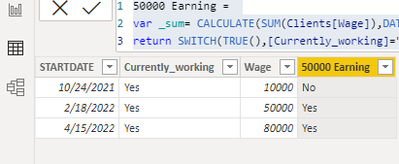
50000 Earning = 
var _sum= CALCULATE(SUM(Clients[Wage]),DATESBETWEEN('Clients'[STARTDATE],MIN('fiscal Year'[Date]), MAX('fiscal Year'[Date])))
return SWITCH(TRUE(),[Currently_working]="Yes"&&_sum>=50000,"Yes","No")

Eyelyn9_0-1651025051503.png


Or if you are still confused about it, please provide me with more details about your table and your problem or share me with your pbix file after removing sensitive data.


Best Regards,
Eyelyn Qin
If this post helps, then please consider Accept it as the solution to help the other members find it more quickly.

View solution in original post

4 REPLIES 4
Ashish_Mathur
Super User
Super User

Hi,

Ideally you should solve this problem with a measure.  If you need help with writing a measure, please share some data to work with.


Regards,
Ashish Mathur
http://www.ashishmathur.com
https://www.linkedin.com/in/excelenthusiasts/
Anonymous
Not applicable

Hi @OPS-MLTSD ,


DATESBETWEEN() returns a table that contains a column of dates that begins with a specified start date and continues until a specified end date.

This function is suited to pass as a filter to the CALCULATE function. Use it to filter an expression by a custom date range.

So you may try:

50000 Earning = 
var _sum= CALCULATE(SUM(Clients[Wage]),DATESBETWEEN('Clients'[STARTDATE],MIN('fiscal Year'[Date]), MAX('fiscal Year'[Date])))
return SWITCH(TRUE(),[Currently_working]="Yes"&&_sum>=50000,"Yes","No")

Eyelyn9_0-1651025051503.png


Or if you are still confused about it, please provide me with more details about your table and your problem or share me with your pbix file after removing sensitive data.


Best Regards,
Eyelyn Qin
If this post helps, then please consider Accept it as the solution to help the other members find it more quickly.

thank you so much! it worked!

Anonymous
Not applicable

Hi, 

I think the FILTER() function in DAX can filter rows based on the given conditions. 

Here's the link: Using FILTER() as a Table function - Power BI Training Australia

Helpful resources

Announcements
April Power BI Update Carousel

Power BI Monthly Update - April 2026

Check out the April 2026 Power BI update to learn about new features.

Fabric SQL PBI Data Days

Data Days 2026 coming soon!

Sign up to receive a private message when registration opens and key events begin.

New to Fabric survey Carousel

New to Fabric Survey

If you have recently started exploring Fabric, we'd love to hear how it's going. Your feedback can help with product improvements.

Power BI DataViz World Championships carousel

Power BI DataViz World Championships - June 2026

A new Power BI DataViz World Championship is coming this June! Don't miss out on submitting your entry.