cancel
Showing results for 
Search instead for 
Did you mean: 

The Power BI Data Visualization World Championships is back! Get ahead of the game and start preparing now! Learn more

Reply
Anonymous
Not applicable

Create another row


Hi All,


i need your help. 


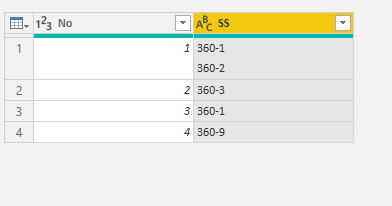
I want to have seperate row for 360-1/ 360-2 in No1.? is it possible please let me know.


q1.PNG


thank you,

CL

1 ACCEPTED SOLUTION
Fowmy
Super User
Super User

@Anonymous 

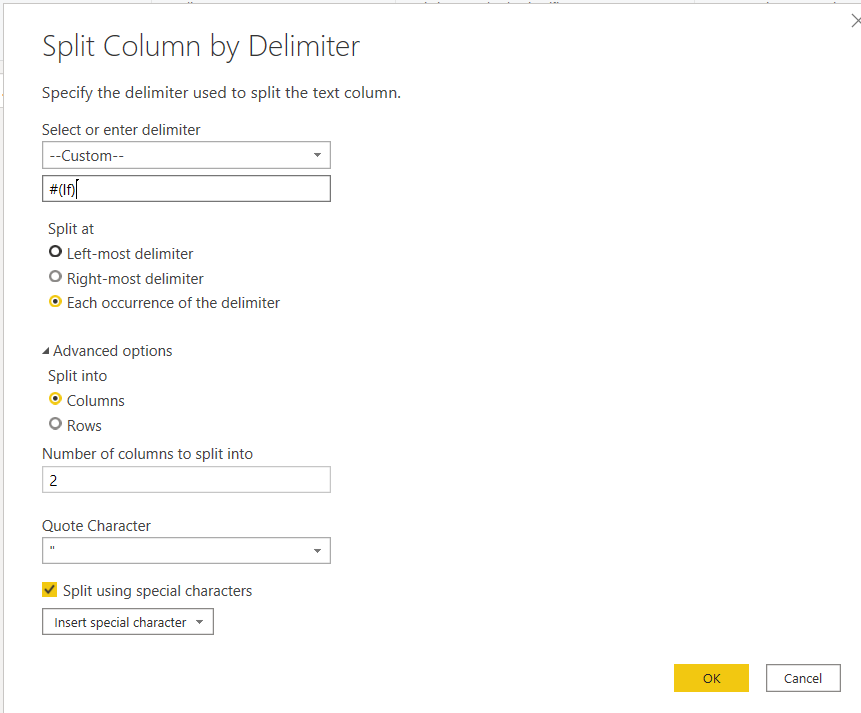
You can select that column, go to Split Column, Split By Delimiter, select custom Delimiter and enter #(lf) as the value 

Fowmy_0-1597131012377.png

________________________

Did I answer your question? Mark this post as a solution, this will help others!.

Click on the Thumbs-Up icon on the right if you like this reply 🙂

YouTube, LinkedIn


Did I answer your question? Mark my post as a solution! and hit thumbs up


Subscribe and learn Power BI from these videos

Website LinkedIn PBI User Group

View solution in original post

2 REPLIES 2
Fowmy
Super User
Super User

@Anonymous 

You can select that column, go to Split Column, Split By Delimiter, select custom Delimiter and enter #(lf) as the value 

Fowmy_0-1597131012377.png

________________________

Did I answer your question? Mark this post as a solution, this will help others!.

Click on the Thumbs-Up icon on the right if you like this reply 🙂

YouTube, LinkedIn


Did I answer your question? Mark my post as a solution! and hit thumbs up


Subscribe and learn Power BI from these videos

Website LinkedIn PBI User Group

amitchandak
Super User
Super User

@Anonymous , can this identified by some delimiter.

if yes: https://www.tutorialgateway.org/how-to-split-columns-in-power-bi/


Or get the code of split by a delimiter using above and then modify the table script and give unichar(10) in place of delimiter.

Table-> right click -> advance editor

Share with Power BI Enthusiasts: Full Power BI Video (20 Hours) YouTube
Microsoft Fabric Series 60+ Videos YouTube
Microsoft Fabric Hindi End to End YouTube

Helpful resources

Announcements
November Power BI Update Carousel

Power BI Monthly Update - November 2025

Check out the November 2025 Power BI update to learn about new features.

Fabric Data Days Carousel

Fabric Data Days

Advance your Data & AI career with 50 days of live learning, contests, hands-on challenges, study groups & certifications and more!

FabCon Atlanta 2026 carousel

FabCon Atlanta 2026

Join us at FabCon Atlanta, March 16-20, for the ultimate Fabric, Power BI, AI and SQL community-led event. Save $200 with code FABCOMM.

Top Kudoed Authors