This is best Fabric, Power BI, SQL and AI community event. How do we know? The last event sold out! Save €200 with code FABCMTY200.
Register nowA new Data Days event is coming soon! This time we’re going bigger than ever. Fabric, Power BI, SQL, AI and more. Don't miss out.
Hi All,
i need your help.
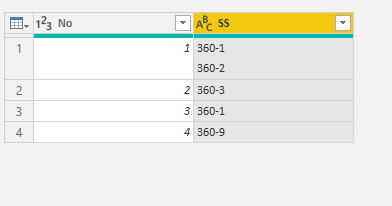
I want to have seperate row for 360-1/ 360-2 in No1.? is it possible please let me know.
thank you,
CL
Solved! Go to Solution.
@Anonymous
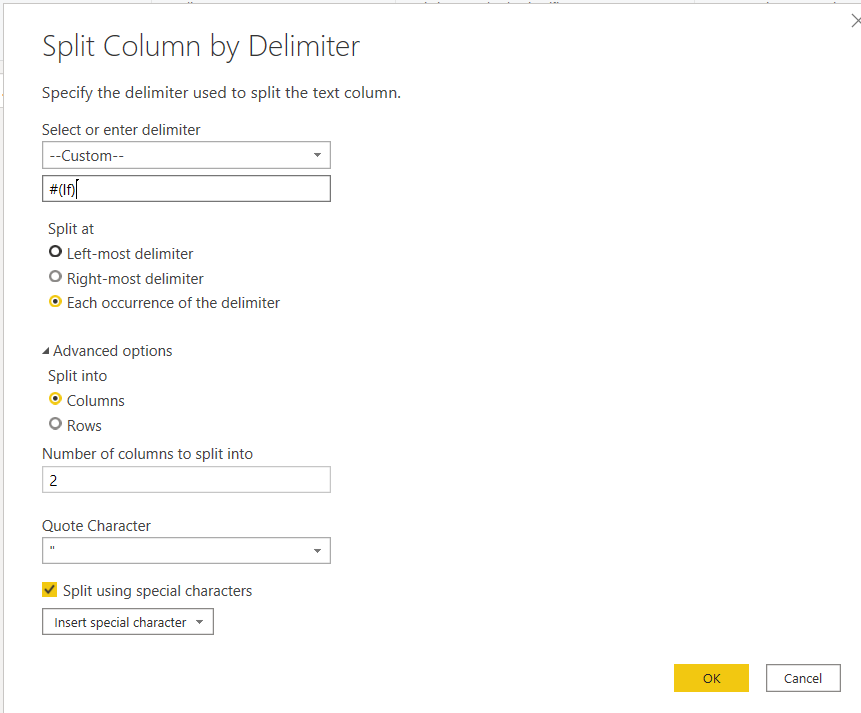
You can select that column, go to Split Column, Split By Delimiter, select custom Delimiter and enter #(lf) as the value
________________________
Did I answer your question? Mark this post as a solution, this will help others!.
Click on the Thumbs-Up icon on the right if you like this reply 🙂
⭕ Subscribe and learn Power BI from these videos
⚪ Website ⚪ LinkedIn ⚪ PBI User Group
@Anonymous
You can select that column, go to Split Column, Split By Delimiter, select custom Delimiter and enter #(lf) as the value
________________________
Did I answer your question? Mark this post as a solution, this will help others!.
Click on the Thumbs-Up icon on the right if you like this reply 🙂
⭕ Subscribe and learn Power BI from these videos
⚪ Website ⚪ LinkedIn ⚪ PBI User Group
@Anonymous , can this identified by some delimiter.
if yes: https://www.tutorialgateway.org/how-to-split-columns-in-power-bi/
Or get the code of split by a delimiter using above and then modify the table script and give unichar(10) in place of delimiter.
Table-> right click -> advance editor
Check out the May 2026 Power BI update to learn about new features.
Sign up to receive a private message when registration opens and key events begin.
If you have recently started exploring Fabric, we'd love to hear how it's going. Your feedback can help with product improvements.
| User | Count |
|---|---|
| 30 | |
| 26 | |
| 25 | |
| 22 | |
| 13 |
| User | Count |
|---|---|
| 58 | |
| 50 | |
| 26 | |
| 20 | |
| 19 |