Join us at FabCon Atlanta from March 16 - 20, 2026, for the ultimate Fabric, Power BI, AI and SQL community-led event. Save $200 with code FABCOMM.
Register now!The Power BI Data Visualization World Championships is back! Get ahead of the game and start preparing now! Learn more
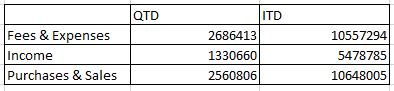
I'm trying to recreate the below table in PowerBI:
Fees & Expenses, Income, and Purchase & Sales are all calculated measures, their DAX queries are as follows:
Is there a way to merge them into one table or to put both QTD and YTD measures into one measure?
Solved! Go to Solution.
Hi @Aymane
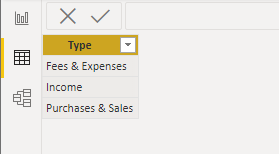
You can first create a table like below to have three type values in a column. I named it as "Types".
Then create the following measures. Put your original QTD and YTD measures into them.
QTD = SWITCH(SELECTEDVALUE(Types[Type]), "Fees & Expenses", [Fees & Expenses_QTD], "Income", [Income_QTD], "Purchases & Sales", [Purchases & Sales_QTD])YTD = SWITCH(SELECTEDVALUE(Types[Type]), "Fees & Expenses", [Fees & Expenses_YTD], "Income", [Income_YTD], "Purchases & Sales", [Purchases & Sales_YTD])
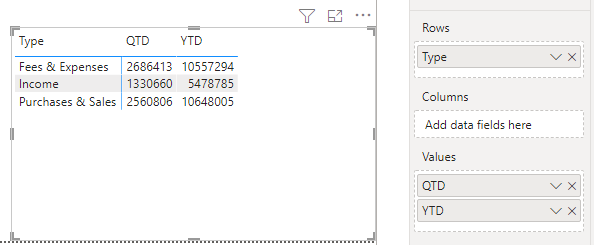
Put 'Types'[Type] column on Rows and put [QTD]&[YTD] measures into Values well. Turn off Row subtotals option in Format pane. You will get the result you want.
Best Regards,
Community Support Team _ Jing
If this post helps, please Accept it as Solution to help other members find it.
Hi @Aymane
You can first create a table like below to have three type values in a column. I named it as "Types".
Then create the following measures. Put your original QTD and YTD measures into them.
QTD = SWITCH(SELECTEDVALUE(Types[Type]), "Fees & Expenses", [Fees & Expenses_QTD], "Income", [Income_QTD], "Purchases & Sales", [Purchases & Sales_QTD])YTD = SWITCH(SELECTEDVALUE(Types[Type]), "Fees & Expenses", [Fees & Expenses_YTD], "Income", [Income_YTD], "Purchases & Sales", [Purchases & Sales_YTD])
Put 'Types'[Type] column on Rows and put [QTD]&[YTD] measures into Values well. Turn off Row subtotals option in Format pane. You will get the result you want.
Best Regards,
Community Support Team _ Jing
If this post helps, please Accept it as Solution to help other members find it.
Hi @v-jingzhang ,
Thank you again for your solution.
Is there another solution where you don't have to create a new table into the model?
Best Regards,
Aymane Benkhaldoun
Hi @Aymane
In my previous sample, I used a matrix visual. So at least a column is needed to play as a row header or a column header. Do you have any existing tables that can provide "Fees & Expenses", "Income", "Purchases & Sales" values or "QTD" & "YTD" values? If so, you can use that column in the matrix instead. It just needs a column to provide values so that the measures can use them to identify different scenarios.
Jing
The Power BI Data Visualization World Championships is back! Get ahead of the game and start preparing now!
| User | Count |
|---|---|
| 39 | |
| 38 | |
| 38 | |
| 28 | |
| 27 |
| User | Count |
|---|---|
| 124 | |
| 89 | |
| 73 | |
| 66 | |
| 65 |