cancel
Showing results for 
Search instead for 
Did you mean: 

Next up in the FabCon + SQLCon recap series: The roadmap for Microsoft SQL and Maximizing Developer experiences in Fabric. All sessions are available on-demand after the live show. Register now

Reply
Anonymous
Not applicable

Create a table using latest available value

Hello everyone! I have two tables one is factual and the other is dimensional and I need to create a relationship based on the "Dojo" where the employees worked. In this scenario My dimension (Latest worked dates) table will not filter the factual (worked dates) table, on the contrary, I need to look up some values from the factual (worked dates) table.  See example below. 


One of the solution I come up for this is creating a bridge table, either by dax or query formula, but I have not been able to solve it yet. 

Please help me providing solutions on how to create an additional table that turns my dimension table  into a factual table that contains only the latest value found.

One of the tables is a factual table (working days), that refreshes every week, therefore It may update  employee working dojo / attributes  from one week another like this

Employee IDDojo WorkedWorking Date
1122Mcdojo29-Jan-23
2233Mcdojo29-Jan-23
1122DojoElite5-Feb-23
2233Mcdojo5-Feb-23
1122Mcppato12-Feb-23


On the other table, I have a factual table including only one entry for each employee that contains the last date they worked. 

Employee IDLast Date WorkedLast Dojo Worked
11226-Feb-23?


Desired Factual Table

Employee IDLatest Dojo WorkedLatest Date Available
2233Mcdojo5-Feb-23
1122Mcppato12-Feb-23
2 ACCEPTED SOLUTIONS
Padycosmos
Solution Sage
Solution Sage

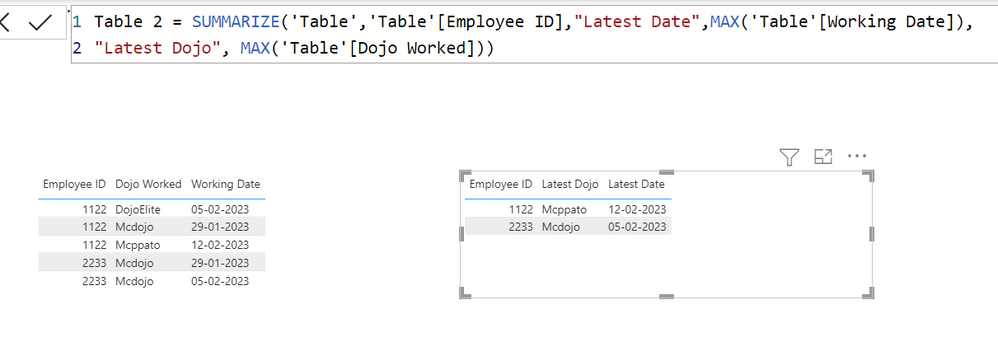
Hope this helps:  However, in your data 

Employee IDLatest Dojo WorkedLatest Date Available
2233Mcdojo29-Jan-23 ------> this is incorrect the latest is 5-Feb-23
1122Mcppato12-Feb-23 


Padycosmos_0-1675865999591.png


View solution in original post

Instead of MAX(), you may use MIN()

View solution in original post

3 REPLIES 3
Padycosmos
Solution Sage
Solution Sage

Hope this helps:  However, in your data 

Employee IDLatest Dojo WorkedLatest Date Available
2233Mcdojo29-Jan-23 ------> this is incorrect the latest is 5-Feb-23
1122Mcppato12-Feb-23 


Padycosmos_0-1675865999591.png


Anonymous
Not applicable

It worked 😄 thanks, how would I do the Opposite? Creating the table with the earliset result found for each employee based on date? 

Thanks in advance

Instead of MAX(), you may use MIN()

Helpful resources

Announcements
New to Fabric survey Carousel

New to Fabric Survey

If you have recently started exploring Fabric, we'd love to hear how it's going. Your feedback can help with product improvements.

Power BI DataViz World Championships carousel

Power BI DataViz World Championships - June 2026

A new Power BI DataViz World Championship is coming this June! Don't miss out on submitting your entry.

Join our Fabric User Panel

Join our Fabric User Panel

Share feedback directly with Fabric product managers, participate in targeted research studies and influence the Fabric roadmap.

March Power BI Update Carousel

Power BI Community Update - March 2026

Check out the March 2026 Power BI update to learn about new features.