cancel
Showing results for 
Search instead for 
Did you mean: 

The Power BI Data Visualization World Championships is back! Get ahead of the game and start preparing now! Learn more

Reply
boddydan
Frequent Visitor

Create a table composed of the last x rows of 3 other tables

Hi everyone,

I'm looking to create a table which is made up of the last few (e.g. 1000) rows of several other similar tables (all with the same column names), and was wondering if anyone knew how to do this as I'm very inexperienced in Power BI.

As an extra requirement I'd also like to add an extra column to my formed table which could be called 'Reference', and each line of this column would have the table name that the corresponding line came from. E.g. 

Reference
Table1
Table1
Table1
Table2
Table3

This reference column would exist so that I could perform filtering and and only show data on some visuals from specific tables.


If anybody could provide any insight on how to achieve this I'd greatly appreciate it.

Many thanks.

2 ACCEPTED SOLUTIONS
mussaenda
Super User
Super User

Hi @boddydan ,


Before you create the table from other similar tables, add a custom column and call it as Reference. And you can indicate the reference you need. Then create the table.


Hope this helps.

View solution in original post

Icey
Community Support
Community Support

Hi @boddydan ,


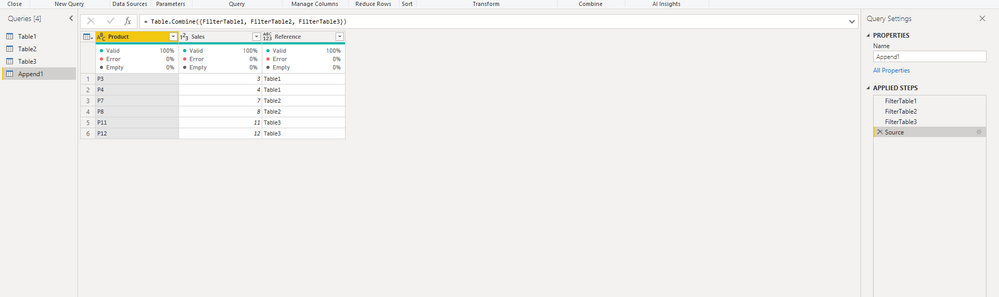
Please check if this is what you want:

let
    FilterTable1 = Table.AddColumn(Table.LastN(#"Table1",2),"Reference",each "Table1"),
    FilterTable2 = Table.AddColumn(Table.LastN(#"Table2",2),"Reference",each "Table2"),
    FilterTable3 = Table.AddColumn(Table.LastN(#"Table3",2),"Reference",each "Table3"),
    Source = Table.Combine({FilterTable1, FilterTable2, FilterTable3})
in
    Source

Icey_0-1632205083221.png


Best Regards,

Icey


If this post helps, then please consider Accept it as the solution to help the other members find it more quickly.

View solution in original post

2 REPLIES 2
Icey
Community Support
Community Support

Hi @boddydan ,


Please check if this is what you want:

let
    FilterTable1 = Table.AddColumn(Table.LastN(#"Table1",2),"Reference",each "Table1"),
    FilterTable2 = Table.AddColumn(Table.LastN(#"Table2",2),"Reference",each "Table2"),
    FilterTable3 = Table.AddColumn(Table.LastN(#"Table3",2),"Reference",each "Table3"),
    Source = Table.Combine({FilterTable1, FilterTable2, FilterTable3})
in
    Source

Icey_0-1632205083221.png


Best Regards,

Icey


If this post helps, then please consider Accept it as the solution to help the other members find it more quickly.

mussaenda
Super User
Super User

Hi @boddydan ,


Before you create the table from other similar tables, add a custom column and call it as Reference. And you can indicate the reference you need. Then create the table.


Hope this helps.

Helpful resources

Announcements
Power BI DataViz World Championships

Power BI Dataviz World Championships

The Power BI Data Visualization World Championships is back! Get ahead of the game and start preparing now!

December 2025 Power BI Update Carousel

Power BI Monthly Update - December 2025

Check out the December 2025 Power BI Holiday Recap!

FabCon Atlanta 2026 carousel

FabCon Atlanta 2026

Join us at FabCon Atlanta, March 16-20, for the ultimate Fabric, Power BI, AI and SQL community-led event. Save $200 with code FABCOMM.