Get certified for free when you join Fabric Data Days 2026 and dive into Fabric, Power BI, SQL, AI, and other essential data skills.
Join nowJuly 28 - August 9 | Final Round of the Power BI Dataviz World Championships. This is your chance. Learn more
Hello,
I have two tables with différent type of code, each table has a code, an amount column and a date table.
I want to create a third table wich is a summary of the previous one.
With 5 columns :
- Month
- Countrows of the first table
- Sum of the amount from the first table
- Countrows of the second table
- Sum of the amount from the second table
I created a pbix file in order to give you some view over my datas.
Best regard,
ScrappyS
Solved! Go to Solution.
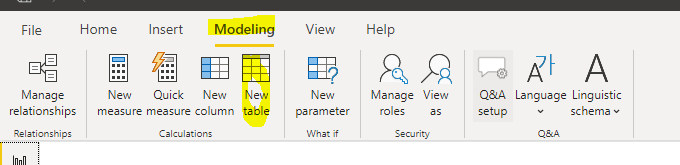
Add this code to a calulated table:
Table =
NATURALINNERJOIN(
SUMMARIZE(ADDCOLUMNS('Table 1' , "Month_" , MONTH('Table 1'[Month])) , [Month_] , "Countrows T1" , COUNTROWS('Table 1') , "SUM CA T1" , SUM('Table 1'[CA]))
,
SUMMARIZE(ADDCOLUMNS('Table 2' , "Month_" , MONTH('Table 2'[Month])) , [Month_] , "Countrows T2" , COUNTROWS('Table 1') , "SUM CA T2" , SUM('Table 1'[CA]))
)
Br,
J
@Anonymous , you can append merge and group by
https://radacad.com/append-vs-merge-in-power-bi-and-power-query
https://www.poweredsolutions.co/2019/07/30/grouping-rows-with-power-bi-power-query/
Add this code to a calulated table:
Table =
NATURALINNERJOIN(
SUMMARIZE(ADDCOLUMNS('Table 1' , "Month_" , MONTH('Table 1'[Month])) , [Month_] , "Countrows T1" , COUNTROWS('Table 1') , "SUM CA T1" , SUM('Table 1'[CA]))
,
SUMMARIZE(ADDCOLUMNS('Table 2' , "Month_" , MONTH('Table 2'[Month])) , [Month_] , "Countrows T2" , COUNTROWS('Table 1') , "SUM CA T2" , SUM('Table 1'[CA]))
)
Br,
J
Thanks a lot @tex628 , it's work like a charm !
I have just another question : how can i add to my summary table a column wich is the difference between 'table 1'[Sum CA] and 'table 2'[Sum CA] ?
('table 1'[Sum CA] - 'table 2'[Sum CA])
Best regards,
ScrappyS
Join us in Barcelona for FabCon and SQLCon, the Fabric, Power BI, SQL, and AI community event. Save €200 with code FABCMTY200.
If you love stickers, then you will definitely want to check out our community sticker challenge, Barcelona edition!
Check out the July 2026 Power BI update to learn about new features.
| User | Count |
|---|---|
| 30 | |
| 28 | |
| 23 | |
| 21 | |
| 19 |
| User | Count |
|---|---|
| 44 | |
| 32 | |
| 18 | |
| 17 | |
| 17 |