cancel
Showing results for 
Search instead for 
Did you mean: 

Level up your Power BI skills this month - build one visual each week and tell better stories with data! Get started

Reply
POSPOS
Post Partisan
Post Partisan

Create a summary table using DAX

Hi,

I have a requirement to create a summary table based on three other tables.

Please find sample data below

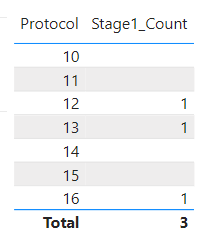
Table1:

POSPOS_0-1699982382168.png

Table2:

POSPOS_1-1699982400380.png

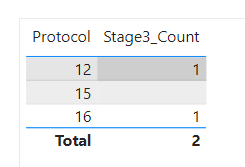
Table3:

POSPOS_2-1699982416722.png

Expected Outut:
Create a summary table with the counts from each table as below:

POSPOS_3-1699982457070.png

I have also attached a sample pbix file here.

Could somone please help with the solution in DAX.

Thank you.


1 ACCEPTED SOLUTION
Anonymous
Not applicable

Hi @POSPOS ,


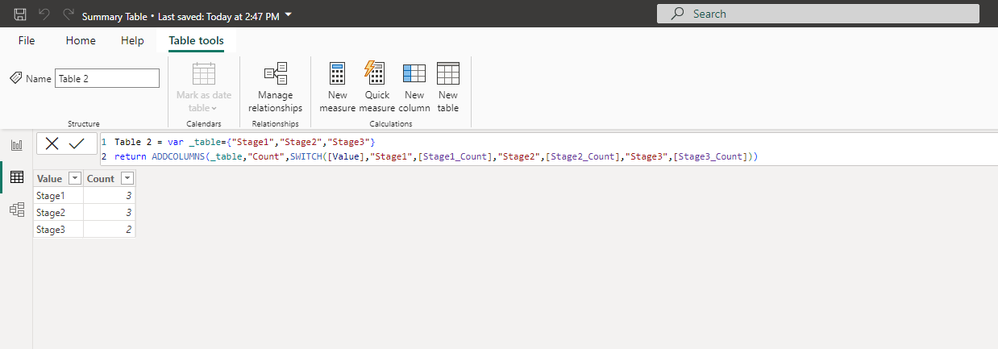
The calculated table is static, here's the formula:


Table 2 = var _table={"Stage1","Stage2","Stage3"}
return ADDCOLUMNS(_table,"Count",SWITCH([Value],"Stage1",[Stage1_Count],"Stage2",[Stage2_Count],"Stage3",[Stage3_Count]))


vstephenmsft_0-1700551882543.png


If you want the dynamic counting result, you should create a table with three stages. And put a measure into the table visual. Because measures are dynamic.


Here're the steps.

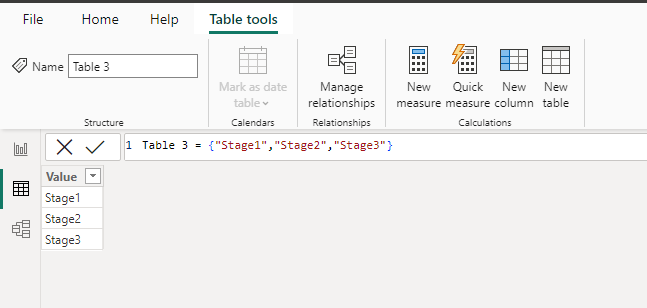
1.Table with three stages. You can also create it by entering data.

vstephenmsft_1-1700552021079.png

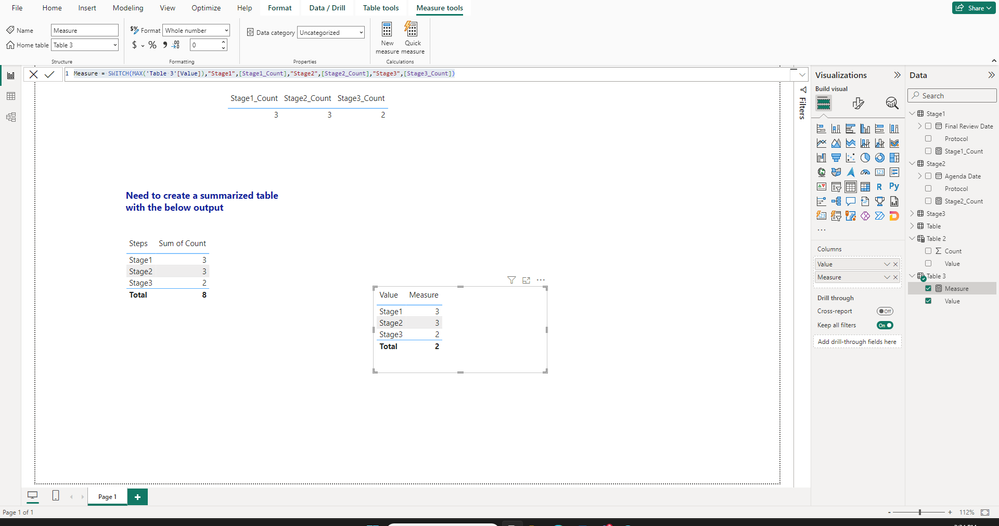
2.Create a measure.


Measure = SWITCH(MAX('Table 3'[Value]),"Stage1",[Stage1_Count],"Stage2",[Stage2_Count],"Stage3",[Stage3_Count])


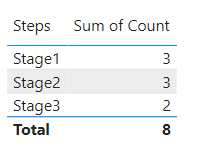
3.Here's the result.

vstephenmsft_2-1700552103603.png

Best Regards,

Stephen Tao


If this post helps, then please consider Accept it as the solution to help the other members find it more quickly.           

View solution in original post

3 REPLIES 3
Anonymous
Not applicable

Hi @POSPOS ,


The calculated table is static, here's the formula:


Table 2 = var _table={"Stage1","Stage2","Stage3"}
return ADDCOLUMNS(_table,"Count",SWITCH([Value],"Stage1",[Stage1_Count],"Stage2",[Stage2_Count],"Stage3",[Stage3_Count]))


vstephenmsft_0-1700551882543.png


If you want the dynamic counting result, you should create a table with three stages. And put a measure into the table visual. Because measures are dynamic.


Here're the steps.

1.Table with three stages. You can also create it by entering data.

vstephenmsft_1-1700552021079.png

2.Create a measure.


Measure = SWITCH(MAX('Table 3'[Value]),"Stage1",[Stage1_Count],"Stage2",[Stage2_Count],"Stage3",[Stage3_Count])


3.Here's the result.

vstephenmsft_2-1700552103603.png

Best Regards,

Stephen Tao


If this post helps, then please consider Accept it as the solution to help the other members find it more quickly.           

dk_dk
Super User
Super User

Hi @POSPOS 

I have a solution that may or may not work for your exact use case.

First I create a blank table with two columns, "Steps" and "Sum of Count". No rows. I called this table "Solution Table".

Then I create a DAX Table as below:

Solution = 

UNION('Solution Table',
        ROW(
        "Steps", "Stage1"
        ,"Sum of Count", Stage1[Stage1_Count]
        ),
        ROW(
        "Steps", "Stage2"
        ,"Sum of Count", Stage2[Stage2_Count]
        ),
        ROW(
        "Steps", "Stage3"
        ,"Sum of Count", Stage3[Stage3_Count]
        )
        )


And the result of this "Solution" will match the result your expected outcome. However, if you start intrducing filters in your report that affect the 3 original measures in the 3 Stage tables, then the summary table will not update automatically. I am afraid I do not have a solution where the summary table would be affected by slicers or filters dynamically.
I hope this helps!


Did I answer your question? Mark my post as a solution!

Proud to be a Super User!


@dk_dk  - Thank you for the response. But we do have other visuals/slicers in the report and the users would expect the visuals to be interactive.
Eg: Selecting a protocol in the slicer and the "Solution" table should be filtered out to see in which step that protocol is in.
Trying to find out if we have any solution to have the visual interactive.

Helpful resources

Announcements
April Power BI Update Carousel

Power BI Monthly Update - April 2026

Check out the April 2026 Power BI update to learn about new features.

Fabric SQL PBI Data Days

Data Days 2026 coming soon!

Sign up to receive a private message when registration opens and key events begin.

New to Fabric survey Carousel

New to Fabric Survey

If you have recently started exploring Fabric, we'd love to hear how it's going. Your feedback can help with product improvements.

Power BI DataViz World Championships carousel

Power BI DataViz World Championships - June 2026

A new Power BI DataViz World Championship is coming this June! Don't miss out on submitting your entry.