Share feedback directly with Fabric product managers, participate in targeted research studies and influence the Fabric roadmap.
Sign up nowGet Fabric certified for FREE! Don't miss your chance! Learn more
Hi,
I'm trying to create a measure to be used as a tooltip in a treemap. The tooltip should show a list of the top 5 sub-items with a total.
For example, each tree item in the chart is a state. The tooltip should show the 5 top cities in the state and the total value for each city.
I'm able to show the top 5 cities, but I couldn't build the expression to include the total values.
I used the following expression:
Principais Partidos = var PartidosCount= DISTINCTCOUNT(deputados[siglaPartido]) Return if (PartidosCount >5; CONCATENATEX(TOPN(5;TOPN(5;Summarize(deputados;deputados[siglaPartido];"Total";Count(deputados[id]));[Total];DESC));[siglaPartido];", ";[Total];DESC) & " e mais"; CONCATENATEX(Summarize(deputados;deputados[siglaPartido];"Total";Count(deputados[id]));deputados[siglaPartido];", "))
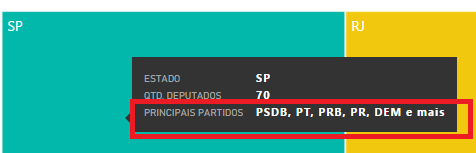
I would like the result to also contain the total of each item, like this: PSDB (#), PT(#), PRB (#), PR (#), DEM (#)
How can I achieve this?
Thank you!
Solved! Go to Solution.
@Dennes wrote:
Hi,
I'm trying to create a measure to be used as a tooltip in a treemap. The tooltip should show a list of the top 5 sub-items with a total.
For example, each tree item in the chart is a state. The tooltip should show the 5 top cities in the state and the total value for each city.
I'm able to show the top 5 cities, but I couldn't build the expression to include the total values.
I used the following expression:
Principais Partidos = var PartidosCount= DISTINCTCOUNT(deputados[siglaPartido]) Return if (PartidosCount >5; CONCATENATEX(TOPN(5;TOPN(5;Summarize(deputados;deputados[siglaPartido];"Total";Count(deputados[id]));[Total];DESC));[siglaPartido];", ";[Total];DESC) & " e mais"; CONCATENATEX(Summarize(deputados;deputados[siglaPartido];"Total";Count(deputados[id]));deputados[siglaPartido];", "))
I would like the result to also contain the total of each item, like this: PSDB (#), PT(#), PRB (#), PR (#), DEM (#)
How can I achieve this?
Thank you!
See my attached demo.
Measure =
VAR summizedTable =
SUMMARIZE (
ALLSELECTED ( 'Table' ),
'Table'[city],
"total sales", SUM ( 'Table'[sales] )
)
VAR Top3 =
TOPN ( 3, summizedTable, [total sales], DESC )
RETURN
CONCATENATEX (
Top3,
'Table'[city] & CONCATENATE ( "(", [total sales] )
& ")",
","
)
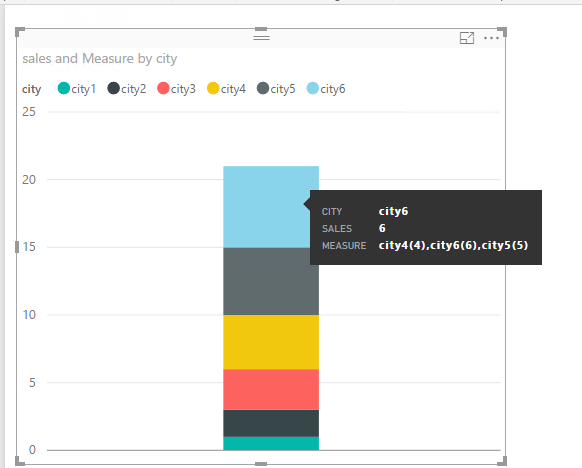
@Dennes wrote:
Hi,
I'm trying to create a measure to be used as a tooltip in a treemap. The tooltip should show a list of the top 5 sub-items with a total.
For example, each tree item in the chart is a state. The tooltip should show the 5 top cities in the state and the total value for each city.
I'm able to show the top 5 cities, but I couldn't build the expression to include the total values.
I used the following expression:
Principais Partidos = var PartidosCount= DISTINCTCOUNT(deputados[siglaPartido]) Return if (PartidosCount >5; CONCATENATEX(TOPN(5;TOPN(5;Summarize(deputados;deputados[siglaPartido];"Total";Count(deputados[id]));[Total];DESC));[siglaPartido];", ";[Total];DESC) & " e mais"; CONCATENATEX(Summarize(deputados;deputados[siglaPartido];"Total";Count(deputados[id]));deputados[siglaPartido];", "))
I would like the result to also contain the total of each item, like this: PSDB (#), PT(#), PRB (#), PR (#), DEM (#)
How can I achieve this?
Thank you!
See my attached demo.
Measure =
VAR summizedTable =
SUMMARIZE (
ALLSELECTED ( 'Table' ),
'Table'[city],
"total sales", SUM ( 'Table'[sales] )
)
VAR Top3 =
TOPN ( 3, summizedTable, [total sales], DESC )
RETURN
CONCATENATEX (
Top3,
'Table'[city] & CONCATENATE ( "(", [total sales] )
& ")",
","
)
Share feedback directly with Fabric product managers, participate in targeted research studies and influence the Fabric roadmap.
| User | Count |
|---|---|
| 63 | |
| 62 | |
| 42 | |
| 19 | |
| 16 |
| User | Count |
|---|---|
| 118 | |
| 106 | |
| 38 | |
| 28 | |
| 27 |