cancel
Showing results for 
Search instead for 
Did you mean: 

The Power BI Data Visualization World Championships is back! It's time to submit your entry. Live now!

Reply
hansvonk007
New Member

Create a reset button

My question is how to make a button which deletes the filters AND the text added in a search field. I made a reset button with a bookmark and all filters are deleted perfectly. But the search filters (you know, the ones with the magnifing glass) don't.


Is there a way to do so without using the reset button for all of the dashboard tabs.


Pardon my English. I'm Dutch.

1 ACCEPTED SOLUTION

OK. That's great. Thanks.

View solution in original post

4 REPLIES 4
nandukrishnavs
Community Champion
Community Champion

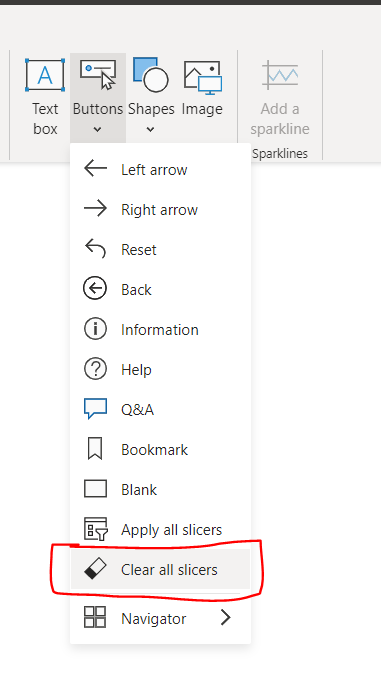
@hansvonk007 In the latest Power BI Desktop (March 2023) version, we have "Clear all slicers" button. You can place this in every page. If you don't this in every page, probably you can disable the persistent filters. So, whenever you refresh the page, it will reset the reports to default.


nandukrishnavs_0-1679918157595.png


Regards,
Nandu Krishna

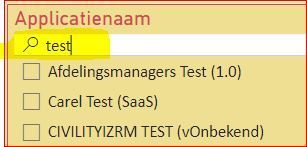
@nandukrishnavs Thank you so much for your answer, however I think I didn't explained my problem to well. I think a textfield is not a slices. Since a picture says more than a thousand words hereby a picture with in yellow the field I want to reset to empty.

Knipsel PBI.JPG

@hansvonk007 "Clear all slicers" button will clear the search text as well.


Regards,
Nandu Krishna

OK. That's great. Thanks.

Helpful resources

Announcements
FabCon Atlanta 2026 carousel

FabCon Atlanta 2026

Join us at FabCon Atlanta, March 16-20, for the ultimate Fabric, Power BI, AI and SQL community-led event. Save $200 with code FABCOMM.