We've captured the moments from FabCon & SQLCon that everyone is talking about, and we are bringing them to the community, live and on-demand. Starts on April 14th. Register now
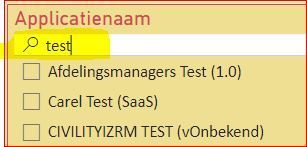
My question is how to make a button which deletes the filters AND the text added in a search field. I made a reset button with a bookmark and all filters are deleted perfectly. But the search filters (you know, the ones with the magnifing glass) don't.
Is there a way to do so without using the reset button for all of the dashboard tabs.
Pardon my English. I'm Dutch.
Solved! Go to Solution.
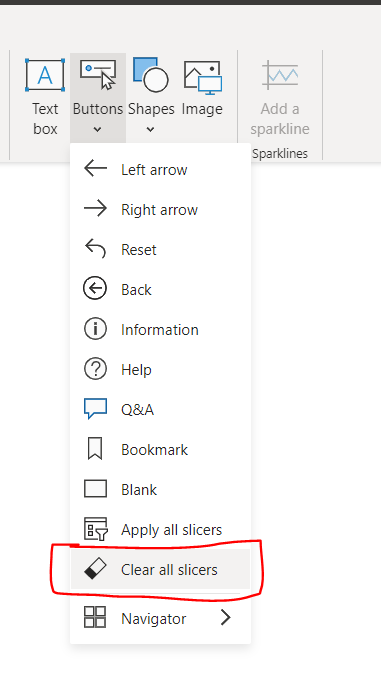
@hansvonk007 In the latest Power BI Desktop (March 2023) version, we have "Clear all slicers" button. You can place this in every page. If you don't this in every page, probably you can disable the persistent filters. So, whenever you refresh the page, it will reset the reports to default.
@nandukrishnavs Thank you so much for your answer, however I think I didn't explained my problem to well. I think a textfield is not a slices. Since a picture says more than a thousand words hereby a picture with in yellow the field I want to reset to empty.
OK. That's great. Thanks.
If you have recently started exploring Fabric, we'd love to hear how it's going. Your feedback can help with product improvements.
A new Power BI DataViz World Championship is coming this June! Don't miss out on submitting your entry.
Share feedback directly with Fabric product managers, participate in targeted research studies and influence the Fabric roadmap.
| User | Count |
|---|---|
| 57 | |
| 38 | |
| 32 | |
| 18 | |
| 16 |
| User | Count |
|---|---|
| 66 | |
| 66 | |
| 39 | |
| 34 | |
| 25 |