cancel
Showing results for 
Search instead for 
Did you mean: 

The Power BI Data Visualization World Championships is back! Get ahead of the game and start preparing now! Learn more

Reply
fabiocovre
Advocate I
Advocate I

Create a ranking for sensitive data

Hello,


I'm working with medical data, and due that, I cannot show the name of the people in my report.


I have this following table in my dashboard:


Name - Cost

John - 50,000

Mark - 20,000

Peter - 10,000


And I need to change the collumn "Name" for a collumn called "Ranking". Example below:


Ranking - Cost

1 - 50,000

2 - 20,000

3 - 10,000


I tried to do this formula "Ranking = RANKX(ALLSELECTED('_BASE'[Name]);[SumCost])", but when I replace the "Name" field in my table for "Ranking", this is the result.


Ranking - Cost

1 - 80,000


Is it possible to be done?

Thank you!

1 ACCEPTED SOLUTION

Hi fabiocovre,


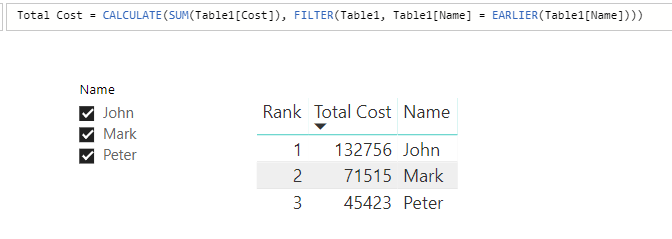
Create a calculate column using DAX like below:

Total Cost = CALCULATE(SUM(Table1[Cost]), FILTER(Table1, Table1[Name] = EARLIER(Table1[Name])))

Then modify the rank measure like this:

Rank = RANKX(ALLSELECTED(Table1), CALCULATE(MAX(Table1[Total Cost]), ALLEXCEPT(Table1, Table1[Name])), , DESC, Dense)

捕获.PNG   


In addtion, I'm afraid the Name column can't be removed because allselect() function are based on the Name column.


PBIX here: https://www.dropbox.com/s/utytv44dtowsqh0/Create%20a%20ranking%20for%20sensitive%20data.pbix?dl=0


Regards,

Jimmy Tao

View solution in original post

5 REPLIES 5
Greg_Deckler
Community Champion
Community Champion

If it is truly a calculated column in a table then it should just be:


Ranking = RANKX('BASE',[Cost])


Follow on LinkedIn
@ me in replies or I'll lose your thread!!!
Instead of a Kudo, please vote for this idea
Become an expert!: Enterprise DNA
External Tools: MSHGQM
YouTube Channel!: Microsoft Hates Greg
Latest book!:
DAX For Humans

DAX is easy, CALCULATE makes DAX hard...

Sorry, I forgot to detail it, bit my database has many values for the same users. I would have to sum it... Is it possible to use this calculated column anyway?


The rank also should change according to the filters. Also showing 1st, 2nd, 3rd etc...


Thank you!

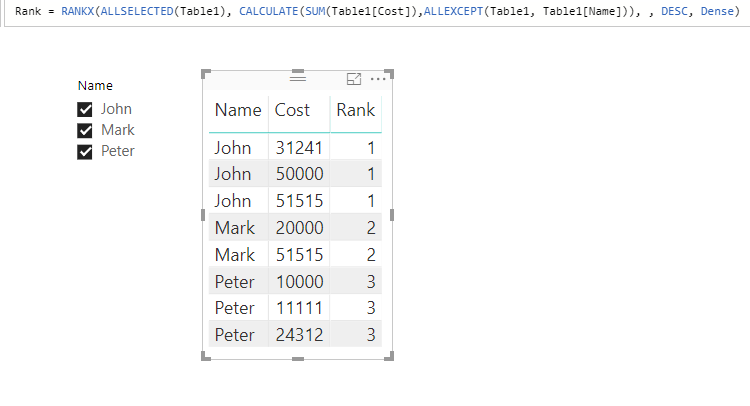
Hi fabiocovre,


Try DAX below:

Rank =
RANKX (
    ALLSELECTED ( Table1 ),
    CALCULATE ( SUM ( Table1[Cost] ), ALLEXCEPT ( Table1, Table1[Name] ) ),
    ,
    DESC,
    DENSE
)

捕获.PNG 


PBIX here: https://www.dropbox.com/s/utytv44dtowsqh0/Create%20a%20ranking%20for%20sensitive%20data.pbix?dl=0


Regards,

Jimmy Tao


Hi fabiocovre,


Create a calculate column using DAX like below:

Total Cost = CALCULATE(SUM(Table1[Cost]), FILTER(Table1, Table1[Name] = EARLIER(Table1[Name])))

Then modify the rank measure like this:

Rank = RANKX(ALLSELECTED(Table1), CALCULATE(MAX(Table1[Total Cost]), ALLEXCEPT(Table1, Table1[Name])), , DESC, Dense)

捕获.PNG   


In addtion, I'm afraid the Name column can't be removed because allselect() function are based on the Name column.


PBIX here: https://www.dropbox.com/s/utytv44dtowsqh0/Create%20a%20ranking%20for%20sensitive%20data.pbix?dl=0


Regards,

Jimmy Tao

Helpful resources

Announcements
Power BI DataViz World Championships

Power BI Dataviz World Championships

The Power BI Data Visualization World Championships is back! Get ahead of the game and start preparing now!

December 2025 Power BI Update Carousel

Power BI Monthly Update - December 2025

Check out the December 2025 Power BI Holiday Recap!

FabCon Atlanta 2026 carousel

FabCon Atlanta 2026

Join us at FabCon Atlanta, March 16-20, for the ultimate Fabric, Power BI, AI and SQL community-led event. Save $200 with code FABCOMM.