Join us at FabCon Atlanta from March 16 - 20, 2026, for the ultimate Fabric, Power BI, AI and SQL community-led event. Save $200 with code FABCOMM.
Register now!The Power BI Data Visualization World Championships is back! Get ahead of the game and start preparing now! Learn more
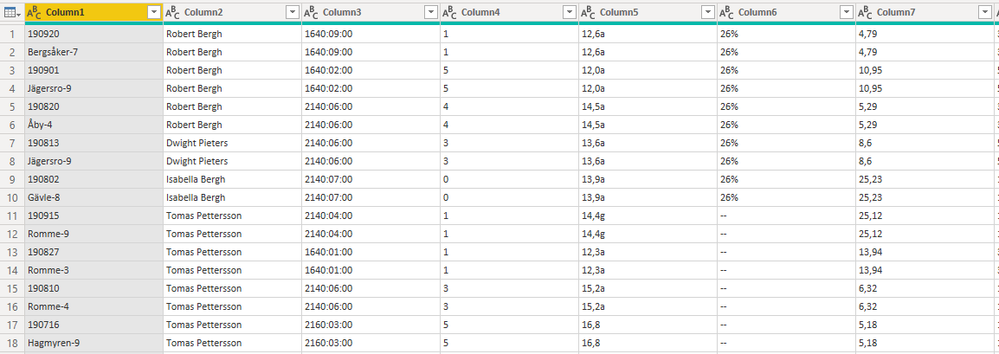
I have a table with a number of columns (see picture). What I want to do is create one or two new columns based on the values of Column1. I want to have the values from like rowno 1,3,5 etc in a new column, they are all dates. As you can see the rest of the data in the table are all the same so I have duplicate values except for Column1,
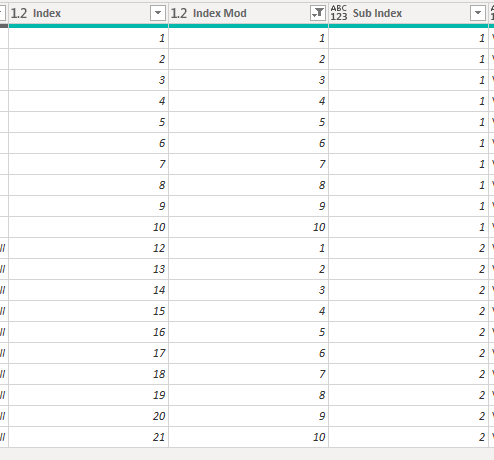
I've also added columns at the end, index, index with mod and sub index,
What is the best approach to accomplish this?
/Magnus
Solved! Go to Solution.
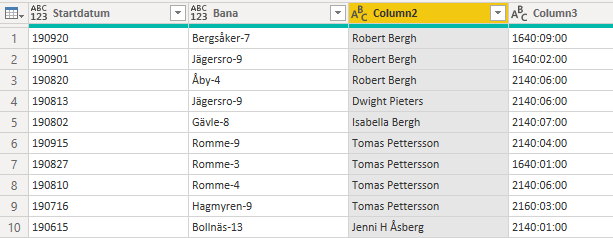
I created a new modulo column with 2 row interval. Then I created a custom column, if modulo index is 0 then get the value from Column1 otherwise set null. Then a new custom column checking if modulo index is 1 then get from Column1. After that I filled up the values for the second column. After that I filtered out the rows with modulo index = 1 🙂 The result looks like this
Hello-
I am not 100% sure what you are looking for but I thought it would be a good idea for to play around with the Pivot and Unpivot columns in the transform and modeling sections. This will likely give you the functionality you need.
Jared
I created a new modulo column with 2 row interval. Then I created a custom column, if modulo index is 0 then get the value from Column1 otherwise set null. Then a new custom column checking if modulo index is 1 then get from Column1. After that I filled up the values for the second column. After that I filtered out the rows with modulo index = 1 🙂 The result looks like this
The Power BI Data Visualization World Championships is back! Get ahead of the game and start preparing now!
| User | Count |
|---|---|
| 64 | |
| 47 | |
| 41 | |
| 36 | |
| 23 |
| User | Count |
|---|---|
| 185 | |
| 123 | |
| 106 | |
| 78 | |
| 52 |