Join us at FabCon Atlanta from March 16 - 20, 2026, for the ultimate Fabric, Power BI, AI and SQL community-led event. Save $200 with code FABCOMM.
Register now!The Power BI Data Visualization World Championships is back! Get ahead of the game and start preparing now! Learn more
Hi friends,
I have table as below-
Original table
| Student name | periodendson | A | B | C | D |
| XYZ1 | 31-12-2019 | 57 | 80 | 44 | 37 |
| XYZ1 | 31-12-2020 | 33 | 51 | 39 | 21 |
| XYZ1 | 31-12-2021 | 26 | 78 | 48 | 37 |
| XYZ2 | 31-12-2019 | 53 | 27 | 57 | 61 |
| XYZ2 | 31-12-2020 | 60 | 70 | 54 | 69 |
| XYZ2 | 31-12-2021 | 29 | 43 | 66 | 74 |
| XYZ3 | 31-12-2019 | 39 | 55 | 73 | 34 |
| XYZ3 | 31-12-2020 | 31 | 65 | 42 | 66 |
| XYZ3 | 31-12-2021 | 73 | 31 | 48 | 79 |
| XYZ4 | 31-12-2019 | 69 | 50 | 57 | 30 |
| XYZ4 | 31-12-2020 | 72 | 77 | 62 | 68 |
| XYZ4 | 31-12-2021 | 43 | 50 | 70 | 31 |
I want to create a table visual like below with Change column newly created(with dax). Can u pls help me to know how can I create the same?
Expected visual-
| Parameter | 2019 | 2020 | 2021 | Change in 2021 compared to 2020 |
| A | 57 | 33 | 26 | -21% |
| B | 80 | 51 | 78 | 53% |
| C | 44 | 39 | 48 | 23% |
| D | 37 | 21 | 37 | 76% |
One way is that I unpivot the original table & then it reflects in below format which allows me to create a matrix table in required format. Now I am unable to understand how to add a change column in the table visual as explained above in the visual. Appreciate your help sir.
Univot table-
| Student name | periodendson | Parameter | Values |
| XYZ1 | 31-12-2019 | A | 57 |
| XYZ1 | 31-12-2019 | B | 80 |
| XYZ1 | 31-12-2019 | C | 44 |
| XYZ1 | 31-12-2019 | D | 37 |
| XYZ1 | 31-12-2020 | A | 33 |
| XYZ1 | 31-12-2020 | B | 51 |
| XYZ1 | 31-12-2020 | C | 39 |
| XYZ1 | 31-12-2020 | D | 21 |
| XYZ1 | 31-12-2021 | A | 26 |
| XYZ1 | 31-12-2021 | B | 78 |
| XYZ1 | 31-12-2021 | C | 48 |
| XYZ1 | 31-12-2021 | D | 37 |
| XYZ2 | 31-12-2019 | A | 53 |
| XYZ2 | 31-12-2019 | B | 27 |
| XYZ2 | 31-12-2019 | C | 57 |
| XYZ2 | 31-12-2019 | D | 61 |
| XYZ2 | 31-12-2020 | A | 60 |
| XYZ2 | 31-12-2020 | B | 70 |
| XYZ2 | 31-12-2020 | C | 54 |
| XYZ2 | 31-12-2020 | D | 69 |
| XYZ2 | 31-12-2021 | A | 29 |
| XYZ2 | 31-12-2021 | B | 43 |
| XYZ2 | 31-12-2021 | C | 66 |
| XYZ2 | 31-12-2021 | D | 74 |
Solved! Go to Solution.
Hi, @harshadrokade
I created a sample to meet your needs.
Column =
VAR maxyear =
YEAR ( TODAY () ) - 1
VAR minyear = maxyear - 2
RETURN
IF (
YEAR ( [periodendson] ) >= minyear
&& YEAR ( [periodendson] ) <= maxyear,
1,
0
)
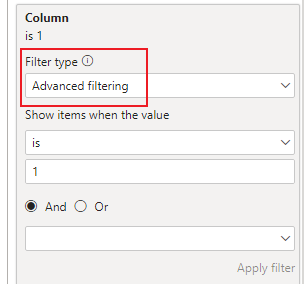
I calculate the sum of the current year and the comparison data separately according to your needs, and force the sum format to remain unchanged, otherwise it will be unified into a percentage format.
Measure =
VAR maxyear =
YEAR ( TODAY () ) - 1
VAR minyear = maxyear - 1
RETURN
IF (
YEAR ( SELECTEDVALUE ( 'Table'[periodendson] ) ) = BLANK (),
DIVIDE (
CALCULATE ( SUM ( 'Table'[Value] ), YEAR ( 'Table'[periodendson] ) = maxyear )
- CALCULATE ( SUM ( 'Table'[Value] ), YEAR ( 'Table'[periodendson] ) = minyear ),
CALCULATE ( SUM ( 'Table'[Value] ), YEAR ( 'Table'[periodendson] ) = minyear )
),
FORMAT ( SUM ( 'Table'[Value] ), "General Number" )
)
Results:
Below is my sample.
Did I answer your question? Please mark my reply as solution. Thank you very much.
If not, please feel free to ask me.
Best Regards,
Community Support Team _ Janey
Hi, @harshadrokade
I created a sample to meet your needs.
Column =
VAR maxyear =
YEAR ( TODAY () ) - 1
VAR minyear = maxyear - 2
RETURN
IF (
YEAR ( [periodendson] ) >= minyear
&& YEAR ( [periodendson] ) <= maxyear,
1,
0
)
I calculate the sum of the current year and the comparison data separately according to your needs, and force the sum format to remain unchanged, otherwise it will be unified into a percentage format.
Measure =
VAR maxyear =
YEAR ( TODAY () ) - 1
VAR minyear = maxyear - 1
RETURN
IF (
YEAR ( SELECTEDVALUE ( 'Table'[periodendson] ) ) = BLANK (),
DIVIDE (
CALCULATE ( SUM ( 'Table'[Value] ), YEAR ( 'Table'[periodendson] ) = maxyear )
- CALCULATE ( SUM ( 'Table'[Value] ), YEAR ( 'Table'[periodendson] ) = minyear ),
CALCULATE ( SUM ( 'Table'[Value] ), YEAR ( 'Table'[periodendson] ) = minyear )
),
FORMAT ( SUM ( 'Table'[Value] ), "General Number" )
)
Results:
Below is my sample.
Did I answer your question? Please mark my reply as solution. Thank you very much.
If not, please feel free to ask me.
Best Regards,
Community Support Team _ Janey
Hi, @harshadrokade
You can try this example:
Did I answer your question? Please Like and Mark my post as a solution if it solves your issue. Thanks.
Appreciate your Kudos !!!
https://www.youtube.com/channel/UCndD_QZVNB_JWYLEmP6KrpA
https://www.linkedin.com/company/77757292/
Proud to be a Super User!
Thanks @ALLUREAN Sir.
In Option 2, I can see that te measures you have created is a static measure which provides the value for only 2019, 2020 & 2021 but if the new data gets added for upcoming years to the original data, my table visual will not get updated.
Also in Option 1, it works when I have a slicer on the screen. I don't have a slicer on dashbaord & so I want to always show current + last 2 years values from the database.
How can I create a visual that will always show me the last three years in table & will show the change in latest year as compared to previous year. Sorry for not putting this requirement earlier.
The Power BI Data Visualization World Championships is back! Get ahead of the game and start preparing now!
| User | Count |
|---|---|
| 41 | |
| 39 | |
| 37 | |
| 29 | |
| 24 |
| User | Count |
|---|---|
| 122 | |
| 110 | |
| 83 | |
| 69 | |
| 68 |