Join us at FabCon Atlanta from March 16 - 20, 2026, for the ultimate Fabric, Power BI, AI and SQL community-led event. Save $200 with code FABCOMM.
Register now!The Power BI Data Visualization World Championships is back! Get ahead of the game and start preparing now! Learn more
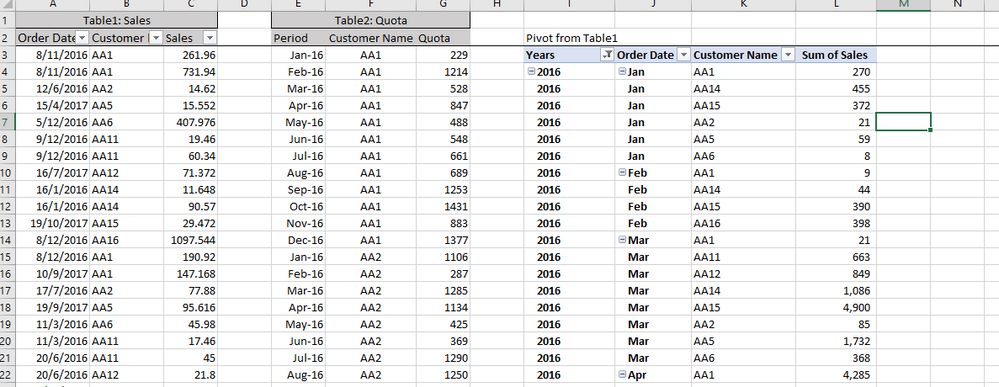
Hi, I am trying to create a measure between my table 2 (raw data) and pivot table 1 (calculated from raw data table 1) in Power BI. Ideally I want get a measure = monthly sales - monthly quota. In this case, since my raw data table 1 (column A) is organized at daily level, I need to aggregate it to monthly level so that I can compare monthly sales with monthly quota (organized at monthly level directly).
Could anyone advise what steps I should follow to achieve this in Power BI?
Many thanks!
LX
Solved! Go to Solution.
Hi @LX,
First, we need a Date table to bring sales and quota together. Establish relationship later.
Calendar = CALENDAR ( DATE ( 2016, 1, 1 ), DATE ( 2017, 12, 31 ) )
Second, we create a measure.
Measure = SUM ( Sales[Sales] ) - SUM ( Quota[Quota] )
Third, create a visual (table). (pay attention to where the fields in the visual come from)
Best Regards!
Dale
Hi @LX,
Could you please tell me if your problem was resolved? Please mark the proper answer if it worked. That will be a help to the others.
Best Regards!
Dale
Hi @LX,
First, we need a Date table to bring sales and quota together. Establish relationship later.
Calendar = CALENDAR ( DATE ( 2016, 1, 1 ), DATE ( 2017, 12, 31 ) )
Second, we create a measure.
Measure = SUM ( Sales[Sales] ) - SUM ( Quota[Quota] )
Third, create a visual (table). (pay attention to where the fields in the visual come from)
Best Regards!
Dale
The Power BI Data Visualization World Championships is back! Get ahead of the game and start preparing now!
| User | Count |
|---|---|
| 37 | |
| 37 | |
| 33 | |
| 32 | |
| 29 |
| User | Count |
|---|---|
| 132 | |
| 88 | |
| 82 | |
| 68 | |
| 64 |