cancel
Showing results for 
Search instead for 
Did you mean: 

View all the Fabric Data Days sessions on demand. View schedule

Reply
vickyd
Helper V
Helper V

Create a highly formatted Table

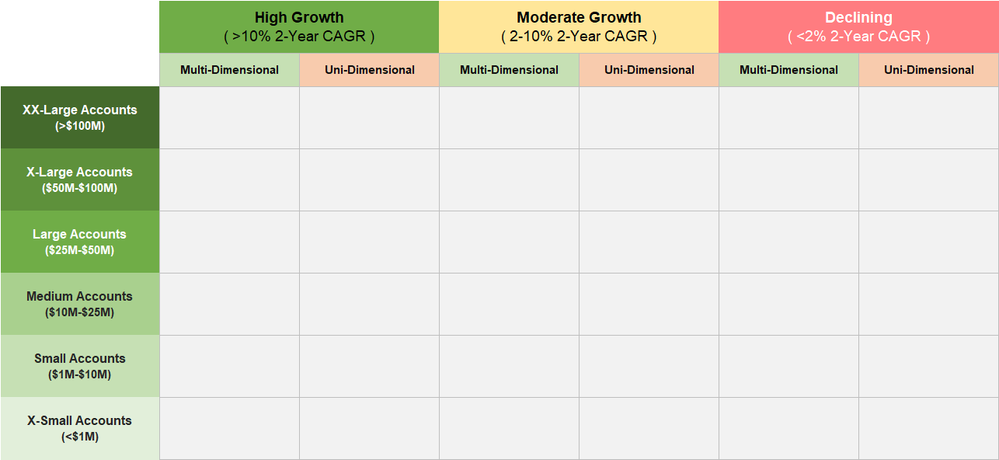
Is it possible to create a highly formatted table like this in Power BI using the Matrix visual or any other way?


Cohort.png

1 REPLY 1
Anonymous
Not applicable

@vickyd,

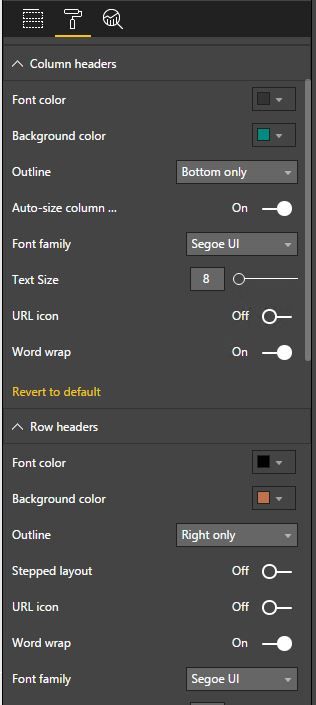
You can create the above Matrix visual in Power BI Desktop, however, it is not possible to apply different background colors for different values in row header and column header. You are only able to choose fixed background color for row header and column header.

1.JPG

Regards,
Lydia

Helpful resources

Announcements
November Power BI Update Carousel

Power BI Monthly Update - November 2025

Check out the November 2025 Power BI update to learn about new features.

Fabric Data Days Carousel

Fabric Data Days

Advance your Data & AI career with 50 days of live learning, contests, hands-on challenges, study groups & certifications and more!

FabCon Atlanta 2026 carousel

FabCon Atlanta 2026

Join us at FabCon Atlanta, March 16-20, for the ultimate Fabric, Power BI, AI and SQL community-led event. Save $200 with code FABCOMM.

Top Solution Authors
Top Kudoed Authors