cancel
Showing results for 
Search instead for 
Did you mean: 

Get Fabric Certified for FREE during Fabric Data Days. Don't miss your chance! Request now

Reply
Anonymous
Not applicable

Create a count of records per ID

Hi All, 


Im looking to accomplish something very simple. Here's a sample:


ID

Date

1

8/1/2021

1

7/1/2021
27/1/2021
38/1/2021
37/1/2021
4

8/1/2021


Im essentially looking to get an idea of employees that "exited", or do not have a record for a selected date. I thought the best way to do this would be to get counts of dates per employee. 


Desired Output:


ID

Count

1

2

2

1

3

2

4

1


Selected Value: 8/1/2021


Output:


ID

Exists?

1

1

2

0

3

1

4

1


Does anyone have any experience with something like this? Any input is appreciated!

1 ACCEPTED SOLUTION
Anonymous
Not applicable

Hi @Anonymous ,


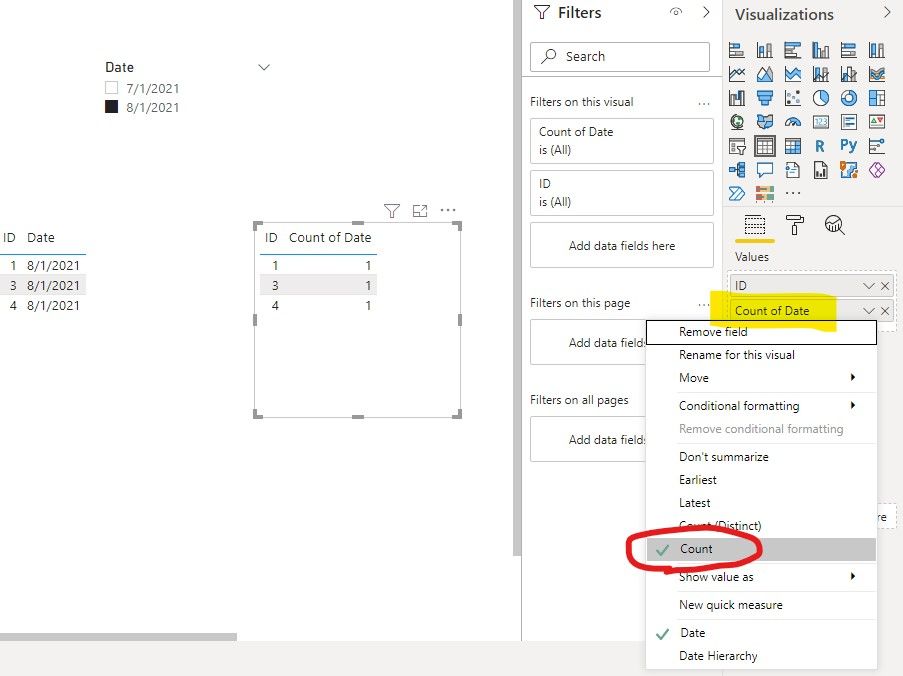
Method1: You could simply change the summarization type as Count like this:

count rows.jpg

But it will not show IDs whose date is not selected such as ID=2.


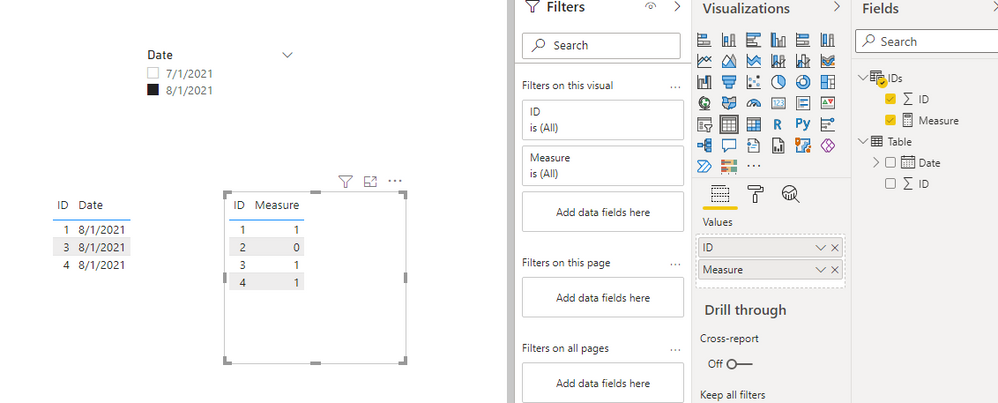
In this case, I'd suggest you add a new table to get all IDs:

IDs = VALUES('Table'[ID])

And then create a measure:

Measure =
CALCULATE (
    COUNTROWS ( 'Table' ),
    FILTER (
        'Table',
        'Table'[Date]
            IN ALLSELECTED ( 'Table'[Date] )
                && 'Table'[ID] = MAX ( 'IDs'[ID] )
    )
) + 0

The final output is shown below:

count rows.PNG

Best Regards,
Eyelyn Qin
If this post helps, then please consider Accept it as the solution to help the other members find it more quickly.

View solution in original post

5 REPLIES 5
Anonymous
Not applicable

Hi @Anonymous ,


Method1: You could simply change the summarization type as Count like this:

count rows.jpg

But it will not show IDs whose date is not selected such as ID=2.


In this case, I'd suggest you add a new table to get all IDs:

IDs = VALUES('Table'[ID])

And then create a measure:

Measure =
CALCULATE (
    COUNTROWS ( 'Table' ),
    FILTER (
        'Table',
        'Table'[Date]
            IN ALLSELECTED ( 'Table'[Date] )
                && 'Table'[ID] = MAX ( 'IDs'[ID] )
    )
) + 0

The final output is shown below:

count rows.PNG

Best Regards,
Eyelyn Qin
If this post helps, then please consider Accept it as the solution to help the other members find it more quickly.

ryan_mayu
Super User
Super User

@Anonymous 

i guess if the real situation is more complex than your sample date.

do you want to show 0 for all ID when select 2021/7/1?

do you have IDs which have more than two rows?

e.g 

ID date

1 2021/1/1  enter?

1 2021/2/1  exit?

1 2021/3/1 enter?

1 2021/4/1 exit?


Did I answer your question? Mark my post as a solution!

Proud to be a Super User!


Anonymous
Not applicable

@ryan_mayu Yes, there will be multiple rows for the same ID as more files (dates) are added. Theoretically yes, when an ID is showing up for the first time, were considering that an "enter", and when an id no longer shows up for the month selected and exists for the previous month, we consider that an "exit"

@Anonymous 

why ID 4 count 1? Since i only see one record


Did I answer your question? Mark my post as a solution!

Proud to be a Super User!


Anonymous
Not applicable

@ryan_mayu It only has one date associated with it. That is technically only an intermediary check. I believe i have solved this, but am looking for help on the next part, seen here:

https://community.powerbi.com/t5/Desktop/Need-Help-Fixing-Measure-Summing-a-count/m-p/1997873

Helpful resources

Announcements
November Power BI Update Carousel

Power BI Monthly Update - November 2025

Check out the November 2025 Power BI update to learn about new features.

Fabric Data Days Carousel

Fabric Data Days

Advance your Data & AI career with 50 days of live learning, contests, hands-on challenges, study groups & certifications and more!

FabCon Atlanta 2026 carousel

FabCon Atlanta 2026

Join us at FabCon Atlanta, March 16-20, for the ultimate Fabric, Power BI, AI and SQL community-led event. Save $200 with code FABCOMM.

Top Solution Authors
Top Kudoed Authors