Join us at FabCon Atlanta from March 16 - 20, 2026, for the ultimate Fabric, Power BI, AI and SQL community-led event. Save $200 with code FABCOMM.
Register now!The Power BI Data Visualization World Championships is back! Get ahead of the game and start preparing now! Learn more
Hi.
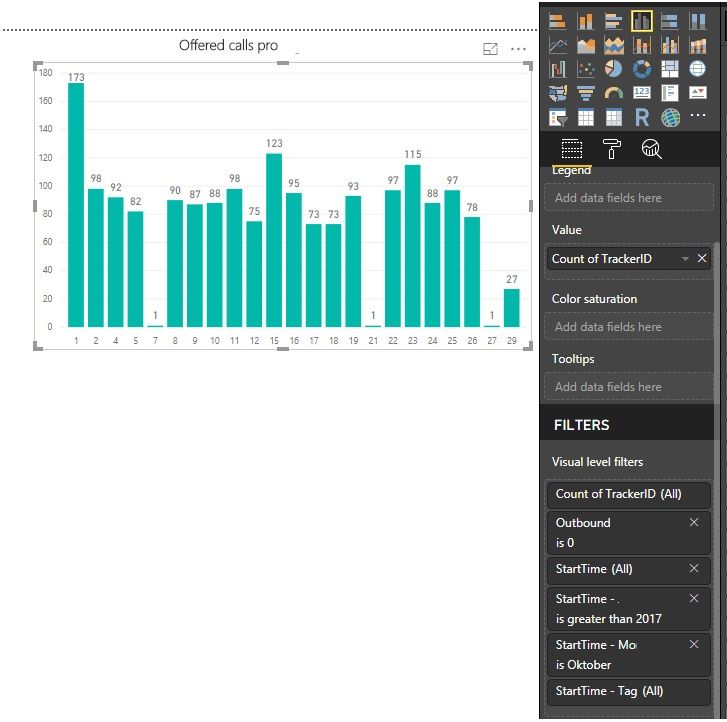
I have a table called journal and then I created a summarize table -> newTable = SUMMARIZECOLUMNS('journal'[TrackerID]; "StartTime"; MAX('journal'[StartTime]);"totalDuration"; SUM('journal'[DurationConnected]);"Outbound"; MAX('journal'[Outbound]);"PhoneNumber"; MAX('journal'[PhoneNumber])).
The new table gives me the amount of offered calls (as seen in graph below).
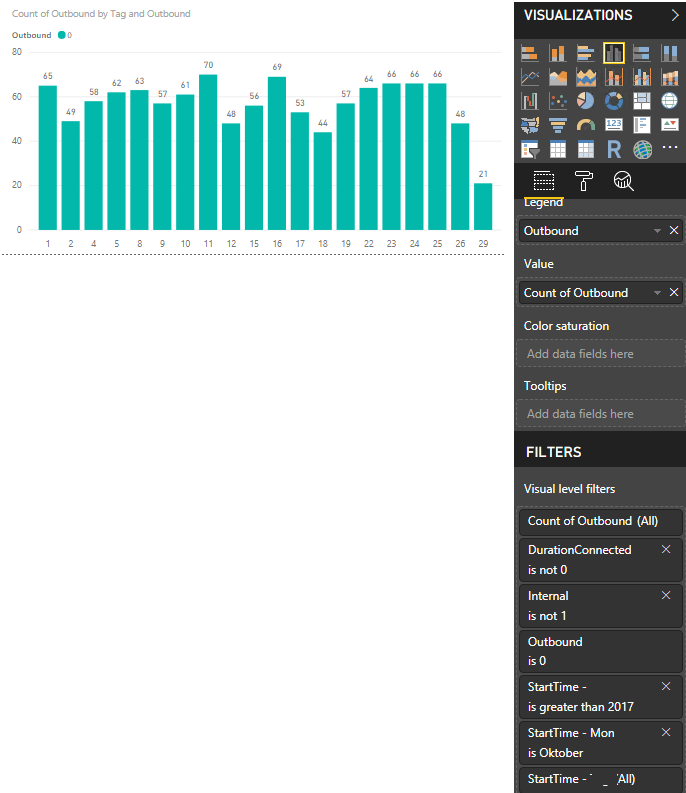
I get the amount of answered calls from the journal table (ordinary table with values):
How can I put these 2 charts in one clustered column chart?
Thanks for any support.
Solved! Go to Solution.
Hi @Anonymous,
Please refer to the steps below.
1. Your dates have time part. Since you don't analysis time here, we add a new column to tables [journal] and [newTable].
StartTimeNew = newTable[StartTime].[Date]
2. Create a date table.
Calendar = CALENDARAUTO()
3. Establish relationships.
4. Create the Table visual.
Best Regards,
Dale
Hi @Anonymous,
We need to establish relationships to connect these tables. It seems the Axis is [TrackerID]. I would suggest you create a table that is full of [TrackerID] then establish relationships among them. The final result is the Axis is 'New Table'[TrackerID].
Can you share a sample file? The solution could be more clear.
Best Regards,
Dale
Hi @Anonymous,
Please refer to the steps below.
1. Your dates have time part. Since you don't analysis time here, we add a new column to tables [journal] and [newTable].
StartTimeNew = newTable[StartTime].[Date]
2. Create a date table.
Calendar = CALENDARAUTO()
3. Establish relationships.
4. Create the Table visual.
Best Regards,
Dale
The Power BI Data Visualization World Championships is back! Get ahead of the game and start preparing now!
| User | Count |
|---|---|
| 63 | |
| 45 | |
| 41 | |
| 36 | |
| 23 |
| User | Count |
|---|---|
| 189 | |
| 124 | |
| 106 | |
| 78 | |
| 52 |