cancel
Showing results for 
Search instead for 
Did you mean: 

The Power BI Data Visualization World Championships is back! Get ahead of the game and start preparing now! Learn more

Reply
BIGedem
Regular Visitor

Create a Table With Data From Other Tables

Hey guys,


I currently have 3 tables with different data.


I need a new table, with two columns, where data is displayed like this:


             Column 1            | Column 2

Row 1 | Name of table1* | Number of rows on table 1

Row 2 | Name of table2* | Number of rows on table 2

Row 3 | Name of table3* | Number of wors on table 3


* manually inserted

How could I create this table using formulas in order to update the values when I update the data?

1 ACCEPTED SOLUTION
VasTg
Memorable Member
Memorable Member

@BIGedem 


If you only have 3 tables, I would create a new table as below.


 New_table =
VAR TABLE1 = "TABLE1"
VAR TABLE1_COUNT = COUNTROWS('Table1')
VAR TABLE2 = "TABLE2"
VAR TABLE2_COUNT = COUNTROWS('Table2')
VAR TABLE3 = "TABLE3"
VAR TABLE3_COUNT = COUNTROWS('Table3')
RETURN UNION(ROW("Table_Name",TABLE1,"Row_Count",TABLE1_COUNT),
ROW("Table_Name",TABLE2,"Row_Count",TABLE2_COUNT)
ROW("Table_Name",TABLE3,"Row_Count",TABLE3_COUNT))


If this helps, Mark it as a solution.

Kudos are nice too.

Connect on LinkedIn

View solution in original post

4 REPLIES 4
VasTg
Memorable Member
Memorable Member

@BIGedem 


If you only have 3 tables, I would create a new table as below.


 New_table =
VAR TABLE1 = "TABLE1"
VAR TABLE1_COUNT = COUNTROWS('Table1')
VAR TABLE2 = "TABLE2"
VAR TABLE2_COUNT = COUNTROWS('Table2')
VAR TABLE3 = "TABLE3"
VAR TABLE3_COUNT = COUNTROWS('Table3')
RETURN UNION(ROW("Table_Name",TABLE1,"Row_Count",TABLE1_COUNT),
ROW("Table_Name",TABLE2,"Row_Count",TABLE2_COUNT)
ROW("Table_Name",TABLE3,"Row_Count",TABLE3_COUNT))


If this helps, Mark it as a solution.

Kudos are nice too.

Connect on LinkedIn

@VasTg thanks, it looks like it is exactly what I need.


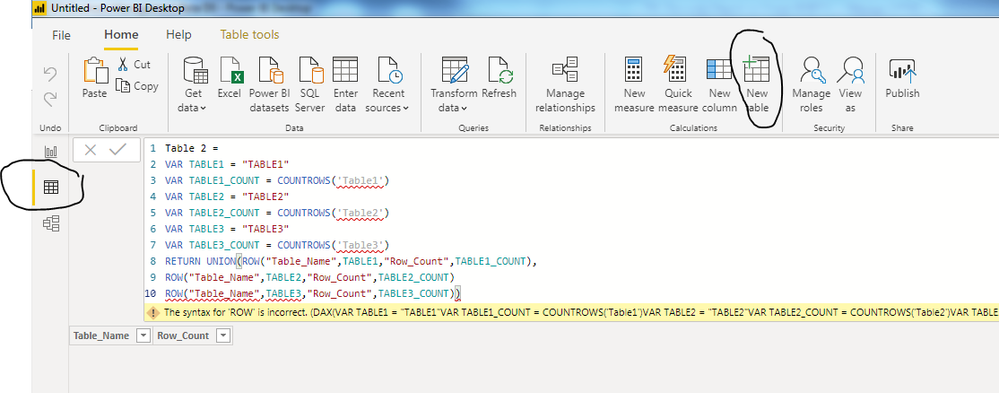
But where should I enter this code?

"Enter Data"?

"New Source" ...?

VasTg
Memorable Member
Memorable Member

@BIGedem See the attachment.


Ignore the error as I don't have table2 and 3 in my test.


cap13.PNG


If it helps, mark it as a solution.

Kudos are nice too.

Connect on LinkedIn

Thank you!!


It worked. 😀

Helpful resources

Announcements
Power BI DataViz World Championships

Power BI Dataviz World Championships

The Power BI Data Visualization World Championships is back! Get ahead of the game and start preparing now!

December 2025 Power BI Update Carousel

Power BI Monthly Update - December 2025

Check out the December 2025 Power BI Holiday Recap!

FabCon Atlanta 2026 carousel

FabCon Atlanta 2026

Join us at FabCon Atlanta, March 16-20, for the ultimate Fabric, Power BI, AI and SQL community-led event. Save $200 with code FABCOMM.