cancel
Showing results for 
Search instead for 
Did you mean: 

Learn from the best! Meet the four finalists headed to the FINALS of the Power BI Dataviz World Championships! Register now

Reply
Anonymous
Not applicable

Create a Stacked Column Chart Help

Hey all,


Forgive this messy question, I'm not sure how to word it, or provide very good examples of what I'm trying to create.


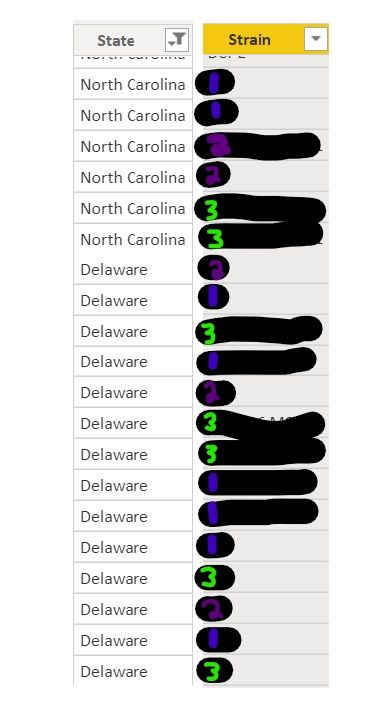
My data sheet includes year, state, and strain (among several other pieces of information, with irrelevant stuff removed/filtered out)

Stacked column help.jpg


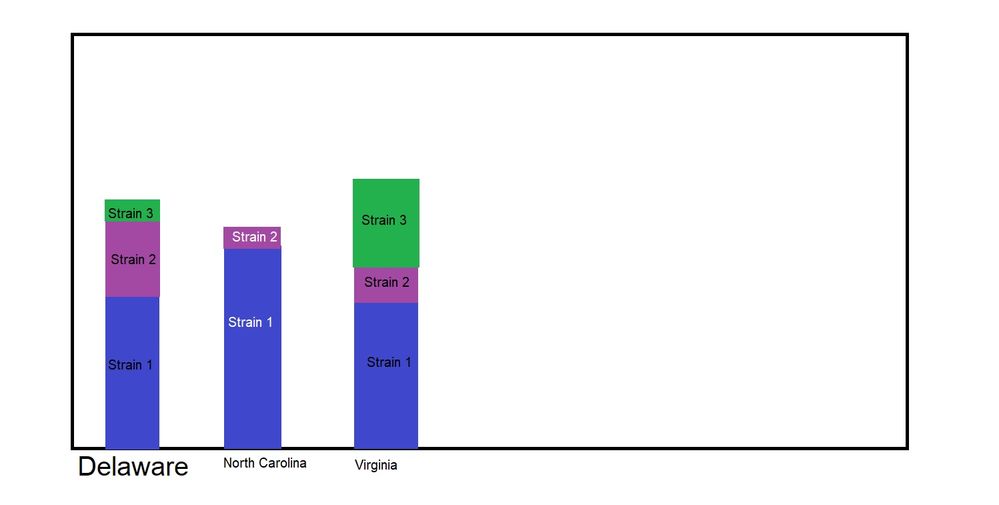
I would like to create a stacked column chart. I want "State" to be on the X axis, and the column to be comprised of the different strains. So if Delaware had (these are random numbers that don't match the pictures) 7 occourances of strain 1, 4 occurances of strain 2, and 1 occurance of strain 3, i want that to tranlate into 100% of Delaware's samples. 


I was pretty close to having what I needed, but it wasn't quite right, and now I'm stuck again.


I've attached a paint picture of what I'm trying to accomplish.


Stacked Bar Help.jpg

I've looked at some previously answered questions similar to mine, and one of them said something about unpivoting my data...but it was never pivoted to begin with? And I don't fully understand what pivoting/unpivoting even does.


ETA: I want the chart to be able to "count" the occurances of each strain by the state. I have measurements up the wazoo, but can't efficiently create the visual I want.

1 ACCEPTED SOLUTION
TheoC
Super User
Super User

Hi @Anonymous 


Can you try the following:


1. Create a new measure (Measure = COUNTROWS (TableName)

2. Drag the visual on to your Power BI Canvas.

3. Place "State" on x-axis

4. Please Strain in Legend

5. Drag Measure into Values.


Should give you what you want.


Hope it helps.

Theo

If I have posted a response that resolves your question, please accept it as a solution to formally close the post.

Also, if you are as passionate about Power BI, DAX and data as I am, please feel free to reach out if you have any questions, queries, or if you simply want to connect and talk to another data geek!

Want to connect?www.linkedin.com/in/theoconias

View solution in original post

3 REPLIES 3
Anonymous
Not applicable

Thank you @TheoC !!!


Absolute pleasure @Anonymous 


Have a great day!

If I have posted a response that resolves your question, please accept it as a solution to formally close the post.

Also, if you are as passionate about Power BI, DAX and data as I am, please feel free to reach out if you have any questions, queries, or if you simply want to connect and talk to another data geek!

Want to connect?www.linkedin.com/in/theoconias

TheoC
Super User
Super User

Hi @Anonymous 


Can you try the following:


1. Create a new measure (Measure = COUNTROWS (TableName)

2. Drag the visual on to your Power BI Canvas.

3. Place "State" on x-axis

4. Please Strain in Legend

5. Drag Measure into Values.


Should give you what you want.


Hope it helps.

Theo

If I have posted a response that resolves your question, please accept it as a solution to formally close the post.

Also, if you are as passionate about Power BI, DAX and data as I am, please feel free to reach out if you have any questions, queries, or if you simply want to connect and talk to another data geek!

Want to connect?www.linkedin.com/in/theoconias

Helpful resources

Announcements
New to Fabric survey Carousel

New to Fabric Survey

If you have recently started exploring Fabric, we'd love to hear how it's going. Your feedback can help with product improvements.

Power BI DataViz World Championships carousel

Power BI DataViz World Championships - June 2026

A new Power BI DataViz World Championship is coming this June! Don't miss out on submitting your entry.

Join our Fabric User Panel

Join our Fabric User Panel

Share feedback directly with Fabric product managers, participate in targeted research studies and influence the Fabric roadmap.

March Power BI Update Carousel

Power BI Community Update - March 2026

Check out the March 2026 Power BI update to learn about new features.