cancel
Showing results for 
Search instead for 
Did you mean: 

Join the FabCon + SQLCon recap series. Up next: Power BI, Real-Time Intelligence, IQ and AI, and Data Factory take center stage. All sessions are available on-demand after the live show. Register now

Reply
siva3012
Helper II
Helper II

Create a NEW column inside matrix ?

Hi,


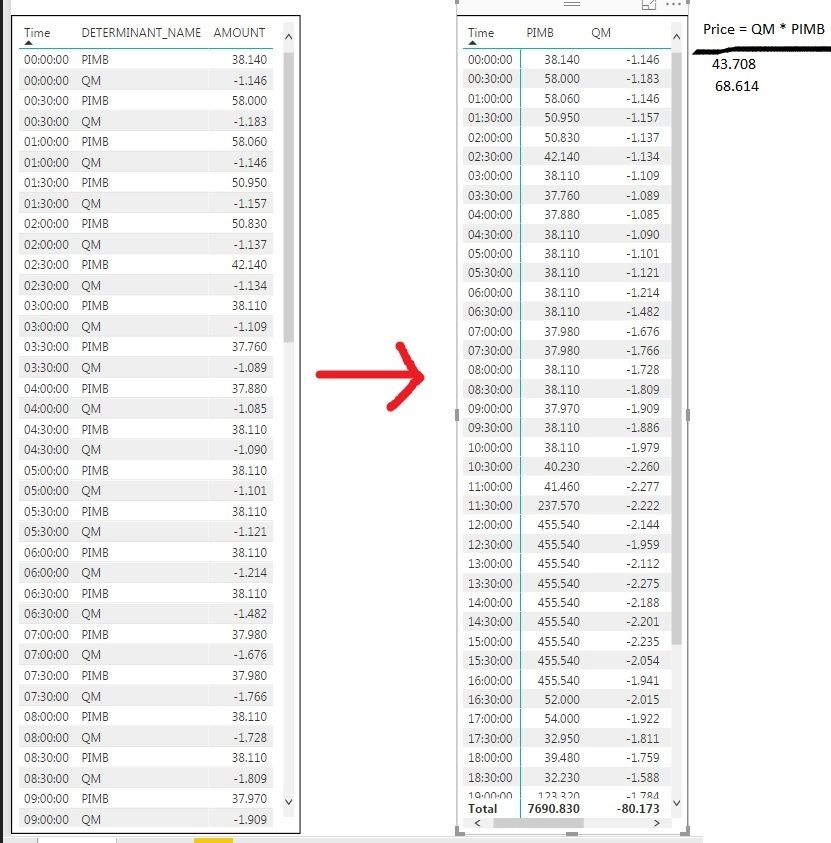
I have an loaded data into PowerBI and selected the TABLE visulization(Left side of the Picture). I need to convert the table in the left side into right side and i need to create an additional column by multiplying "PIMB * QM". 


PowerBI.jpg


Can anyone help me to solve this problem?


2 ACCEPTED SOLUTIONS
TomMartens
Super User
Super User

Hey,


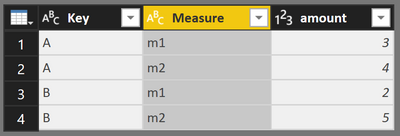
I would recommend to use the "Pivot Column" function from the Querd Editor, this helps to transform a long table into a wide table.

From

image.png


To this

image.png


You can create your new column m3 = m1 * m2 either in Power Query or with DAX


Basically it's a good idea to consider a row in a table as observation with various measurements. An observation should always be unique but can consist of various keys. From your example I would consider your column "Time" as key. During one observation two measurements have been taken "PIMB" and "QM".

For this reason I would Pivot the column "Determinant_Name".


Hopefully this gives you an idea


Regards

Tom


Did I answer your question? Mark my post as a solution, this will help others!

Proud to be a Super User!
I accept Kudos 😉
Hamburg, Germany

View solution in original post

Hardik
Continued Contributor

Hi @siva3012,


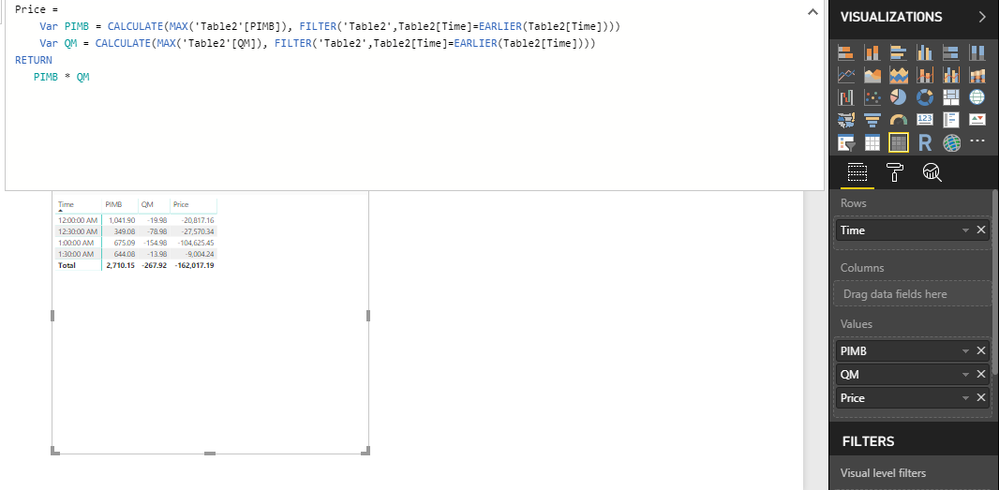
You can first pivot the table on the basis of Determinant Name column and then use the below calculation to create a Price column:


 Untitled.png

View solution in original post

2 REPLIES 2
Hardik
Continued Contributor

Hi @siva3012,


You can first pivot the table on the basis of Determinant Name column and then use the below calculation to create a Price column:


 Untitled.png

TomMartens
Super User
Super User

Hey,


I would recommend to use the "Pivot Column" function from the Querd Editor, this helps to transform a long table into a wide table.

From

image.png


To this

image.png


You can create your new column m3 = m1 * m2 either in Power Query or with DAX


Basically it's a good idea to consider a row in a table as observation with various measurements. An observation should always be unique but can consist of various keys. From your example I would consider your column "Time" as key. During one observation two measurements have been taken "PIMB" and "QM".

For this reason I would Pivot the column "Determinant_Name".


Hopefully this gives you an idea


Regards

Tom


Did I answer your question? Mark my post as a solution, this will help others!

Proud to be a Super User!
I accept Kudos 😉
Hamburg, Germany

Helpful resources

Announcements
April Power BI Update Carousel

Power BI Monthly Update - April 2026

Check out the April 2026 Power BI update to learn about new features.

New to Fabric survey Carousel

New to Fabric Survey

If you have recently started exploring Fabric, we'd love to hear how it's going. Your feedback can help with product improvements.

Power BI DataViz World Championships carousel

Power BI DataViz World Championships - June 2026

A new Power BI DataViz World Championship is coming this June! Don't miss out on submitting your entry.

FabCon and SQLCon Highlights Carousel

FabCon &SQLCon Highlights

Experience the highlights from FabCon & SQLCon, available live and on-demand starting April 14th.