cancel
Showing results for 
Search instead for 
Did you mean: 

Data Days is here! Join us now for 60+ days of learning, challenges, and connection. Learn more

Reply
SaCvP125
Frequent Visitor

Create a Clustered Column Chart using Two Summarize Measures

Hi guys,


I'm trying to create the following query using DAX:
WITH OPEN_DATA
                        AS
                            (
                            SELECT COUNT(DISTINCT [Ticket ID]) AS [Num_Open_Tickets]
                                        ,CAST([OPEN DATE] AS DATE) AS [Open Date]
                            FROM TableA
                            WHERE [OPEN DATE] >= DATEADD(DAY, -5,GETDATE())
                            GROUP BY CAST([OPEN DATE] AS DATE)
                            ),
            CLOSE_DATA
                        AS
                            (
                            SELECT COUNT(DISTINCT [Ticket ID]) AS [Num_Close_Tickets]
                                        ,CAST([CLOSE DATE] AS DATE) AS [Close Date]
                         FROM TableB
                         WHERE [OPEN DATE] >= DATEADD(DAY, -5,GETDATE())
                         GROUP BY CAST([CLOSE DATE] AS DATE)
                            )

SELECT CAST(COALESCE([Open Date],[Close Date]) AS DATE) AS [Date]
            ,ISNULL([Num_Open_Tickets],0) AS [Num_Open_Tickets]
            ,ISNULL([Num_Close_Tickets],0) AS [Num_Close_Tickets]
FROM OPEN_DATA
FULL OUTER JOIN CLOSE_DATA ON
    OPEN_DATA.[Open Date] = CLOSE_DATA.[Close Date]


For that I'm using the followinge measures to calculate the [Num_Open_Tickets] and [Num_Close_Tickets]:

Num_Open_Tickets= CALCULATE(
DISTINCTCOUNT(Tickets_Volumes[Ticket ID]);
ALLEXCEPT(Tickets_Volumes;Tickets_Volumes[OPEN DATE]))


Num_Close_Tickets = CALCULATE(
DISTINCTCOUNT(Tickets_Volumes[Ticket ID]);
ALLEXCEPT(Tickets_Volumes;Tickets_Volumes[CLOSE DATE]))


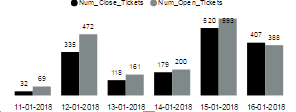
In powerBI I'm using a Clustered Column Chart with [Open Date ] in Axis and the Measures calculated in Values. But I'm getting the following chart:

Error1.PNG

 But I'm trying to get this:Error2.PNG


How Can I get this?


Many thanks!


1 ACCEPTED SOLUTION
v-chuncz-msft
Community Support
Community Support

@SaCvP125,


Add a calendar table and use the following measures.

Num_Open_Tickets =
VAR d =
    MAX ( 'Calendar'[Date] )
RETURN
    CALCULATE (
        DISTINCTCOUNT ( Tickets_Volumes[Ticket ID] ),
        Tickets_Volumes[OPEN DATE] = d
    )
Num_Close_Tickets =
VAR d =
    MAX ( 'Calendar'[Date] )
RETURN
    CALCULATE (
        DISTINCTCOUNT ( Tickets_Volumes[Ticket ID] ),
        Tickets_Volumes[CLOSE DATE] = d
    )
Community Support Team _ Sam Zha
If this post helps, then please consider Accept it as the solution to help the other members find it more quickly.

View solution in original post

2 REPLIES 2
v-chuncz-msft
Community Support
Community Support

@SaCvP125,


Add a calendar table and use the following measures.

Num_Open_Tickets =
VAR d =
    MAX ( 'Calendar'[Date] )
RETURN
    CALCULATE (
        DISTINCTCOUNT ( Tickets_Volumes[Ticket ID] ),
        Tickets_Volumes[OPEN DATE] = d
    )
Num_Close_Tickets =
VAR d =
    MAX ( 'Calendar'[Date] )
RETURN
    CALCULATE (
        DISTINCTCOUNT ( Tickets_Volumes[Ticket ID] ),
        Tickets_Volumes[CLOSE DATE] = d
    )
Community Support Team _ Sam Zha
If this post helps, then please consider Accept it as the solution to help the other members find it more quickly.
Anonymous
Not applicable

I think it won't work. When I filter by a specific month it will give me the number of projects open and closed in that month.


I want to know: for the projects opened in January, how many closed in January, February, March, etc.

Helpful resources

Announcements
Fabric Data Days is here Carousel

Fabric Data Days 2026

Don't miss out on Data Days, June 15 through August 7. Learn Fabric, Power BI, SQL, AI and more.

May Power BI Update Carousel

Power BI Monthly Update - May 2026

Check out the May 2026 Power BI update to learn about new features.

Power BI DataViz World Championships carousel

Power BI DataViz World Championships - June 2026

A new Power BI DataViz World Championship is coming this June! Don't miss out on submitting your entry.