Hi all,
I have Two tables.
TABLE 1: Rows of this Table are generated Daily when a STATUS of a Department is Updated.
| DATE | DEPARTMENT | STATUS |
| 24/04/2020 | HR | ACTIVE |
| 24/04/2020 | IT | INACTIVE |
| 24/04/2020 | SALES | ACTIVE |
| 24/04/2020 | PRODUCTION | ACTIVE |
| 24/04/2020 | OPERATIONS | ACTIVE |
| 24/04/2020 | ANALYSIS | INACTIVE |
| 24/04/2020 | FINANCE | ACTIVE |
| 25/04/2020 | SALES | ACTIVE |
| 25/04/2020 | PRODUCTION | ACTIVE |
| 25/04/2020 | OPERATIONS | ACTIVE |
| 25/04/2020 | LOGISTICS | INACTIVE |
| 25/04/2020 | ANALYSIS | ACTIVE |
| 25/04/2020 | FINANCE | ACTIVE |
TABLE2 : This Table includes all Departments avaiable.
| DEPARTMENT |
| HR |
| IT |
| SALES |
| PRODUCTION |
| OPERATIONS |
| LOGISTICS |
| ANALYSIS |
| FINANCE |
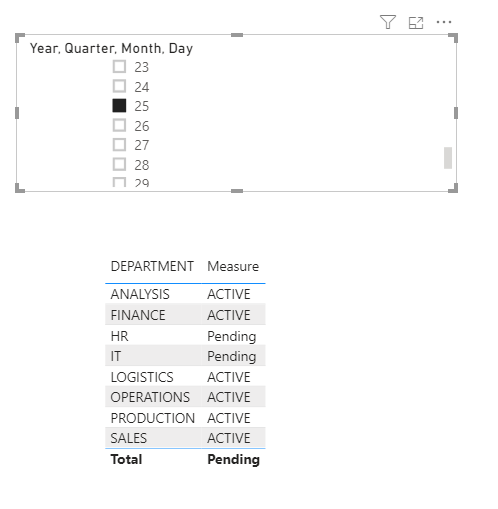
So in my Report, I want to add Table Visualization, Where it displays All the Available Departments (from TABLE1), and their STATUS (from TABLE2). BUT, this Visualization should be filtered using a Date Slicer. If a Status is not available for that day,
The status should say "Pending".
Is this possible? Hope I am clear with the problem.
For example, For 24/04/2020, the report table should be like this:
| DEPARTMENT | STATUS |
| HR | ACTIVE |
| IT | ACTIVE |
| SALES | ACTIVE |
| PRODUCTION | ACTIVE |
| OPERATIONS | ACTIVE |
| LOGISTICS | Pending |
| ANALYSIS | ACTIVE |
| FINANCE | ACTIVE |
And if we change the date to 25/04/2020, it should be like this:
| DEPARTMENT | STATUS |
| HR | Pending |
| IT | Pending |
| SALES | ACTIVE |
| PRODUCTION | ACTIVE |
| OPERATIONS | ACTIVE |
| LOGISTICS | ACTIVE |
| ANALYSIS | ACTIVE |
| FINANCE | ACTIVE |
Hope this is possible...
Thanx and Regards,
KAD