Join us at FabCon Atlanta from March 16 - 20, 2026, for the ultimate Fabric, Power BI, AI and SQL community-led event. Save $200 with code FABCOMM.
Register now!The Power BI Data Visualization World Championships is back! It's time to submit your entry. Live now!
Hi power bi experts.
I am tring to create a summarize table in power bi.
My sample tables are.
Calender Table
| Date | Year | Month |
| 1/01/2023 | 2023 | 1 |
| 2/01/2023 | 2023 | 1 |
| 3/01/2023 | 2023 | 1 |
| 4/01/2023 | 2023 | 1 |
| 5/01/2023 | 2023 | 1 |
| 6/01/2023 | 2023 | 1 |
Product Table
| Product ID | Prodct Name |
| 1 | AA |
| 2 | AB |
| 3 | AC |
| 4 | AD |
Sales Table
| Date | Product ID | Qty | Amount |
| 5/01/2023 | 1 | 5 | 120 |
| 10/01/2023 | 2 | 2 | 50 |
| 12/01/2023 | 1 | 10 | 240 |
| 20/01/2023 | 3 | 5 | 150 |
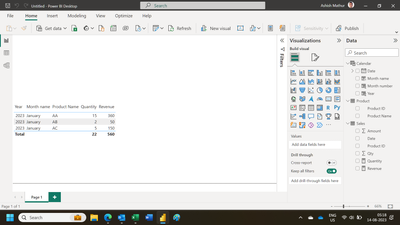
I need to create a Month to Date summary table as follow.
Expected Table
| Date | Product | Qty | Sales |
| 31/01/2023 | AA | 15 | 360 |
| 31/01/2023 | AB | 2 | 50 |
| 31/01/2023 | AC | 5 | 150 |
Can anyone help me to solve this problem please.
Thanks.
@Ashish_Mathur
Thank you for your reply.
I need to create this using Summarize Table.
Because I need to read this data in Power Automate.
Thanks.
SUMMARIZE( Sales, Calender[Date], Product[Product Name], "Qty", SUM(Sales[Qty]), "Sales", SUM(Sales[Amount]) )
Thank you for your reply.
This gives me daily details. I need month to date.
Thanks
The Power BI Data Visualization World Championships is back! It's time to submit your entry.
Check out the January 2026 Power BI update to learn about new features.
| User | Count |
|---|---|
| 56 | |
| 42 | |
| 40 | |
| 21 | |
| 20 |
| User | Count |
|---|---|
| 150 | |
| 106 | |
| 65 | |
| 36 | |
| 36 |