This time we’re going bigger than ever. Fabric, Power BI, SQL, AI and more. We're covering it all. You won't want to miss it.
Learn moreDid you hear? There's a new SQL AI Developer certification (DP-800). Start preparing now and be one of the first to get certified. Register now
I have a table which consists of a DateTime range. I want to graphically count the # of records that fall into that time range by the hour.
Table:
trx_no, trx_begin_dt, trx_en_dt, Start Date, Start Time
Start Date & Start Time are just separated from trx_begin_dt
The target should look something like this: https://imgur.com/G6NNI5M
But what I get by graphic the trx_begin_dt is this: https://imgur.com/a/H54eh6n
My idea was to create a calculated table which would consist of a single record for each hour used to acheive the desired graph, but I don't know how to go about doing it. I was hoping someone could might be able to help me go about acheiving this kind of table, or if there was another way of doing it.
Like this: https://imgur.com/a/LEVYH9j
Solved! Go to Solution.
Hi @v-yuta-msft ,
I was able to achieve the desired affect with a sub table in power query.
The table in question looks like this:
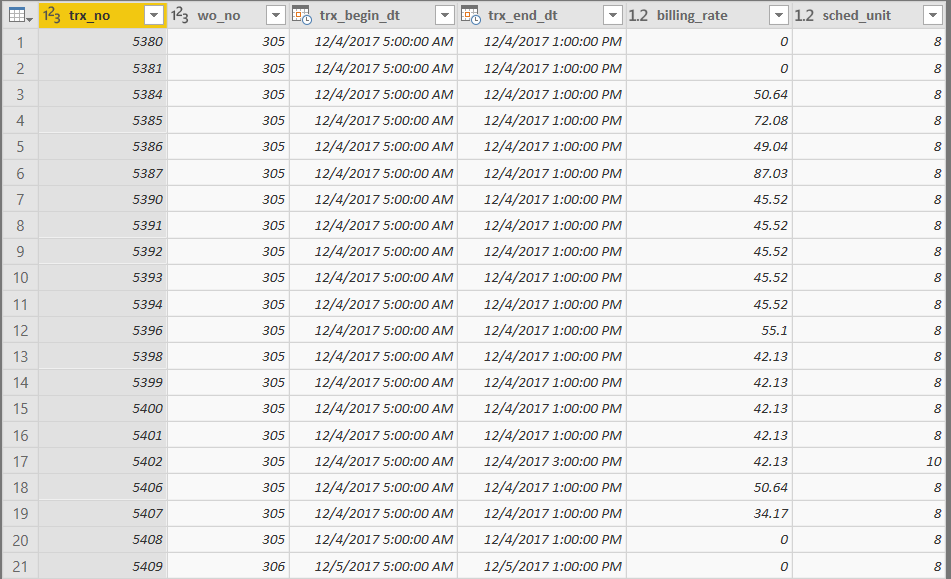
trx_no: transaction ID
trx_begin_dt: Start DateTime
trx_end_dt: End DateTime
sched_unit: # of hours in the booking (i.e End - Start)
Each record represents a scheduled booking of a resource. I want to graph the utilization of resources hourly. I was able to achieve this effect by creating a sub table from the original table. Using List.Numbers basically make a list of numbers from 0 to # hours in 15 minute increments. i.e 2 Hr booking = {0, 1, 2, 3, 4, 5, 6, 7}. Then Table.ExpandListColumn to repeat the record for each number in the list. Then calculate dt_point which will be the Start Time + (15 minutes * sched_unit_index) used as a data point in the graph. The final graph will be a count of dt_point.
#"Added sched_unit_index" = Table.AddColumn(#"Filtered Rows", "sched_unit_index", each List.Numbers(0, 4*[sched_unit])),
#"Expanded" = Table.ExpandListColumn(#"Added sched_unit_index", "sched_unit_index"),
#"Added dt_point" = Table.AddColumn(Expanded, "dt_point", each [trx_begin_dt]+#duration(0,Number.RoundDown([sched_unit_index]*0.25),60*([sched_unit_index]*0.25-Number.RoundDown([sched_unit_index]*0.25)),0))
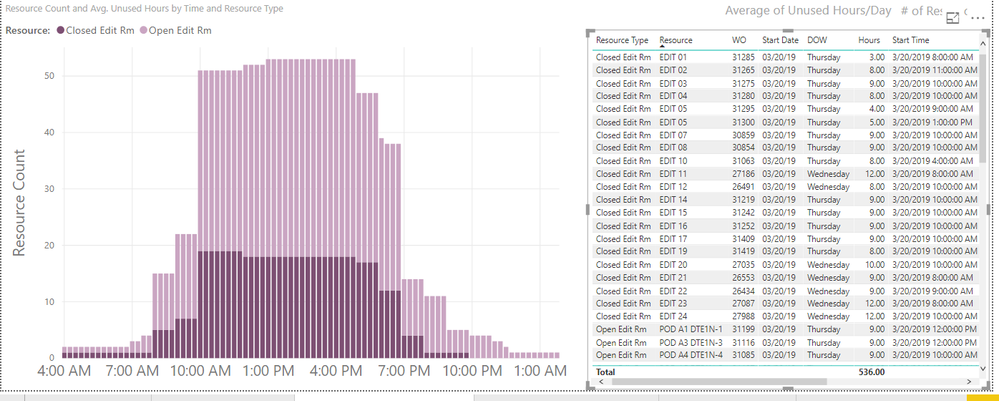
This query results in:
The graph (x: dt_point, y: resource count):
@Anonymous ,
Could you share more details about what which columns/measures/calculate columns are used in the stacked bar chart and what does the table structure look like?
Community Support Team _ Jimmy Tao
If this post helps, then please consider Accept it as the solution to help the other members find it more quickly.
Hi @v-yuta-msft ,
I was able to achieve the desired affect with a sub table in power query.
The table in question looks like this:
trx_no: transaction ID
trx_begin_dt: Start DateTime
trx_end_dt: End DateTime
sched_unit: # of hours in the booking (i.e End - Start)
Each record represents a scheduled booking of a resource. I want to graph the utilization of resources hourly. I was able to achieve this effect by creating a sub table from the original table. Using List.Numbers basically make a list of numbers from 0 to # hours in 15 minute increments. i.e 2 Hr booking = {0, 1, 2, 3, 4, 5, 6, 7}. Then Table.ExpandListColumn to repeat the record for each number in the list. Then calculate dt_point which will be the Start Time + (15 minutes * sched_unit_index) used as a data point in the graph. The final graph will be a count of dt_point.
#"Added sched_unit_index" = Table.AddColumn(#"Filtered Rows", "sched_unit_index", each List.Numbers(0, 4*[sched_unit])),
#"Expanded" = Table.ExpandListColumn(#"Added sched_unit_index", "sched_unit_index"),
#"Added dt_point" = Table.AddColumn(Expanded, "dt_point", each [trx_begin_dt]+#duration(0,Number.RoundDown([sched_unit_index]*0.25),60*([sched_unit_index]*0.25-Number.RoundDown([sched_unit_index]*0.25)),0))
This query results in:
The graph (x: dt_point, y: resource count):
Check out the April 2026 Power BI update to learn about new features.
Sign up to receive a private message when registration opens and key events begin.
If you have recently started exploring Fabric, we'd love to hear how it's going. Your feedback can help with product improvements.
| User | Count |
|---|---|
| 34 | |
| 31 | |
| 30 | |
| 21 | |
| 16 |
| User | Count |
|---|---|
| 65 | |
| 53 | |
| 31 | |
| 23 | |
| 23 |