cancel
Showing results for 
Search instead for 
Did you mean: 

July 7 - July 17 | Round 2 of the Power BI Dataviz World Championships. Don't miss your chance! Learn more

Reply
koorosh
Post Partisan
Post Partisan

Create Slicer

Hi, Please check the attached file (testdays.pbix). I need a slicer on page one including 3 options.
Option1- filter table visual based on dafediff >60.

Option2- filter table visual based on datediff>100.

Option3- filter table visual based on dafediff>900.


I want a slicer like that one in the test.pbix attached.


1 ACCEPTED SOLUTION
jdbuchanan71
Super User
Super User

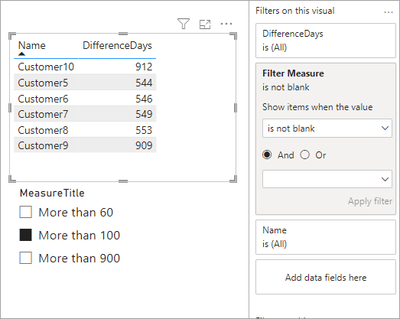
You need to add the Min field to the MeasureListTable and make sure it is a number.

jdbuchanan71_1-1688851764412.png

The SelectedMeasure should be loooking at the Min column.

SelectedMeasure = SELECTEDVALUE(MeasureListTable[Min])

Then you write the filter measure and apply it as a filter on your table.

Filter Measure = 
VAR _Days = [SelectedMeasure]
RETURN
    CALCULATE (
        COUNTROWS ( 'Table' ),
        FILTER ( VALUES ( 'Table'[DifferenceDays] ), 'Table'[DifferenceDays] >= _Days )
    )


jdbuchanan71_3-1688851952216.png

I have attached your file with my updates.


View solution in original post

4 REPLIES 4
jdbuchanan71
Super User
Super User

You need to add the Min field to the MeasureListTable and make sure it is a number.

jdbuchanan71_1-1688851764412.png

The SelectedMeasure should be loooking at the Min column.

SelectedMeasure = SELECTEDVALUE(MeasureListTable[Min])

Then you write the filter measure and apply it as a filter on your table.

Filter Measure = 
VAR _Days = [SelectedMeasure]
RETURN
    CALCULATE (
        COUNTROWS ( 'Table' ),
        FILTER ( VALUES ( 'Table'[DifferenceDays] ), 'Table'[DifferenceDays] >= _Days )
    )


jdbuchanan71_3-1688851952216.png

I have attached your file with my updates.


jdbuchanan71
Super User
Super User

On the Days Filter table you should also sort the [Days Range] solumn by the [Min] Column so they appear in the correct order.

jdbuchanan71
Super User
Super User

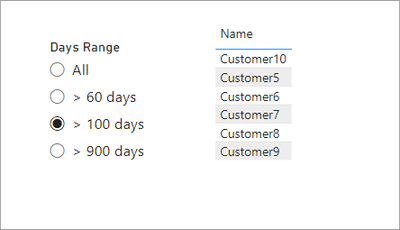
We can add a selection table that has the minimum days in it to use as a filter.  Create a new table with this dax code.

Days Filter = 
DATATABLE (
    "Days Range", STRING,
    "Min", INTEGER,
    {
        { "All", 0 },
        { "> 60 days", 60 },
        { "> 100 days", 100 },
        { "> 900 days", 900 }
    }
)

Then a measure to read the selection

Selected Option = SELECTEDVALUE ( 'Days Filter'[Min], 0 )

Then the mesure that will filter the table.

Filter Measure = 
VAR _Days = [Selected Option]
RETURN
    CALCULATE (
        COUNTROWS ( 'Table' ),
        FILTER ( VALUES ( 'Table'[DifferenceDays] ), 'Table'[DifferenceDays] >= _Days )
    )

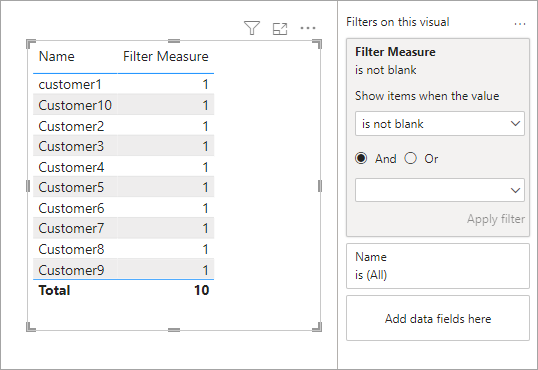
You can add that measure to the visual, set a filter on the field to [Filter Measure] is not blank.

jdbuchanan71_0-1688767861768.png

You can then remove the [Filter Measure] from the table and it will keep the filter.

jdbuchanan71_1-1688767912178.png

I have attached my sample file for you to look at.


Thank you for your reply. I should read it carefully so please give me time.
Meantime could you please check my attached file and let me know which command I should add to the switch command in 'Dynamicmeasure' measure so that it filters the table visual based on the selected vaule?

Thanks in advance.

Helpful resources

Announcements
FabCon and SQLCon Barcelona 2026

FabCon & SQLCon – Barcelona 2026

Join us in Barcelona for FabCon and SQLCon, the Fabric, Power BI, SQL, and AI community event. Save €200 with code FABCMTY200.

60 days of Data Days Carousel

Data Days 2026

Join Fabric Data Days 2026: 60 days of free live/on-demand sessions, challenges, study groups, and certification opportunities.

Power BI DataViz World Championships carousel

Power BI DataViz World Championships - June 2026

A new Power BI DataViz World Championship is coming this June! Don't miss out on submitting your entry.