Get Fabric or SQL Certified for Free.
Get certified for free when you join Fabric Data Days 2026 and dive into Fabric, Power BI, SQL, AI, and other essential data skills.
Join now- Power BI forums
- Get Help with Power BI
- Desktop
- Service
- Report Server
- Power Query
- Mobile Apps
- Developer
- DAX Commands and Tips
- Custom Visuals Development Discussion
- Health and Life Sciences
- Power BI Spanish forums
- Translated Spanish Desktop
- Training and Consulting
- Instructor Led Training
- Dashboard in a Day for Women, by Women
- Galleries
- Data Stories Gallery
- Themes Gallery
- Contests Gallery
- QuickViz Gallery
- Quick Measures Gallery
- Visual Calculations Gallery
- Fabric Apps Gallery
- Notebook Gallery
- Translytical Task Flow Gallery
- TMDL Gallery
- R Script Showcase
- Webinars and Video Gallery
- Ideas
- Custom Visuals Ideas (read-only)
- Issues
- Issues
- Events
- Upcoming Events
July 28 - August 9 | Final Round of the Power BI Dataviz World Championships. This is your chance. Learn more
- Power BI forums
- Forums
- Get Help with Power BI
- Desktop
- Re: Create Running Total On A Calculated Measure
- Subscribe to RSS Feed
- Mark Topic as New
- Mark Topic as Read
- Float this Topic for Current User
- Bookmark
- Subscribe
- Printer Friendly Page

- Mark as New
- Bookmark
- Subscribe
- Mute
- Subscribe to RSS Feed
- Permalink
- Report Inappropriate Content
Create Running Total On A Calculated Measure
Hi.
I am trying to create a running total for a field that is defined as a Calulated Measure. Having read numerous posts I am clear about the formula struture which needs to be implemented;
RunningTotal = CALCULATE(SUM(my_field),
FILTER(ALL(my_table),
my_table.date_field <= MAX(my_table.date_field)
)
)
The issue is regarding the SUM component. "my_field" is a very complex measure and the customer would like a running total of this field year on year. I know SUM cannot be used in conjunction with a measure, so can anyone help with how best to implement this requirement?
Thanks In Advance.
Solved! Go to Solution.

- Mark as New
- Bookmark
- Subscribe
- Mute
- Subscribe to RSS Feed
- Permalink
- Report Inappropriate Content
Hi @dax_bee,
Create running total using the following DAX formula and check if you get desired result.
RunningTotal = SUMX(FILTER(ALLSELECTED('Calendar'[DateKey]),'Calendar'[DateKey]<=MAX('Calendar'[DateKey])),[my_field])
If the above Dax doesn’t help in your scenario, please help to share sample data of your table and post expected result.
Thanks,
Lydia Zhang

- Mark as New
- Bookmark
- Subscribe
- Mute
- Subscribe to RSS Feed
- Permalink
- Report Inappropriate Content
Hi there,
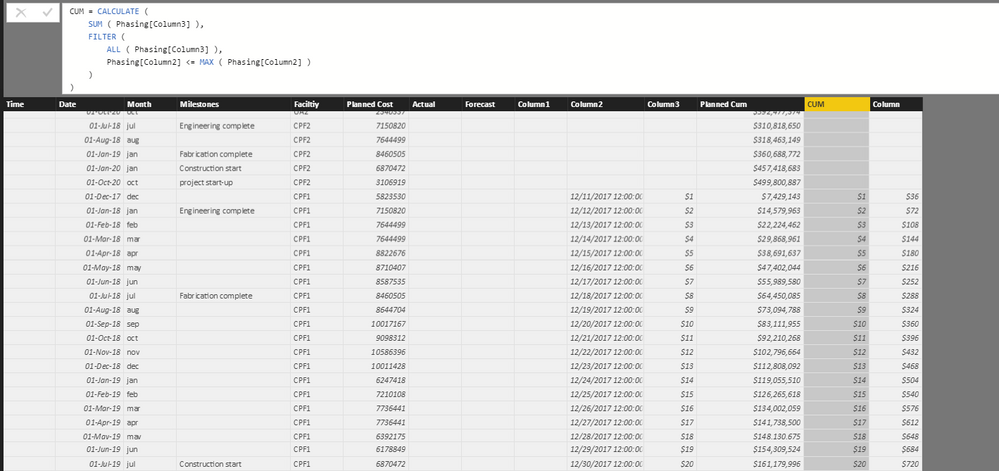
I am using this formula to run the total in my table but it doesnt work . it bring the exact same value from the column i am looking to sum.
Column 3 is monthly cost and column 2 is dates.
Do I need to chnage the formula???
CUMULATIVE = CALCULATE (
SUM ( Phasing[Column3] ),
FILTER (
ALL ( Phasing[Column3] ),
Phasing[Column2] <= MAX ( Phasing[Column2] )
)
)
- Mark as New
- Bookmark
- Subscribe
- Mute
- Subscribe to RSS Feed
- Permalink
- Report Inappropriate Content
Hi,
I am using this formula in my tables for running totals on column **bleep** from coulmn 3 with dates in coulmn 2 but it doesn't seem to work. it bring the exact value as coulmn 3 and not totals. Is there anything that i need to change ?
CUMULATIVE = CALCULATE (
SUM ( Phasing[Column3] ),
FILTER (
ALL ( Phasing[Column3] ),
Phasing[Column2] <= MAX ( Phasing[Column2] )
)
)
- Mark as New
- Bookmark
- Subscribe
- Mute
- Subscribe to RSS Feed
- Permalink
- Report Inappropriate Content
Hi @dax_bee,
Create running total using the following DAX formula and check if you get desired result.
RunningTotal = SUMX(FILTER(ALLSELECTED('Calendar'[DateKey]),'Calendar'[DateKey]<=MAX('Calendar'[DateKey])),[my_field])
If the above Dax doesn’t help in your scenario, please help to share sample data of your table and post expected result.
Thanks,
Lydia Zhang

- Mark as New
- Bookmark
- Subscribe
- Mute
- Subscribe to RSS Feed
- Permalink
- Report Inappropriate Content
THanks a lot. I also had same query .

- Mark as New
- Bookmark
- Subscribe
- Mute
- Subscribe to RSS Feed
- Permalink
- Report Inappropriate Content
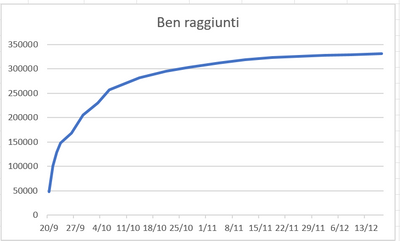
Hello everyone, I have to calculate cumulative sum for distinct Ben per day in order to obtain this
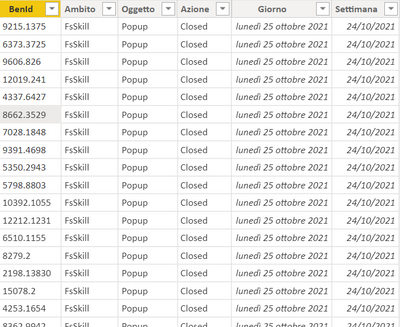
My table have these columns:

- Mark as New
- Bookmark
- Subscribe
- Mute
- Subscribe to RSS Feed
- Permalink
- Report Inappropriate Content
- Mark as New
- Bookmark
- Subscribe
- Mute
- Subscribe to RSS Feed
- Permalink
- Report Inappropriate Content
Thank you for all your help.
v-yuezhe-msft - your solution worked a treat!


- Mark as New
- Bookmark
- Subscribe
- Mute
- Subscribe to RSS Feed
- Permalink
- Report Inappropriate Content
- Mark as New
- Bookmark
- Subscribe
- Mute
- Subscribe to RSS Feed
- Permalink
- Report Inappropriate Content
Hi.
The logic of my_field is very complicated and consists of references to a number of other columns. So ideally I do not want to replicate within the Running Total logic.
- Mark as New
- Bookmark
- Subscribe
- Mute
- Subscribe to RSS Feed
- Permalink
- Report Inappropriate Content
Hmm. As don't the exact logic of my_field, if possible try to push that logic at ETL(Power Query) level and use that column in sum function.
Helpful resources

Fabric Community Sticker Challenge - Barcelona 2026
If you love stickers, then you will definitely want to check out our community sticker challenge, Barcelona edition!

Power BI Monthly Update - July 2026
Check out the July 2026 Power BI update to learn about new features.

Power BI DataViz World Championships - June 2026
A new Power BI DataViz World Championship is coming this June! Don't miss out on submitting your entry.

| User | Count |
|---|---|
| 28 | |
| 28 | |
| 20 | |
| 19 | |
| 19 |


| User | Count |
|---|---|
| 43 | |
| 31 | |
| 18 | |
| 18 | |
| 16 |


