FabCon is coming to Atlanta
Join us at FabCon Atlanta from March 16 - 20, 2026, for the ultimate Fabric, Power BI, AI and SQL community-led event. Save $200 with code FABCOMM.
Register now!- Power BI forums
- Get Help with Power BI
- Desktop
- Service
- Report Server
- Power Query
- Mobile Apps
- Developer
- DAX Commands and Tips
- Custom Visuals Development Discussion
- Health and Life Sciences
- Power BI Spanish forums
- Translated Spanish Desktop
- Training and Consulting
- Instructor Led Training
- Dashboard in a Day for Women, by Women
- Galleries
- Data Stories Gallery
- Themes Gallery
- Contests Gallery
- QuickViz Gallery
- Quick Measures Gallery
- Visual Calculations Gallery
- Notebook Gallery
- Translytical Task Flow Gallery
- TMDL Gallery
- R Script Showcase
- Webinars and Video Gallery
- Ideas
- Custom Visuals Ideas (read-only)
- Issues
- Issues
- Events
- Upcoming Events
The Power BI Data Visualization World Championships is back! Get ahead of the game and start preparing now! Learn more
- Power BI forums
- Forums
- Get Help with Power BI
- Desktop
- Re: Create New Measure using Top 3 Highest Values ...
- Subscribe to RSS Feed
- Mark Topic as New
- Mark Topic as Read
- Float this Topic for Current User
- Bookmark
- Subscribe
- Printer Friendly Page

- Mark as New
- Bookmark
- Subscribe
- Mute
- Subscribe to RSS Feed
- Permalink
- Report Inappropriate Content
Create New Measure using Top 3 Highest Values of Another Measure Falling Within Specific Timeframe
Need to create Measure X that sums the top three values, occuring within the last 3 months, of Measure Y (that will filter down and or up timewise (wkly, mnthly, yrly). Simply, Measure Y is an average calc measure summing the 3 values found in Measure X to be divided by Related (count*hours)...[Measure X]/(Related(Table.Count)*Related(Table.Hours)...but not so simply as I am not figuring out how to create Measure X.


- Mark as New
- Bookmark
- Subscribe
- Mute
- Subscribe to RSS Feed
- Permalink
- Report Inappropriate Content
Hi @Anonymous ,
Is your issue solved now?If not,could you pls check my last reply?
Best Regards,
Kelly
Did I answer your question? Mark my post as a solution!
- Mark as New
- Bookmark
- Subscribe
- Mute
- Subscribe to RSS Feed
- Permalink
- Report Inappropriate Content
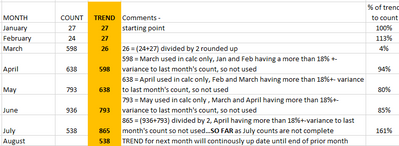
Switching up original post a bit...MONTH column and COUNT column. I want to create a new measure for TREND column to calculate up to 3 month moving average of COUNT for each future month ignoring any values less than or more than 18% of the prior months' value.
Below is what I am trying to accomplish.
- Mark as New
- Bookmark
- Subscribe
- Mute
- Subscribe to RSS Feed
- Permalink
- Report Inappropriate Content
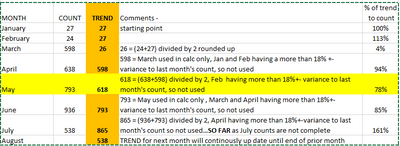
Correction...
- Mark as New
- Bookmark
- Subscribe
- Mute
- Subscribe to RSS Feed
- Permalink
- Report Inappropriate Content
Hi @Anonymous ,
How to check whether the prior months' variance is over 18%+-?Can you show me the logic or calculation?
Best Regards,
Kelly
Did I answer your question? Mark my post as a solution!
- Mark as New
- Bookmark
- Subscribe
- Mute
- Subscribe to RSS Feed
- Permalink
- Report Inappropriate Content
For May TREND...use March and April counts only as Feburary is outside variance
April - March 598/638 for a variance of 6%
April - February 24/638 for a variance of 96%
For June TREND...use May count only as April and March variance is greater than 18%
May - April = 638/793 for a variance of 20%
May - March = 598/793 for a variance of 25%
- Mark as New
- Bookmark
- Subscribe
- Mute
- Subscribe to RSS Feed
- Permalink
- Report Inappropriate Content
Hi @Anonymous ,
Sorry for the late reply.
Do you wanna to calculate the data whose variance is below 18%?
Best Regards,
Kelly
Did I answer your question? Mark my post as a solution!
- Mark as New
- Bookmark
- Subscribe
- Mute
- Subscribe to RSS Feed
- Permalink
- Report Inappropriate Content
Yes, but only up to the prior three months and if each prior month is over 18%, accept the last prior month's count.
- Mark as New
- Bookmark
- Subscribe
- Mute
- Subscribe to RSS Feed
- Permalink
- Report Inappropriate Content
Hi @Anonymous ,
Create 2 columns as below:
Trend =
VAR _count =
    CALCULATE (
        COUNTROWS ( 'Table' ),
        FILTER (
            'Table',
            'Table'[MonthNo]
                <= EARLIER ( 'Table'[MonthNo] ) - 1
                && 'Table'[MonthNo]
                    >= EARLIER ( 'Table'[MonthNo] ) - 3
        )
    )
VAR _previous =
    CALCULATE (
        MAX ( 'Table'[Count] ),
        FILTER ( 'Table', 'Table'[MonthNo] = EARLIER ( 'Table'[MonthNo] ) - 1 )
    )
VAR _previous_1 =
    CALCULATE (
        MAX ( 'Table'[Count] ),
        FILTER ( 'Table', 'Table'[MonthNo] = EARLIER ( 'Table'[MonthNo] ) - 2 )
    )
VAR _previous_2 =
    CALCULATE (
        MAX ( 'Table'[Count] ),
        FILTER ( 'Table', 'Table'[MonthNo] = EARLIER ( 'Table'[MonthNo] ) - 3 )
    )
RETURN
    IF (
        _previous = BLANK (),
        'Table'[Count],
        IF (
            _previous_1 = BLANK (),
            _previous,
            IF (
                _previous_2 = BLANK (),
                DIVIDE ( _previous + _previous_1, 2 ),
                IF (
                    ABS ( DIVIDE ( _previous_1, _previous ) - 1 ) < 0.18
                        && ABS ( DIVIDE ( _previous_2, _previous ) - 1 ) < 0.18,
                    DIVIDE ( _previous_1 + _previous_2, 2 ),
                    IF (
                        ABS ( DIVIDE ( _previous_1, _previous ) - 1 ) > 0.18
                            && ABS ( DIVIDE ( _previous_2, _previous ) - 1 ) > 0.18,
                        _previous,
                        IF (
                            ABS ( DIVIDE ( _previous_1, _previous ) - 1 ) < 0.18
                                && ABS ( DIVIDE ( _previous_2, _previous ) - 1 ) > 0.18,
                            DIVIDE ( _previous_1 + _previous, 2 ),
                            IF (
                                ABS ( DIVIDE ( _previous_1, _previous ) - 1 ) > 0.18
                                    && ABS ( DIVIDE ( _previous_2, _previous ) - 1 ) < 0.18,
                                DIVIDE ( _previous_2 + _previous, 2 )
                            )
                        )
                    )
                )
            )
        )
    )
% of trend to count = DIVIDE('Table'[Trend],'Table'[Count])And you will see:
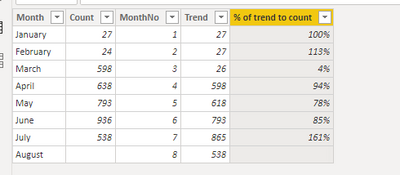
For the related .pbix file,pls see attached.
Best Regards,
Kelly
Did I answer your question? Mark my post as a solution!
- Mark as New
- Bookmark
- Subscribe
- Mute
- Subscribe to RSS Feed
- Permalink
- Report Inappropriate Content
Hi @Anonymous ,
Could you pls provide some sample data with expected output for test?
Best Regards,
Kelly
Did I answer your question? Mark my post as a solution!
Helpful resources

Power BI Dataviz World Championships
The Power BI Data Visualization World Championships is back! Get ahead of the game and start preparing now!

Power BI Monthly Update - December 2025
Check out the December 2025 Power BI Holiday Recap!

FabCon Atlanta 2026
Join us at FabCon Atlanta, March 16-20, for the ultimate Fabric, Power BI, AI and SQL community-led event. Save $200 with code FABCOMM.

| User | Count |
|---|---|
| 41 | |
| 38 | |
| 36 | |
| 30 | |
| 28 |


| User | Count |
|---|---|
| 128 | |
| 88 | |
| 79 | |
| 67 | |
| 62 |


