cancel
Showing results for 
Search instead for 
Did you mean: 

Learn from the best! Meet the four finalists headed to the FINALS of the Power BI Dataviz World Championships! Register now

Reply
Anonymous
Not applicable

Create Measure for Conditional Formatting Categorical values

Hi there, 


I have a categorical column with three values: On Time, Late, or Blank. I am trying to apply condition formatting to the x-axis (date) for a chart. I need a measure to return red if value Late, blue if value is On Time, and grey if value is blank for the corresponding dates on the chart. Is there an example somewhere of how to do this?


So far I tried to create a measure to bin the categories into numbers. 


Ontime_Number =
VAR OnTime = SELECTEDVALUE(FlaggingLabor[On Time])
RETURN

SWITCH(TRUE(),
OnTime = "On Time", 1,
OnTime = "Late", 2,
ISBLANK(OnTime),3
)
 
Then I tried to apply conditional formatting on the x-axis of the clustered bar chart. 
felixthecat_nyc_0-1648590509978.png

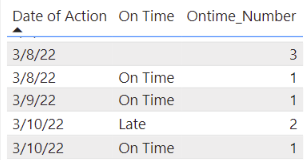
For some reason when I do this, the formatting only reads the 3, as if all records were blank but that is not the case when viewing the measure in a table. 

felixthecat_nyc_1-1648590579994.png


Any help is greatly appreciated. 

5 REPLIES 5
v-janeyg-msft
Community Support
Community Support

Hi, @Anonymous 


You can count three conditions and then choose colors according to your needs (Prioritize late and blank conditions).

Like this:

Measure =
//VAR ontime =   COUNTX ( FILTER ( 'Table', [On Time] = "On Time" ), [On Time] )
VAR late =
    COUNTX ( FILTER ( 'Table', [On Time] = "Late" ), [On Time] )
VAR blankontime =
    COUNTX ( FILTER ( 'Table', [On Time] = BLANK () ), [On Time] )
RETURN
    IF ( late <> 0, "Red", IF ( blankontime <> 0, "Grey", "Blue" ) )

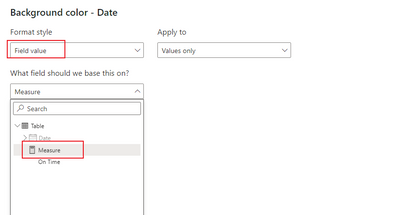
Select 'field value' in conditional format.

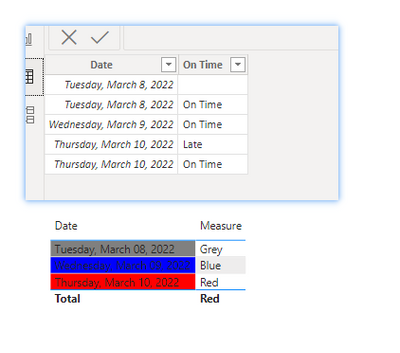
Like this:

vjaneygmsft_1-1648803703015.png


vjaneygmsft_0-1648803611307.png

Did I answer your question? Please mark my reply as solution. Thank you very much.
If not, please feel free to ask me.

Best Regards,
Community Support Team _ Janey

Anonymous
Not applicable

Hi @v-janeyg-msft ,


Thank you for your response. I applied the countx function to the measure as you've shown, but the result in my visual is that if any record is late, all dates show red. 

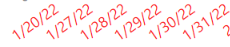
felixthecat_nyc_0-1649083367685.png

When I filter the late record out with a slicer, they all go blue. 

felixthecat_nyc_1-1649083423979.png

I am needing the colors to not be uniform, but indicate per date if there was a late record on that date. The result would be some dates as blue and some dates as red. Let me know if you have any further thoughts. 


Thank you! 


Hi, @Anonymous 


I am not clear what visual you are using and in which option the conditional formatting is used. Can you explain it?

It's fine with me.

vjaneygmsft_0-1649241759588.png

Can you share a sample file? So we can see your problem intuitively.


Best Regards,
Community Support Team _ Janey

amitchandak
Super User
Super User

@Anonymous , Create a color measure and use that in conditional formating using field value option


Ontime_Number =
VAR OnTime = max(FlaggingLabor[On Time])
RETURN

SWITCH(TRUE(),
OnTime = "On Time", "Blue",
OnTime = "Late", "Red",
ISBLANK(OnTime),"Green"
)


How to do conditional formatting by measure and apply it on pie? : https://youtu.be/RqBb5eBf_I4

Share with Power BI Enthusiasts: Full Power BI Video (20 Hours) YouTube
Microsoft Fabric Series 60+ Videos YouTube
Microsoft Fabric Hindi End to End YouTube
Anonymous
Not applicable

Hi @amitchandak ,


Thanks for your response. When I implement your suggestion, all of the dates on the x-axis still show as one color or "On Time". I think what is happening, is that on some dates have multiple values for the field On Time. In this case, I would want to have the date show red if any record is late on that date. Is this possible? 


Thanks 

Helpful resources

Announcements
New to Fabric survey Carousel

New to Fabric Survey

If you have recently started exploring Fabric, we'd love to hear how it's going. Your feedback can help with product improvements.

Power BI DataViz World Championships carousel

Power BI DataViz World Championships - June 2026

A new Power BI DataViz World Championship is coming this June! Don't miss out on submitting your entry.

Join our Fabric User Panel

Join our Fabric User Panel

Share feedback directly with Fabric product managers, participate in targeted research studies and influence the Fabric roadmap.

March Power BI Update Carousel

Power BI Community Update - March 2026

Check out the March 2026 Power BI update to learn about new features.