cancel
Showing results for 
Search instead for 
Did you mean: 

Get Fabric Certified for FREE during Fabric Data Days. Don't miss your chance! Request now

Reply
venkataramana
Regular Visitor

Create Measure based on selected Quarter months

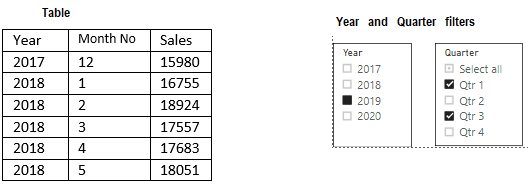
YearAndQuarterData.PNG

I have Year and month wise sales data in a table and I have created a Calendar with Min and Max dates based on above table.

My requirement like

  1. Quarter means –> 3 months + Previous Quarter last month also (Total 4 months)

(Eg: Qtr 1 = Jan.2019 + Feb2019 + March.2019 + Dec.2018

Qtr 2 = Apr.2019 + May.2019 + June.2019 + Mar.2019)


  1. If we don’t select any year and any Quarter, it will take previous year (2019) as a default year

(if current year = 2020, then previous year = 2019)


  1. If we select any year and not select any Quarter, then it need to show selected year all months data + previous year last month data. (Total 13 months)

(Eg: if we select 2019, then it should show Dec.2018 data + 12 months for 2019)


  1. If we select any Quarter and not select any year, then it should show previous year’s Quarter months data. And it should be 4 months data (3 months of selected quarter + previous quarter last month)

(Eg: if we select Qrt1, that means Jan.2019 + Feb2019 + March.2019 + Dec.2018)


Please tell, how I need to create measures to show the sum of sales for multiple Quarter selections.

Ex: if I select year=2019 and Quarter = Q1+Q3, then it should show the sum of sales for the period.

Dec.2018 + Jan.2019 + Feb.2019 + Mar.2019 + June.2019 + July.2019 + Aug.2019 + Sept.2019

1 ACCEPTED SOLUTION
v-kelly-msft
Community Support
Community Support

Hi  @venkataramana ,


Per your request,I made a sample .pbix file for you to refer to,pls click here.

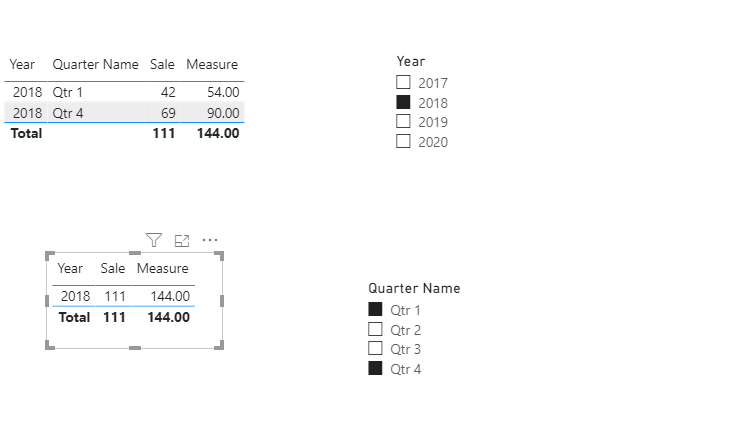
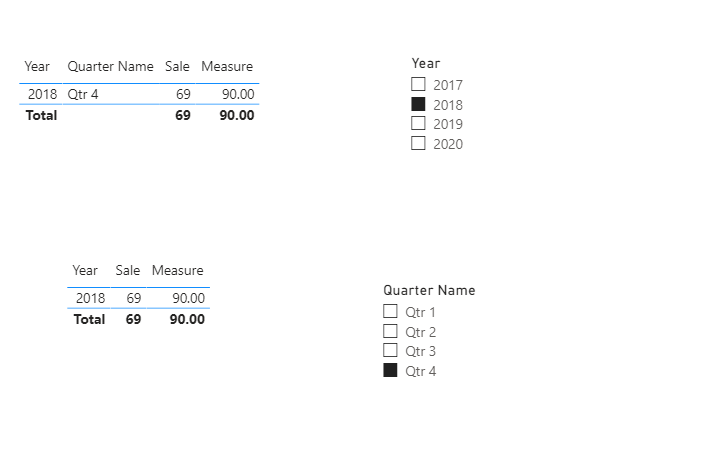
Below are pics after some filters:

Annotation 2020-06-08 173842.pngAnnotation 2020-06-08 173924.png


Best Regards,
Kelly
Did I answer your question? Mark my post as a solution!


View solution in original post

1 REPLY 1
v-kelly-msft
Community Support
Community Support

Hi  @venkataramana ,


Per your request,I made a sample .pbix file for you to refer to,pls click here.

Below are pics after some filters:

Annotation 2020-06-08 173842.pngAnnotation 2020-06-08 173924.png


Best Regards,
Kelly
Did I answer your question? Mark my post as a solution!


Helpful resources

Announcements
November Power BI Update Carousel

Power BI Monthly Update - November 2025

Check out the November 2025 Power BI update to learn about new features.

Fabric Data Days Carousel

Fabric Data Days

Advance your Data & AI career with 50 days of live learning, contests, hands-on challenges, study groups & certifications and more!

FabCon Atlanta 2026 carousel

FabCon Atlanta 2026

Join us at FabCon Atlanta, March 16-20, for the ultimate Fabric, Power BI, AI and SQL community-led event. Save $200 with code FABCOMM.

Top Solution Authors
Top Kudoed Authors