cancel
Showing results for 
Search instead for 
Did you mean: 

The Power BI Data Visualization World Championships is back! Get ahead of the game and start preparing now! Learn more

Reply
venkataramana
Regular Visitor

Create Measure based on selected Quarter months

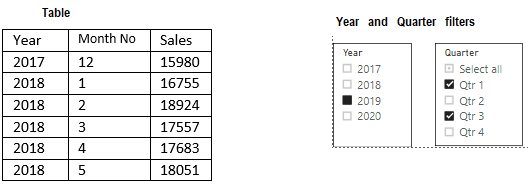
YearAndQuarterData.PNG

I have Year and month wise sales data in a table and I have created a Calendar with Min and Max dates based on above table.

My requirement like

  1. Quarter means –> 3 months + Previous Quarter last month also (Total 4 months)

(Eg: Qtr 1 = Jan.2019 + Feb2019 + March.2019 + Dec.2018

Qtr 2 = Apr.2019 + May.2019 + June.2019 + Mar.2019)


  1. If we don’t select any year and any Quarter, it will take previous year (2019) as a default year

(if current year = 2020, then previous year = 2019)


  1. If we select any year and not select any Quarter, then it need to show selected year all months data + previous year last month data. (Total 13 months)

(Eg: if we select 2019, then it should show Dec.2018 data + 12 months for 2019)


  1. If we select any Quarter and not select any year, then it should show previous year’s Quarter months data. And it should be 4 months data (3 months of selected quarter + previous quarter last month)

(Eg: if we select Qrt1, that means Jan.2019 + Feb2019 + March.2019 + Dec.2018)


Please tell, how I need to create measures to show the sum of sales for multiple Quarter selections.

Ex: if I select year=2019 and Quarter = Q1+Q3, then it should show the sum of sales for the period.

Dec.2018 + Jan.2019 + Feb.2019 + Mar.2019 + June.2019 + July.2019 + Aug.2019 + Sept.2019

1 ACCEPTED SOLUTION
v-kelly-msft
Community Support
Community Support

Hi  @venkataramana ,


Per your request,I made a sample .pbix file for you to refer to,pls click here.

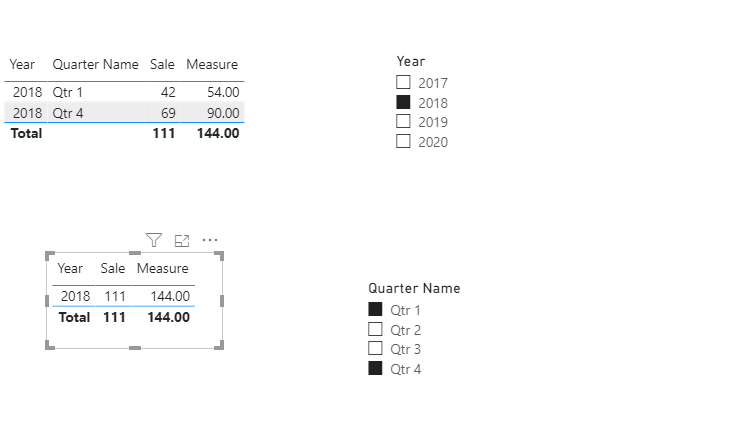
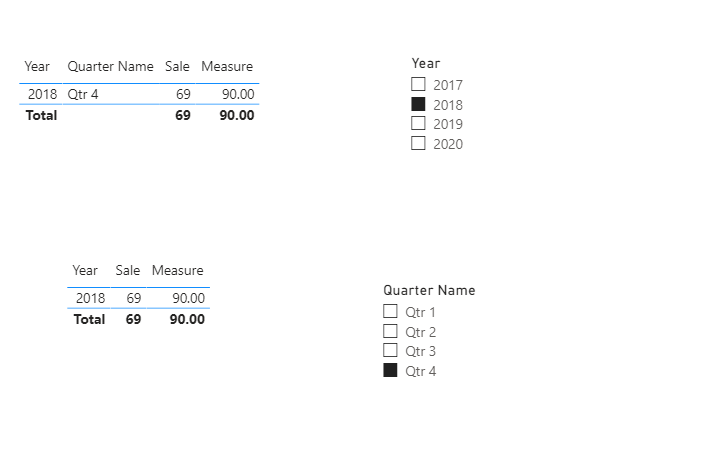
Below are pics after some filters:

Annotation 2020-06-08 173842.pngAnnotation 2020-06-08 173924.png


Best Regards,
Kelly
Did I answer your question? Mark my post as a solution!


View solution in original post

1 REPLY 1
v-kelly-msft
Community Support
Community Support

Hi  @venkataramana ,


Per your request,I made a sample .pbix file for you to refer to,pls click here.

Below are pics after some filters:

Annotation 2020-06-08 173842.pngAnnotation 2020-06-08 173924.png


Best Regards,
Kelly
Did I answer your question? Mark my post as a solution!


Helpful resources

Announcements
Power BI DataViz World Championships

Power BI Dataviz World Championships

The Power BI Data Visualization World Championships is back! Get ahead of the game and start preparing now!

December 2025 Power BI Update Carousel

Power BI Monthly Update - December 2025

Check out the December 2025 Power BI Holiday Recap!

FabCon Atlanta 2026 carousel

FabCon Atlanta 2026

Join us at FabCon Atlanta, March 16-20, for the ultimate Fabric, Power BI, AI and SQL community-led event. Save $200 with code FABCOMM.