Get Fabric or SQL Certified for Free.
Get certified for free when you join Fabric Data Days 2026 and dive into Fabric, Power BI, SQL, AI, and other essential data skills.
Join now- Power BI forums
- Get Help with Power BI
- Desktop
- Service
- Report Server
- Power Query
- Mobile Apps
- Developer
- DAX Commands and Tips
- Custom Visuals Development Discussion
- Health and Life Sciences
- Power BI Spanish forums
- Translated Spanish Desktop
- Training and Consulting
- Instructor Led Training
- Dashboard in a Day for Women, by Women
- Galleries
- Data Stories Gallery
- Themes Gallery
- Contests Gallery
- QuickViz Gallery
- Quick Measures Gallery
- Visual Calculations Gallery
- Notebook Gallery
- Translytical Task Flow Gallery
- TMDL Gallery
- R Script Showcase
- Webinars and Video Gallery
- Ideas
- Custom Visuals Ideas (read-only)
- Issues
- Issues
- Events
- Upcoming Events
July 7 - July 17 | Round 2 of the Power BI Dataviz World Championships. Don't miss your chance! Learn more
- Power BI forums
- Forums
- Get Help with Power BI
- Desktop
- Re: Create Measure - Period On Period % Diff, Base...
- Subscribe to RSS Feed
- Mark Topic as New
- Mark Topic as Read
- Float this Topic for Current User
- Bookmark
- Subscribe
- Printer Friendly Page

- Mark as New
- Bookmark
- Subscribe
- Mute
- Subscribe to RSS Feed
- Permalink
- Report Inappropriate Content
Create Measure - Period On Period % Diff, Based On User's Input In Built-In Relative Date Slicer For
Hi everyone!
Would appreciate any help on the following requirements:
I'd like to create a measure for:
- Period On Period % Diff
- Based On User's Input In Built-In Relative Date Slicer
- For Matrix Visual With Date Dimension In Columns (Year, Month, Week)
The month column in matrix should also show month names (Jan, Feb, Mar, etc...)
Here's the pbix file
The dataset is shown in the picture below.

The expected results are below:
(Disclaimer - I had to create 2 separate measures in order to show the expected results. Whereas what I'd like is to have a single measure that is able to display the output show by these 2 measures. Extending further, it should also show the correct output when, for example, "last 3 days" is selected in slicer, but matrix column is on weekly level. Or "last 3 weeks" selected in slicer, but matrix column is on monthly level.)
When selecting "last 2 months" on slicer, and matrix column is on monthly level:

When selecting "last 3 months" on slicer, and matrix column is on monthly level:

When selecting "last 2 weeks" on slicer, and matrix column is on weekly level:

When selecting "last 3 weeks" on slicer, and matrix column is on weekly level:

Solved! Go to Solution.


- Mark as New
- Bookmark
- Subscribe
- Mute
- Subscribe to RSS Feed
- Permalink
- Report Inappropriate Content
Hi @CALCULATEpizza ,
Believe that the main issue you have here is the fact that you cannot know how the relative slicer selection is made, if it's on weeks, month or days.
What you can do keeping the two measures you have is to create a measure that gets the context of the matrix, and returns the correct measure:
Switch bewteen = if(ISINSCOPE('Date Dimension'[Week]), [WEEK ON WEEK % DIFFERENCE], [MONTH ON MONTH % DIFFERENCE])
Has you can see when you drill up or down the calculations changes:
Regards
Miguel Félix
Did I answer your question? Mark my post as a solution!
Proud to be a Super User!
Check out my blog: Power BI em Português

- Mark as New
- Bookmark
- Subscribe
- Mute
- Subscribe to RSS Feed
- Permalink
- Report Inappropriate Content
Hi @CALCULATEpizza ,
Please refer to my pbix file to see if it helps you.
Create a measure.
Measure =
VAR _sum =
    CALCULATE (
        SUM ( 'Sales Data'[QTY Sold] ),
        FILTER (
            ALL ( 'Date Dimension' ),
            'Date Dimension'[Week] = SELECTEDVALUE ( 'Date Dimension'[Week] )
        )
    )
RETURN
    DIVIDE ( SUM ( 'Sales Data'[QTY Sold] ), _sum )
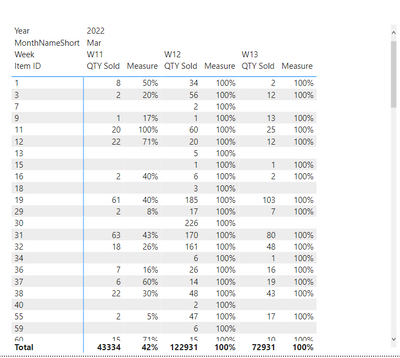
If I have misunderstood your meaning, please provide your desired output with a screenshot.
How to Get Your Question Answered Quickly
Best Regards
Community Support Team _ Polly
If this post helps, then please consider Accept it as the solution to help the other members find it more quickly.
- Mark as New
- Bookmark
- Subscribe
- Mute
- Subscribe to RSS Feed
- Permalink
- Report Inappropriate Content
Hi @Anonymous,
Thanks so much for your response, unfortunate the measure doesn't provide the output I'm looking for. I've updated my original post with the expected results.
I have also reuploaded the pbix file. In this update:
- added 2 measures to demonstrate what the output should be
- Mark as New
- Bookmark
- Subscribe
- Mute
- Subscribe to RSS Feed
- Permalink
- Report Inappropriate Content
Hi @CALCULATEpizza ,
Believe that the main issue you have here is the fact that you cannot know how the relative slicer selection is made, if it's on weeks, month or days.
What you can do keeping the two measures you have is to create a measure that gets the context of the matrix, and returns the correct measure:
Switch bewteen = if(ISINSCOPE('Date Dimension'[Week]), [WEEK ON WEEK % DIFFERENCE], [MONTH ON MONTH % DIFFERENCE])
Has you can see when you drill up or down the calculations changes:
Regards
Miguel Félix
Did I answer your question? Mark my post as a solution!
Proud to be a Super User!
Check out my blog: Power BI em Português- Mark as New
- Bookmark
- Subscribe
- Mute
- Subscribe to RSS Feed
- Permalink
- Report Inappropriate Content
@MFelix Thanks so much! This solves exactly what I'm trying to accomplish. Appreciate your time looking into this.
- Mark as New
- Bookmark
- Subscribe
- Mute
- Subscribe to RSS Feed
- Permalink
- Report Inappropriate Content
Hi @CALCULATEpizza ,
Add and index colum for the week:
INT( ROUNDDOWN( ( DATEDIFF( [Date], TODAY(), DAY) * -1 + -1 * IF( WEEKDAY( TODAY() ) + 1 <= 6, WEEKDAY( TODAY() ) + 1, WEEKDAY( TODAY() ) + 1 - 7 )) / 7, 0 ) )
Then try the following measure:
Measure = var WeekSelection =
 MAX('Date Dimension'[weekindex]) - 1

var _sum = CALCULATE(SUM('Sales Data'[QTY Sold]), FILTER(ALL('Date Dimension'),'Date Dimension'[weekindex] = WeekSelection))
return
DIVIDE(SUM('Sales Data'[QTY Sold]), _sum)
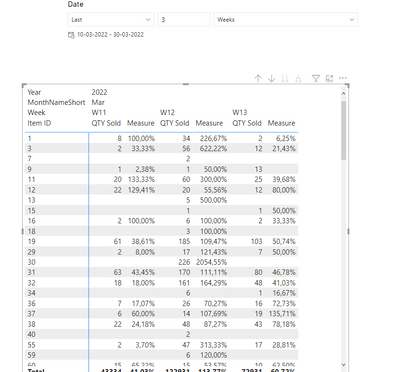
Regards
Miguel Félix
Did I answer your question? Mark my post as a solution!
Proud to be a Super User!
Check out my blog: Power BI em Português- Mark as New
- Bookmark
- Subscribe
- Mute
- Subscribe to RSS Feed
- Permalink
- Report Inappropriate Content
You can use a onedrive, google drive, we transfer or similar link to upload your files.
If the information is sensitive please share it trough private message.
Regards
Miguel Félix
Did I answer your question? Mark my post as a solution!
Proud to be a Super User!
Check out my blog: Power BI em Português- Mark as New
- Bookmark
- Subscribe
- Mute
- Subscribe to RSS Feed
- Permalink
- Report Inappropriate Content
Helpful resources

FabCon & SQLCon – Barcelona 2026
Join us in Barcelona for FabCon and SQLCon, the Fabric, Power BI, SQL, and AI community event. Save €200 with code FABCMTY200.

Data Days 2026
Join Data Days 2026: 60 days of free live/on-demand sessions, challenges, study groups, and certification opportunities.

Power BI DataViz World Championships - June 2026
A new Power BI DataViz World Championship is coming this June! Don't miss out on submitting your entry.

| User | Count |
|---|---|
| 29 | |
| 27 | |
| 26 | |
| 23 | |
| 16 |


| User | Count |
|---|---|
| 53 | |
| 46 | |
| 38 | |
| 30 | |
| 21 |


