Get certified for free when you join Fabric Data Days 2026 and dive into Fabric, Power BI, SQL, AI, and other essential data skills.
Join nowJuly 7 - July 17 | Round 2 of the Power BI Dataviz World Championships. Don't miss your chance! Learn more
Hello,
Not sure if this is possible but I am trying to create a matrix using columns from multiple tables. This a two part questions:
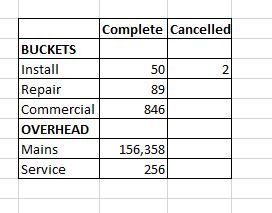
1. Is it possible to add multiple rows to a matrix table from different tables? Below you will see that the table names are in bold and the variables in each table are not. Currently, I have a matrix created using the BUCKETS table rows with drill downs for each variable (install, repair, etc). I want to add rows from a new table OVERHEAD to the matrix with variables (mains, services). There is no correlation to either tables, but for visualization purposes (exporting), I want all my rows from different tables to be in one matrix.
This is what I would like to see:
2. Is there anyway to calculate the Complete column filtering on multiple tables since I am now looking to add the OVERHEAD row totals?
Thanks!
@sccoleman1189 without having relationship it will not make sense to have values coming from two non-related table.
Subscribe to the @PowerBIHowTo YT channel for an upcoming video on List and Record functions in Power Query!!
Learn Power BI and Fabric - subscribe to our YT channel - Click here: @PowerBIHowTo
If my solution proved useful, I'd be delighted to receive Kudos. When you put effort into asking a question, it's equally thoughtful to acknowledge and give Kudos to the individual who helped you solve the problem. It's a small gesture that shows appreciation and encouragement! ❤
Did I answer your question? Mark my post as a solution. Proud to be a Super User! Appreciate your Kudos 🙂
Feel free to email me with any of your BI needs.
Join us in Barcelona for FabCon and SQLCon, the Fabric, Power BI, SQL, and AI community event. Save €200 with code FABCMTY200.
Join Fabric Data Days 2026: 60 days of free live/on-demand sessions, challenges, study groups, and certification opportunities.
| User | Count |
|---|---|
| 22 | |
| 22 | |
| 18 | |
| 16 | |
| 13 |
| User | Count |
|---|---|
| 63 | |
| 41 | |
| 40 | |
| 39 | |
| 38 |