FabCon is coming to Atlanta
Join us at FabCon Atlanta from March 16 - 20, 2026, for the ultimate Fabric, Power BI, AI and SQL community-led event. Save $200 with code FABCOMM.
Register now!- Power BI forums
- Get Help with Power BI
- Desktop
- Service
- Report Server
- Power Query
- Mobile Apps
- Developer
- DAX Commands and Tips
- Custom Visuals Development Discussion
- Health and Life Sciences
- Power BI Spanish forums
- Translated Spanish Desktop
- Training and Consulting
- Instructor Led Training
- Dashboard in a Day for Women, by Women
- Galleries
- Data Stories Gallery
- Themes Gallery
- Contests Gallery
- QuickViz Gallery
- Quick Measures Gallery
- Visual Calculations Gallery
- Notebook Gallery
- Translytical Task Flow Gallery
- TMDL Gallery
- R Script Showcase
- Webinars and Video Gallery
- Ideas
- Custom Visuals Ideas (read-only)
- Issues
- Issues
- Events
- Upcoming Events
The Power BI Data Visualization World Championships is back! Get ahead of the game and start preparing now! Learn more
- Power BI forums
- Forums
- Get Help with Power BI
- Desktop
- Create Lower Triangular Matrix
- Subscribe to RSS Feed
- Mark Topic as New
- Mark Topic as Read
- Float this Topic for Current User
- Bookmark
- Subscribe
- Printer Friendly Page


- Mark as New
- Bookmark
- Subscribe
- Mute
- Subscribe to RSS Feed
- Permalink
- Report Inappropriate Content
Create Lower Triangular Matrix
Hello everybody,
I would like to implement the following:
I have a DateTable in Power BI, a table "FSE" with data, and then a filtered Table table. This contains the dates of the last date of the year (relative to "FSE") and the corresponding value. I would like to visualize a lower triangular matrix that looks like this: (The color formatting is unimportant. The calculations/values are important)

In Excel I did this manually, the files are attached (pbix and excel file): https://we.tl/t-x5Zi1P1Zw1
For Power BI I have not been successful so far. Can someone help me?
Best regards, hwoehler
Information about calculations:
The calculation works according to the formula: new value = ((final value / initial value) ^(1 / n)) - 1
The divisor (initial value) is fixed per column (the year on the x-axis). It is a constant (per column!). The dividend (= the final value) increases by 1 until it reaches the year 2018 (maximum of year). The final value is therefore flexible. The exponent also changes the value n (= the duration in years). This increases logically over the years. Columnwise, one line is always started later, as before.
How the calculations work, you can see on the pictures here: https://we.tl/t-hEQNrFJ9FS
Solved! Go to Solution.


- Mark as New
- Bookmark
- Subscribe
- Mute
- Subscribe to RSS Feed
- Permalink
- Report Inappropriate Content
@hwoehler solution is attached, the core of it is following DAX measure
Value =
VAR __yearonColumn = CALCULATE( MAX ( FSE[Year Column] ), ALLEXCEPT( FSE, FSE[Year] ) )
VAR __cYear =MAX ( DateTable[Year] )
VAR __pYear = __cYear - 1
VAR __prevYear =
 CALCULATE(
    [Parv Last Value of Year],
    ALL ( DateTable[Year]),  FSE[Year] = __pYear )
VAR __currYear =
 CALCULATE(
    [Parv Last Value of Year],
    ALLEXCEPT( FSE, FSE[Year] )
)
VAR __identity =  __yearonColumn - __pYear
RETURN
IF ( __identity > 0 && __prevYear <> BLANK(),
    (
        DIVIDE( __currYear, __prevYear ) ^
        DIVIDE( 1, __identity )
    ) - 1
)
Subscribe to the @PowerBIHowTo YT channel for an upcoming video on List and Record functions in Power Query!!
Learn Power BI and Fabric - subscribe to our YT channel - Click here: @PowerBIHowTo
If my solution proved useful, I'd be delighted to receive Kudos. When you put effort into asking a question, it's equally thoughtful to acknowledge and give Kudos to the individual who helped you solve the problem. It's a small gesture that shows appreciation and encouragement! ❤
Did I answer your question? Mark my post as a solution. Proud to be a Super User! Appreciate your Kudos 🙂
Feel free to email me with any of your BI needs.
- Mark as New
- Bookmark
- Subscribe
- Mute
- Subscribe to RSS Feed
- Permalink
- Report Inappropriate Content
@hwoehler what is the conditional formatting based on?
Subscribe to the @PowerBIHowTo YT channel for an upcoming video on List and Record functions in Power Query!!
Learn Power BI and Fabric - subscribe to our YT channel - Click here: @PowerBIHowTo
If my solution proved useful, I'd be delighted to receive Kudos. When you put effort into asking a question, it's equally thoughtful to acknowledge and give Kudos to the individual who helped you solve the problem. It's a small gesture that shows appreciation and encouragement! ❤
Did I answer your question? Mark my post as a solution. Proud to be a Super User! Appreciate your Kudos 🙂
Feel free to email me with any of your BI needs.
- Mark as New
- Bookmark
- Subscribe
- Mute
- Subscribe to RSS Feed
- Permalink
- Report Inappropriate Content
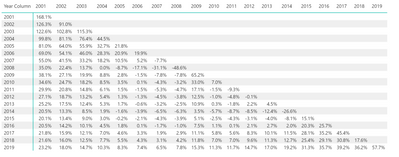
@hwoehler this is how it looks like in Power BI, just need to conditional format it
Subscribe to the @PowerBIHowTo YT channel for an upcoming video on List and Record functions in Power Query!!
Learn Power BI and Fabric - subscribe to our YT channel - Click here: @PowerBIHowTo
If my solution proved useful, I'd be delighted to receive Kudos. When you put effort into asking a question, it's equally thoughtful to acknowledge and give Kudos to the individual who helped you solve the problem. It's a small gesture that shows appreciation and encouragement! ❤
Did I answer your question? Mark my post as a solution. Proud to be a Super User! Appreciate your Kudos 🙂
Feel free to email me with any of your BI needs.
- Mark as New
- Bookmark
- Subscribe
- Mute
- Subscribe to RSS Feed
- Permalink
- Report Inappropriate Content
- Mark as New
- Bookmark
- Subscribe
- Mute
- Subscribe to RSS Feed
- Permalink
- Report Inappropriate Content
@hwoehler solution is attached, the core of it is following DAX measure
Value =
VAR __yearonColumn = CALCULATE( MAX ( FSE[Year Column] ), ALLEXCEPT( FSE, FSE[Year] ) )
VAR __cYear =MAX ( DateTable[Year] )
VAR __pYear = __cYear - 1
VAR __prevYear =
 CALCULATE(
    [Parv Last Value of Year],
    ALL ( DateTable[Year]),  FSE[Year] = __pYear )
VAR __currYear =
 CALCULATE(
    [Parv Last Value of Year],
    ALLEXCEPT( FSE, FSE[Year] )
)
VAR __identity =  __yearonColumn - __pYear
RETURN
IF ( __identity > 0 && __prevYear <> BLANK(),
    (
        DIVIDE( __currYear, __prevYear ) ^
        DIVIDE( 1, __identity )
    ) - 1
)
Subscribe to the @PowerBIHowTo YT channel for an upcoming video on List and Record functions in Power Query!!
Learn Power BI and Fabric - subscribe to our YT channel - Click here: @PowerBIHowTo
If my solution proved useful, I'd be delighted to receive Kudos. When you put effort into asking a question, it's equally thoughtful to acknowledge and give Kudos to the individual who helped you solve the problem. It's a small gesture that shows appreciation and encouragement! ❤
Did I answer your question? Mark my post as a solution. Proud to be a Super User! Appreciate your Kudos 🙂
Feel free to email me with any of your BI needs.
- Mark as New
- Bookmark
- Subscribe
- Mute
- Subscribe to RSS Feed
- Permalink
- Report Inappropriate Content
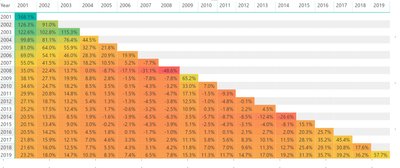
@hwoehler I think this is what you are looking for, it is from power bi
Subscribe to the @PowerBIHowTo YT channel for an upcoming video on List and Record functions in Power Query!!
Learn Power BI and Fabric - subscribe to our YT channel - Click here: @PowerBIHowTo
If my solution proved useful, I'd be delighted to receive Kudos. When you put effort into asking a question, it's equally thoughtful to acknowledge and give Kudos to the individual who helped you solve the problem. It's a small gesture that shows appreciation and encouragement! ❤
Did I answer your question? Mark my post as a solution. Proud to be a Super User! Appreciate your Kudos 🙂
Feel free to email me with any of your BI needs.

Helpful resources

Power BI Monthly Update - November 2025
Check out the November 2025 Power BI update to learn about new features.

Fabric Data Days
Advance your Data & AI career with 50 days of live learning, contests, hands-on challenges, study groups & certifications and more!

FabCon Atlanta 2026
Join us at FabCon Atlanta, March 16-20, for the ultimate Fabric, Power BI, AI and SQL community-led event. Save $200 with code FABCOMM.

| User | Count |
|---|---|
| 58 | |
| 43 | |
| 41 | |
| 23 | |
| 17 |


| User | Count |
|---|---|
| 190 | |
| 121 | |
| 96 | |
| 65 | |
| 46 |


