FabCon is coming to Atlanta
Join us at FabCon Atlanta from March 16 - 20, 2026, for the ultimate Fabric, Power BI, AI and SQL community-led event. Save $200 with code FABCOMM.
Register now!- Power BI forums
- Get Help with Power BI
- Desktop
- Service
- Report Server
- Power Query
- Mobile Apps
- Developer
- DAX Commands and Tips
- Custom Visuals Development Discussion
- Health and Life Sciences
- Power BI Spanish forums
- Translated Spanish Desktop
- Training and Consulting
- Instructor Led Training
- Dashboard in a Day for Women, by Women
- Galleries
- Data Stories Gallery
- Themes Gallery
- Contests Gallery
- QuickViz Gallery
- Quick Measures Gallery
- Visual Calculations Gallery
- Notebook Gallery
- Translytical Task Flow Gallery
- TMDL Gallery
- R Script Showcase
- Webinars and Video Gallery
- Ideas
- Custom Visuals Ideas (read-only)
- Issues
- Issues
- Events
- Upcoming Events
Vote for your favorite vizzies from the Power BI Dataviz World Championship submissions. Vote now!
- Power BI forums
- Forums
- Get Help with Power BI
- Desktop
- Re: Create Lower Triangular Matrix
- Subscribe to RSS Feed
- Mark Topic as New
- Mark Topic as Read
- Float this Topic for Current User
- Bookmark
- Subscribe
- Printer Friendly Page


- Mark as New
- Bookmark
- Subscribe
- Mute
- Subscribe to RSS Feed
- Permalink
- Report Inappropriate Content
Create Lower Triangular Matrix
Hello everybody,
I would like to implement the following:
I have a DateTable in Power BI, a table "FSE" with data, and then a filtered Table table. This contains the dates of the last date of the year (relative to "FSE") and the corresponding value. I would like to visualize a lower triangular matrix that looks like this: (The color formatting is unimportant. The calculations/values are important)

In Excel I did this manually, the files are attached (pbix and excel file): https://we.tl/t-x5Zi1P1Zw1
For Power BI I have not been successful so far. Can someone help me?
Best regards, hwoehler
Information about calculations:
The calculation works according to the formula: new value = ((final value / initial value) ^(1 / n)) - 1
The divisor (initial value) is fixed per column (the year on the x-axis). It is a constant (per column!). The dividend (= the final value) increases by 1 until it reaches the year 2018 (maximum of year). The final value is therefore flexible. The exponent also changes the value n (= the duration in years). This increases logically over the years. Columnwise, one line is always started later, as before.
How the calculations work, you can see on the pictures here: https://we.tl/t-hEQNrFJ9FS
Solved! Go to Solution.


- Mark as New
- Bookmark
- Subscribe
- Mute
- Subscribe to RSS Feed
- Permalink
- Report Inappropriate Content
@hwoehler solution is attached, the core of it is following DAX measure
Value =
VAR __yearonColumn = CALCULATE( MAX ( FSE[Year Column] ), ALLEXCEPT( FSE, FSE[Year] ) )
VAR __cYear =MAX ( DateTable[Year] )
VAR __pYear = __cYear - 1
VAR __prevYear =
 CALCULATE(
    [Parv Last Value of Year],
    ALL ( DateTable[Year]),  FSE[Year] = __pYear )
VAR __currYear =
 CALCULATE(
    [Parv Last Value of Year],
    ALLEXCEPT( FSE, FSE[Year] )
)
VAR __identity =  __yearonColumn - __pYear
RETURN
IF ( __identity > 0 && __prevYear <> BLANK(),
    (
        DIVIDE( __currYear, __prevYear ) ^
        DIVIDE( 1, __identity )
    ) - 1
)
Subscribe to the @PowerBIHowTo YT channel for an upcoming video on List and Record functions in Power Query!!
Learn Power BI and Fabric - subscribe to our YT channel - Click here: @PowerBIHowTo
If my solution proved useful, I'd be delighted to receive Kudos. When you put effort into asking a question, it's equally thoughtful to acknowledge and give Kudos to the individual who helped you solve the problem. It's a small gesture that shows appreciation and encouragement! ❤
Did I answer your question? Mark my post as a solution. Proud to be a Super User! Appreciate your Kudos 🙂
Feel free to email me with any of your BI needs.
- Mark as New
- Bookmark
- Subscribe
- Mute
- Subscribe to RSS Feed
- Permalink
- Report Inappropriate Content
@hwoehler what is the conditional formatting based on?
Subscribe to the @PowerBIHowTo YT channel for an upcoming video on List and Record functions in Power Query!!
Learn Power BI and Fabric - subscribe to our YT channel - Click here: @PowerBIHowTo
If my solution proved useful, I'd be delighted to receive Kudos. When you put effort into asking a question, it's equally thoughtful to acknowledge and give Kudos to the individual who helped you solve the problem. It's a small gesture that shows appreciation and encouragement! ❤
Did I answer your question? Mark my post as a solution. Proud to be a Super User! Appreciate your Kudos 🙂
Feel free to email me with any of your BI needs.
- Mark as New
- Bookmark
- Subscribe
- Mute
- Subscribe to RSS Feed
- Permalink
- Report Inappropriate Content
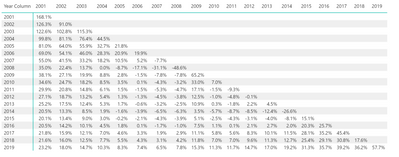
@hwoehler this is how it looks like in Power BI, just need to conditional format it
Subscribe to the @PowerBIHowTo YT channel for an upcoming video on List and Record functions in Power Query!!
Learn Power BI and Fabric - subscribe to our YT channel - Click here: @PowerBIHowTo
If my solution proved useful, I'd be delighted to receive Kudos. When you put effort into asking a question, it's equally thoughtful to acknowledge and give Kudos to the individual who helped you solve the problem. It's a small gesture that shows appreciation and encouragement! ❤
Did I answer your question? Mark my post as a solution. Proud to be a Super User! Appreciate your Kudos 🙂
Feel free to email me with any of your BI needs.
- Mark as New
- Bookmark
- Subscribe
- Mute
- Subscribe to RSS Feed
- Permalink
- Report Inappropriate Content
- Mark as New
- Bookmark
- Subscribe
- Mute
- Subscribe to RSS Feed
- Permalink
- Report Inappropriate Content
@hwoehler solution is attached, the core of it is following DAX measure
Value =
VAR __yearonColumn = CALCULATE( MAX ( FSE[Year Column] ), ALLEXCEPT( FSE, FSE[Year] ) )
VAR __cYear =MAX ( DateTable[Year] )
VAR __pYear = __cYear - 1
VAR __prevYear =
 CALCULATE(
    [Parv Last Value of Year],
    ALL ( DateTable[Year]),  FSE[Year] = __pYear )
VAR __currYear =
 CALCULATE(
    [Parv Last Value of Year],
    ALLEXCEPT( FSE, FSE[Year] )
)
VAR __identity =  __yearonColumn - __pYear
RETURN
IF ( __identity > 0 && __prevYear <> BLANK(),
    (
        DIVIDE( __currYear, __prevYear ) ^
        DIVIDE( 1, __identity )
    ) - 1
)
Subscribe to the @PowerBIHowTo YT channel for an upcoming video on List and Record functions in Power Query!!
Learn Power BI and Fabric - subscribe to our YT channel - Click here: @PowerBIHowTo
If my solution proved useful, I'd be delighted to receive Kudos. When you put effort into asking a question, it's equally thoughtful to acknowledge and give Kudos to the individual who helped you solve the problem. It's a small gesture that shows appreciation and encouragement! ❤
Did I answer your question? Mark my post as a solution. Proud to be a Super User! Appreciate your Kudos 🙂
Feel free to email me with any of your BI needs.
- Mark as New
- Bookmark
- Subscribe
- Mute
- Subscribe to RSS Feed
- Permalink
- Report Inappropriate Content
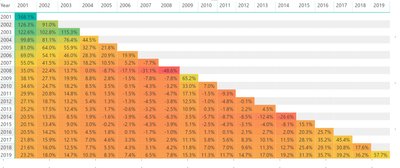
@hwoehler I think this is what you are looking for, it is from power bi
Subscribe to the @PowerBIHowTo YT channel for an upcoming video on List and Record functions in Power Query!!
Learn Power BI and Fabric - subscribe to our YT channel - Click here: @PowerBIHowTo
If my solution proved useful, I'd be delighted to receive Kudos. When you put effort into asking a question, it's equally thoughtful to acknowledge and give Kudos to the individual who helped you solve the problem. It's a small gesture that shows appreciation and encouragement! ❤
Did I answer your question? Mark my post as a solution. Proud to be a Super User! Appreciate your Kudos 🙂
Feel free to email me with any of your BI needs.

Helpful resources

Power BI Dataviz World Championships
Vote for your favorite vizzies from the Power BI World Championship submissions!

Join our Community Sticker Challenge 2026
If you love stickers, then you will definitely want to check out our Community Sticker Challenge!

Power BI Monthly Update - January 2026
Check out the January 2026 Power BI update to learn about new features.

FabCon Atlanta 2026
Join us at FabCon Atlanta, March 16-20, for the ultimate Fabric, Power BI, AI and SQL community-led event. Save $200 with code FABCOMM.

| User | Count |
|---|---|
| 63 | |
| 51 | |
| 41 | |
| 19 | |
| 16 |


| User | Count |
|---|---|
| 123 | |
| 109 | |
| 47 | |
| 30 | |
| 25 |


