cancel
Showing results for 
Search instead for 
Did you mean: 

The Power BI Data Visualization World Championships is back! Get ahead of the game and start preparing now! Learn more

Reply
Anonymous
Not applicable

Create Indicator Color/Light With A Single Column

Hi, 


I need to create indicator from one column called "FIELD". Basically, the column has two string values "EOD" and "SOD". The indicator that i need to create is: 


If SOD > EOD then red color 

IF EOD < SOD then green color 

IF SOD = EOD then yellow color


Could anyone please help with this.  Thank you in advance. 


1 ACCEPTED SOLUTION
v-gizhi-msft
Community Support
Community Support

Hi,


According to your description, i create a sample to test:
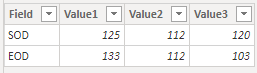
31.PNG

Then try these measures:

Color 1 = 
var EOD_1 = CALCULATE(MAX('Table'[Value1]),FILTER('Table','Table'[Field]="EOD"))
var SOD_1 = CALCULATE(MAX('Table'[Value1]),FILTER('Table','Table'[Field]="SOD"))
return
SWITCH(true,EOD_1>SOD_1,"#FF0000",EOD_1<SOD_1,"#00FF00",EOD_1=SOD_1,"#FFFF66")

Color 2 = 
var EOD_2 = CALCULATE(MAX('Table'[Value2]),FILTER('Table','Table'[Field]="EOD"))
var SOD_2 = CALCULATE(MAX('Table'[Value2]),FILTER('Table','Table'[Field]="SOD"))
return
SWITCH(true,EOD_2>SOD_2,"#FF0000",EOD_2<SOD_2,"#00FF00",EOD_2=SOD_2,"#FFFF66")

Color 3 = 
var EOD_3 = CALCULATE(MAX('Table'[Value3]),FILTER('Table','Table'[Field]="EOD"))
var SOD_3 = CALCULATE(MAX('Table'[Value3]),FILTER('Table','Table'[Field]="SOD"))
return
SWITCH(true,EOD_3>SOD_3,"#FF0000",EOD_3<SOD_3,"#00FF00",EOD_3=SOD_3,"#FFFF66")

Apply these measures to three value columns' background conditional formatting, the result shows:
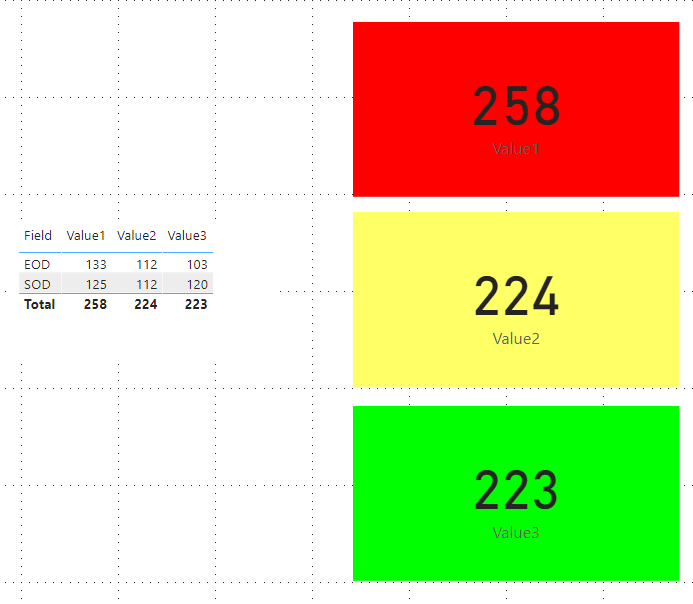
33.PNG

Hope this can help.


Best Reagrds,

Giotto Zhi


View solution in original post

2 REPLIES 2
v-gizhi-msft
Community Support
Community Support

Hi,


According to your description, i create a sample to test:

31.PNG

Then try these measures:

Color 1 = 
var EOD_1 = CALCULATE(MAX('Table'[Value1]),FILTER('Table','Table'[Field]="EOD"))
var SOD_1 = CALCULATE(MAX('Table'[Value1]),FILTER('Table','Table'[Field]="SOD"))
return
SWITCH(true,EOD_1>SOD_1,"#FF0000",EOD_1<SOD_1,"#00FF00",EOD_1=SOD_1,"#FFFF66")

Color 2 = 
var EOD_2 = CALCULATE(MAX('Table'[Value2]),FILTER('Table','Table'[Field]="EOD"))
var SOD_2 = CALCULATE(MAX('Table'[Value2]),FILTER('Table','Table'[Field]="SOD"))
return
SWITCH(true,EOD_2>SOD_2,"#FF0000",EOD_2<SOD_2,"#00FF00",EOD_2=SOD_2,"#FFFF66")

Color 3 = 
var EOD_3 = CALCULATE(MAX('Table'[Value3]),FILTER('Table','Table'[Field]="EOD"))
var SOD_3 = CALCULATE(MAX('Table'[Value3]),FILTER('Table','Table'[Field]="SOD"))
return
SWITCH(true,EOD_3>SOD_3,"#FF0000",EOD_3<SOD_3,"#00FF00",EOD_3=SOD_3,"#FFFF66")

Apply these measures to three value columns' background conditional formatting, the result shows:

33.PNG

Hope this can help.


Best Reagrds,

Giotto Zhi


amitchandak
Super User
Super User

You can create a measure like this

Color Category = SWITCH(true(),
Max(Sheet1[Category]) in {"A"} && Sheet1[Target]<10,"green",
Max(Sheet1[Category]) in {"B"} && Sheet1[Target]<10,"orange"
"red"
)


You have to aggregation for the measure. Then you can use this under advance control fields.

https://docs.microsoft.com/en-us/power-bi/desktop-conditional-table-formatting#color-by-color-values

Share with Power BI Enthusiasts: Full Power BI Video (20 Hours) YouTube
Microsoft Fabric Series 60+ Videos YouTube
Microsoft Fabric Hindi End to End YouTube

Helpful resources

Announcements
Power BI DataViz World Championships

Power BI Dataviz World Championships

The Power BI Data Visualization World Championships is back! Get ahead of the game and start preparing now!

December 2025 Power BI Update Carousel

Power BI Monthly Update - December 2025

Check out the December 2025 Power BI Holiday Recap!

FabCon Atlanta 2026 carousel

FabCon Atlanta 2026

Join us at FabCon Atlanta, March 16-20, for the ultimate Fabric, Power BI, AI and SQL community-led event. Save $200 with code FABCOMM.