This time we’re going bigger than ever. Fabric, Power BI, SQL, AI and more. We're covering it all. You won't want to miss it.
Learn moreDid you hear? There's a new SQL AI Developer certification (DP-800). Start preparing now and be one of the first to get certified. Register now
Hello,
I need your support with the next issue please.
I have the next 2 tables.
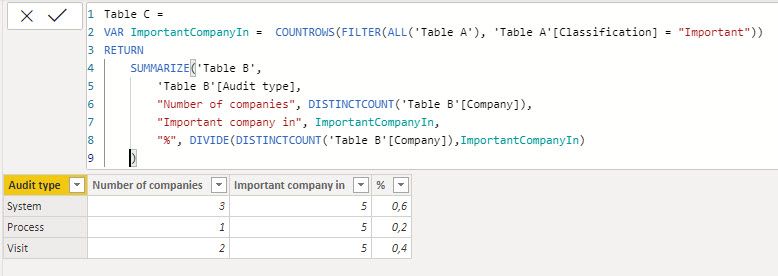
I want to create a 3rd table, calculating for every Audit type, the % of the number of companies in column (company) in table B from the total number of companies identified as 'Important' in table A.
Is it possible to create a new column with this calculation automatically once per month ? (target is to avoid to overwrite the existing one, but for example to create new column with the updated % every end of month - to keep history).
Thanks for your support.
Best regards.
Solved! Go to Solution.
Hi @Anonymous ,
what about the following solution:
Regards FrankAT
Thanks it works perfectly !
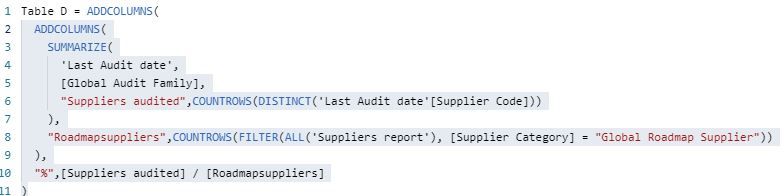
@Anonymous I believe you want something like:
Table C =
ADDCOLUMNS(
ADDCOLUMNS(
SUMMARIZE(
'Table B',
[Audit type],
"Number of companies",COUNTROWS(DISTINCT('Table B'[Company]))
),
"Important company in",COUNTROWS(ALL('Table A'),[Classification]="Important")
),
"%",[Number of companies] / [Important company in]
)
Hello,
Thanks for the solution it is working (after a small correction in line 8 - missing 'FILTER').
BR.
Hello,
Thanks for your interest.
I succeeded to create the table with the team support 😉
I still don't have an answer for the second part of my question:
Is it possible to save the calculated "%" in a new table (to take a fixed image of these value), every specified frequency (every end of month for example) ?
BR.
Check out the April 2026 Power BI update to learn about new features.
Sign up to receive a private message when registration opens and key events begin.
If you have recently started exploring Fabric, we'd love to hear how it's going. Your feedback can help with product improvements.
| User | Count |
|---|---|
| 35 | |
| 32 | |
| 25 | |
| 23 | |
| 16 |
| User | Count |
|---|---|
| 65 | |
| 50 | |
| 30 | |
| 24 | |
| 23 |