Join us at FabCon Atlanta from March 16 - 20, 2026, for the ultimate Fabric, Power BI, AI and SQL community-led event. Save $200 with code FABCOMM.
Register now!The Power BI Data Visualization World Championships is back! Get ahead of the game and start preparing now! Learn more
Hi,
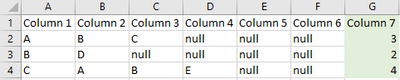
I want to create a custom column (column 7) that does a count of non-null values in columns 1 to 6.
Need it as a Power Query.
Thank you!
Solved! Go to Solution.
I think you can use a similar principle. Add a custom column as
List.NonNullCount( { [Column 1], [Column 2], [Column 3] } )
I think you could create a new column like
Column 7 =
VAR TmpTable = { 'Table'[Column 1], 'Table'[Column 2], 'Table'[Column 3] }
RETURN
COUNTAX ( TmpTable, [Value] )
Thank you, that solution works for adding a column in the regular table view. But I just realised I need it as a Power Query.
I think you can use a similar principle. Add a custom column as
List.NonNullCount( { [Column 1], [Column 2], [Column 3] } )
Brilliant. Thank you very much!
The Power BI Data Visualization World Championships is back! Get ahead of the game and start preparing now!
| User | Count |
|---|---|
| 64 | |
| 47 | |
| 41 | |
| 36 | |
| 23 |
| User | Count |
|---|---|
| 185 | |
| 123 | |
| 106 | |
| 78 | |
| 52 |