Join us at FabCon Atlanta from March 16 - 20, 2026, for the ultimate Fabric, Power BI, AI and SQL community-led event. Save $200 with code FABCOMM.
Register now!The Power BI Data Visualization World Championships is back! Get ahead of the game and start preparing now! Learn more
Hi,
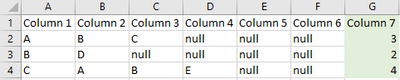
I want to create a custom column (column 7) that does a count of non-null values in columns 1 to 6.
Need it as a Power Query.
Thank you!
Solved! Go to Solution.
I think you can use a similar principle. Add a custom column as
List.NonNullCount( { [Column 1], [Column 2], [Column 3] } )
I think you could create a new column like
Column 7 =
VAR TmpTable = { 'Table'[Column 1], 'Table'[Column 2], 'Table'[Column 3] }
RETURN
COUNTAX ( TmpTable, [Value] )
Thank you, that solution works for adding a column in the regular table view. But I just realised I need it as a Power Query.
I think you can use a similar principle. Add a custom column as
List.NonNullCount( { [Column 1], [Column 2], [Column 3] } )
Brilliant. Thank you very much!
The Power BI Data Visualization World Championships is back! Get ahead of the game and start preparing now!
Check out the November 2025 Power BI update to learn about new features.
| User | Count |
|---|---|
| 66 | |
| 46 | |
| 42 | |
| 26 | |
| 19 |
| User | Count |
|---|---|
| 195 | |
| 126 | |
| 101 | |
| 67 | |
| 49 |