Don't miss your chance to take the Fabric Data Engineer (DP-600) exam for FREE! Find out how by watching the DP-600 session on-demand now through April 28th.
Learn moreJoin the FabCon + SQLCon recap series. Up next: Power BI, Real-Time Intelligence, IQ and AI, and Data Factory take center stage. All sessions are available on-demand after the live show. Register now
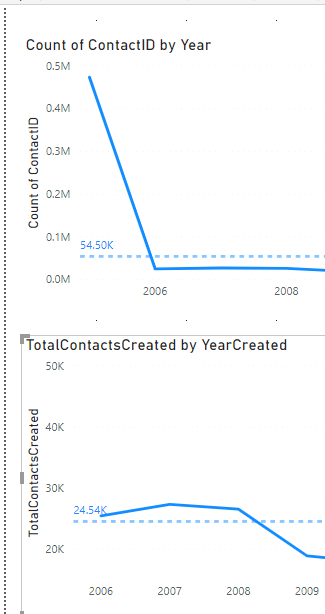
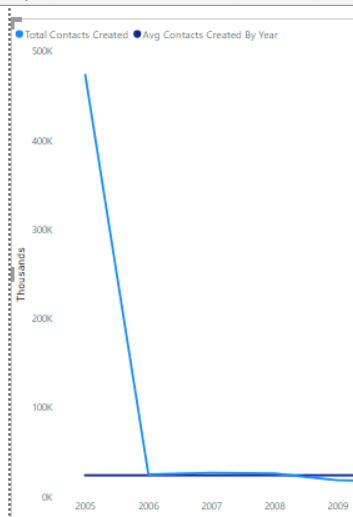
How can I create a custom Average Line? I am counting records created by year, but I don't want the average based on inclusion of the first year (2005). The average on the bottom is what i am aiming for , but it doesn't display the skewed value in the solid line, which i need to include.
Solved! Go to Solution.
Hello @Anonymous ,
You can create a new average measure using DAX as follows,
AverageMeasure = CALCULATE(AVERAGE(column_name),FILTER(table_name,tablename[year]<>2005))
Hello @Anonymous ,
You can create a new average measure using DAX as follows,
AverageMeasure = CALCULATE(AVERAGE(column_name),FILTER(table_name,tablename[year]<>2005))
Thanks @SriKandimalla , This helped me to see what I was doing wrong in how I implemented my dax expression. I also needed to implement as a calculated column instead of a measure to get the constant line on the chart. The only tradeoff of this custom way is that I can't format the line to show the average like I can using the analytics pane average line. Turning on the data label will show the average datapoint on all years.
Check out the April 2026 Power BI update to learn about new features.
If you have recently started exploring Fabric, we'd love to hear how it's going. Your feedback can help with product improvements.
A new Power BI DataViz World Championship is coming this June! Don't miss out on submitting your entry.
| User | Count |
|---|---|
| 42 | |
| 37 | |
| 35 | |
| 22 | |
| 15 |
| User | Count |
|---|---|
| 67 | |
| 58 | |
| 29 | |
| 27 | |
| 25 |